

Power cuts rarely happen at a convenient time, and that’s where a solid home battery backup earns its keep. You may need a compact UPS for a modem and desktop, or a larger power station that can keep a fridge, lights, and charging gear going through an outage. This roundup focuses on practical fit, not hype, so you can match the right backup to your space, workload, and tolerance for setup.
The Shortlist At A Glance

GOLDENMATE 1000VA/600W Lithium UPS Backup, White

Jackery Explorer 2000 v2 Portable Power Station 2042Wh

APC 1050VA/600W UPS Backup BE1050G3

Anker SOLIX S2000 Portable Power Station 2,010Wh
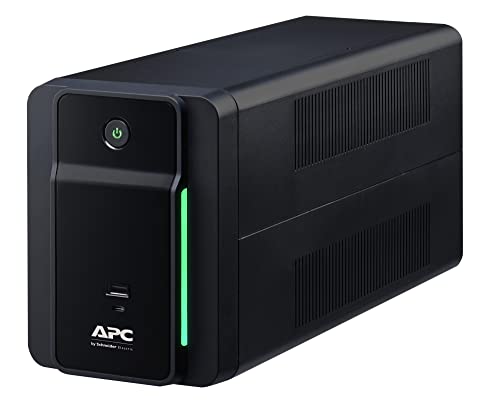
APC 950VA/480W Backup Battery Power Supply BVK950M2

EF ECOFLOW Smart Home Panel 2


ECO-WORTHY Powermega 48V 314Ah LiFePO4 Battery

GOLDENMATE 1500VA/1000W Lithium UPS Backup, Gray
More Details On Our Top Picks
Goldenmate’s white cabinet fits the kind of desk setup that needs backup power without looking bulky. The pure sine wave output matters for sensitive electronics, because it delivers a smoother AC waveform than a stepped unit, and the color LCD gives you a quick read on status without digging through menus.
Eight outlets give you room for a computer, monitor, modem, and a couple of small accessories, though the 600W ceiling still keeps this squarely in desktop territory. The LiFePO4 battery chemistry should suit anyone who wants a longer-service UPS than older lead-acid designs, and the honest trade-off is that you’re paying for that modern battery format rather than raw wattage.
Strong Points
- Eight outlets cover a tidy home office cluster.
- Pure sine wave output supports sensitive electronics more comfortably.
- Color LCD keeps the status readout easy to scan.
- LiFePO4 battery chemistry fits long-term desktop backup use.
Things To Consider
- 600W output keeps it out of heavy appliance territory.
- White housing shows scuffs more readily than darker finishes.
- Best results come from a clean, uncluttered outlet layout.
Feature Snapshot
Who It Suits Best
You get the most from this one in a home office with a PC, router, and monitor that all need orderly shutdown support.
A Better Fit Elsewhere
APC 1050VA/600W UPS Backup BE1050G3 suits a network-heavy desk better, especially when you want USB-C and USB-A charging built in.
Jackery’s large 2042Wh capacity moves this out of simple desktop backup territory and into short-term household support. That matters during longer outages, because you can think in hours of real use rather than just enough time to save files and shut down.
The 2200W AC output also opens the door to a wider range of devices than a small UPS, including higher-draw gear that would overwhelm the APC desktop units earlier in the list. The trade-off is size and price class, so this makes more sense for someone who wants a portable reserve for emergencies, camping, or a room-level backup plan.
What We Like
- 2042Wh capacity gives you serious reserve time.
- 2200W AC output handles a broader mix of gear.
- LiFePO4 battery chemistry fits repeat-use backup needs.
- USB-C PD 100W charging helps modern devices refill faster.
- Portable format works for both outage prep and travel use.
Room For Improvement
- Large capacity means a bigger footprint to store.
- It makes less sense for a tiny desk setup.
- Higher capacity units usually need a more deliberate charging plan.
Details At A Glance
Who Will Love This
You suit this best if you want a portable reserve that can support a family room, a work-from-home station, or a camping loadout.
Swap It Out When
GOLDENMATE 1000VA/600W Lithium UPS Backup, White is the cleaner match for a single desk, especially when you only need graceful shutdown time.
This APC lands in the sweet spot for a router, a desktop, and maybe a small security setup. The six battery-backed outlets help you separate the gear that really needs runtime from the devices that only need surge protection, which keeps the load easier to manage.
USB-C and USB-A charging add a useful twist that the GOLDENMATE desktop unit above doesn’t emphasize in the same way, so it feels a little more flexible around phones and accessories. The catch is still the same class of limitation, it’s a UPS for electronics, not a stand-in for a room-sized power source.
Highlights
- Six battery outlets give core devices priority.
- USB-C and USB-A ports add everyday charging convenience.
- Good fit for routers, PCs, and small security gear.
- Compact UPS format keeps placement straightforward.
Minor Gripes
- It stays in the small-load category.
- Desktop use works best with a tidy cable plan.
- Like most UPS units, placement near the devices matters.
Feature Rundown
Made For
You fit this well if your main goal is keeping internet gear and a computer online long enough to ride out brief outages.
Where A Sibling Pick Shines
APC 1500VA UPS Backup BN1500M2R works better for a larger desk stack that needs more headroom and dataline support.
The Anker SOLIX S2000 sits closer to household backup territory than a traditional desk UPS, and that’s exactly why it stands out here. Its 2,010Wh LiFePO4 battery and 1,500W output make it a sensible bridge between portable power and home emergency support.
The stated fridge backup window will matter to households that want a practical emergency anchor, not just a way to save work on a laptop. Compared with the Jackery above, this model feels a little more focused on home backup framing, while still staying portable enough to move around a garage or pantry shelf.
Bright Spots
- 2,010Wh capacity supports longer household runtime.
- 1,500W output broadens the usable device list.
- LiFePO4 battery chemistry suits repeat backup use.
- Useful for a fridge, which changes outage planning.
- Portable format still keeps it easier to place than a fixed system.
Points To Note
- Storage space matters more than with a small UPS.
- It may feel oversized for a single workstation.
- Battery-care habits matter more as capacity grows.
Key Specs
The Right Fit
You suit this best if you want a portable reserve for kitchen essentials, emergency room use, or a mixed home-and-outdoor power role.
Reach For A Different Pick When
Jackery Explorer 2000 v2 Portable Power Station 2042Wh is the more obvious match for someone who wants the biggest all-round portable reserve in this group.
This APC keeps the formula lean: battery backup, surge protection, and AVR, which stands for automatic voltage regulation. AVR matters in homes with flaky wall power, because it helps smooth small voltage swings before they become a problem for connected electronics.
It’s the plainspoken choice in this list, and that’s not a criticism. You get a straightforward UPS for a modest office, but you don’t get the extra outlet count or USB flexibility of the APC 1050VA model above.
Plus Points
- AVR adds useful voltage smoothing.
- Simple design keeps setup easy.
- Good match for a modest home office.
- Surge protection gives everyday electronics a safer buffer.
Areas To Watch
- Lower output limits heavier desk loads.
- Not as flexible as units with USB charging.
- Best kept for essentials rather than a crowded workbench.
Core Details
Whose Shelf It Belongs On
You fit this well if you want a no-fuss UPS for a small office, basic electronics, or a spare work area.
Another Choice May Suit
APC 1050VA/600W UPS Backup BE1050G3 makes more sense for a busier desk that needs more outlets and charging flexibility.
This is the most infrastructure-minded entry in the group, and it’s aimed at a very different job than the desktop UPS units. The panel sits at the center of a whole-home backup setup, so the value comes from how it organizes larger power sources rather than from stored energy inside the panel itself.
It also supports multiple source types, including compatible battery systems, solar gear, and gas generators, which gives you a planning layer the smaller picks simply don’t offer. For households building a more serious outage setup, that flexibility can matter more than raw outlet count.
What We Like
- Acts as a control center for larger backup systems.
- Useful for whole-home planning rather than one room only.
- Compatibility across several power-source types expands setup options.
Softer Spots
- Installation is far beyond a plug-and-play UPS.
- It makes sense only in a bigger backup plan.
- Storage and placement depend on the full system design.
Feature Card
Best Suited To
You suit this if you’re building a home backup system around a panel-level setup rather than a simple plug-in unit.
Look Elsewhere When
GOLDENMATE 1500VA/1000W Lithium UPS Backup, Gray is a much easier fit for a bedroom office or a small desk stack.
This renewed APC steps up in capacity and adds dataline protection, which is useful for network gear that travels through more than just the wall outlet. For a workstation with a modem, router, and desktop, that extra layer can make the setup feel more complete.
Because it’s renewed, the appeal is often in getting a capable class of UPS in a more economical format than a brand-new equivalent. The trade-off is simple enough: a renewed unit can be a smart value move, but you should be comfortable with that refurbishment path and the normal variation that comes with it.
Standout Traits
- 1500VA size gives more breathing room than smaller desktop units.
- Dataline protection suits networking-heavy setups.
- AVR helps steady minor voltage changes.
- Good match for a serious home workstation.
Small Caveats
- Renewed condition may not suit every shopper.
- Space planning matters once the unit gets larger.
- Some households won’t need dataline protection at all.
Quick Facts
Who Should Grab It
You suit this best if you run a busier desk with networking gear that deserves more than a basic UPS.
Where Another Pick Fits Better
APC 950VA/480W Backup Battery Power Supply BVK950M2 is easier to place when your backup needs stay modest.
This ECO-WORTHY battery sits in a very different lane from the portable power stations, because it’s storage hardware for a larger system. The 16.1kWh figure is the kind of number that speaks to serious backup planning, especially where you’re building around inverters, breakers, and a fixed energy bank.
Its active balancing BMS, or battery management system, helps coordinate the cells inside the pack, and that matters in larger storage builds where consistency counts. The trade-off is practical: this is not a casual add-on, and the transport restrictions alone tell you it belongs in a planned installation, not a weekend purchase.
Reasons To Buy
- 16.1kWh storage suits serious backup builds.
- 200A active balancing BMS supports system control.
- Breakers add a useful layer in larger installations.
- 7-inch LCD and Bluetooth make monitoring easier.
Worth Noting
- Transport and return handling are more complicated here.
- It belongs in a planned power system.
- Storage and installation require real space.
Technical Sheet
Built With In Mind
You suit this best if you are assembling a larger off-grid or backup storage system and want a substantial battery bank.
Skip It When
Anker SOLIX S2000 Portable Power Station 2,010Wh is easier to handle for a household that wants portability first and system building second.
This GOLDENMATE feels more versatile than the smaller white model at the top because it moves up to 1000W and adds two USB ports, a wall-mount option, and a built-in emergency light. That mix is handy in tighter homes, where a single unit may need to sit on a wall, feed a few devices, and still be easy to locate during an outage.
The 230Wh LiFePO4 battery keeps it in the UPS lane rather than the room-backup lane, but the extra output gives you a little more headroom for mixed electronics. It’s a sensible choice for a hallway, small office, or utility shelf where space is tight and you still want useful features in one box.
Standout Traits
- 1000W output gives more headroom than the smaller GOLDENMATE unit.
- Wall-mount option helps in cramped spaces.
- Two USB ports add simple device charging.
- Built-in emergency light is handy during dark outages.
- Pure sine wave output suits sensitive electronics.
Areas To Watch
- 230Wh capacity still keeps it in the short-runtime class.
- Wall placement needs a bit of planning.
- Emergency-light usefulness depends on where you mount it.
Core Details
Right Fit
You suit this best if you want a compact UPS with a little more muscle and a few thoughtful extras for everyday outage prep.
Where Shoppers Go Wrong
Don’t choose a small UPS for a high-draw appliance, because the capacity gap shows up fast once you move past desk gear.
How To Choose The Right Home Battery Backups Without Solar
Start With The Load You Need To Keep Alive
Match the backup to the actual devices, not the wish list. A modem, router, and laptop ask for a very different setup than a fridge or a small room of electronics, and the watt rating tells you which side of that line you’re on.
For a desk setup, a 600W UPS often makes sense. For household continuity, a portable power station with 1,500W or more starts to feel more realistic.
Choose Between Runtime And Portability
UPS units stay small, tidy, and easy to place beside a desk, while portable power stations trade that compactness for much larger energy reserves. LiFePO4, which is lithium iron phosphate, is worth noticing here because it shows up in several picks and usually points to a more modern backup design.
The catch is size. Bigger reserves need more storage space, and the heavier units make less sense for a tiny apartment office than for a pantry shelf or garage corner.
Look At The Outlets And Ports, Not Just Capacity
Outlet count changes day-to-day usefulness more than many people expect. A unit with battery-backed outlets, surge-only outlets, and USB-C or USB-A charging can simplify the cable mess around a desk or media cabinet.
Pure sine wave output matters for sensitive electronics, especially desktop computers and network gear, because it gives a cleaner AC waveform than simpler backup output styles. That detail matters most for workstations and home offices where a brief outage shouldn’t turn into a messy shutdown.
Think About Setup, Placement, And Maintenance
Wall-mount options, LCD status screens, and dataline protection all change how easy a backup feels after the box is opened. A small UPS is a plug-and-place item, while a panel-level system or large battery bank needs planning, clearances, and a more careful installation mindset.
The honest read is that the most expensive option isn’t always the smartest one. The better choice is the one that fits your room, your devices, and the amount of outage time you actually need.
A Quick Reality Check
Common Shopping Slip Ups
People often focus on capacity and forget output. That mismatch causes trouble, because a large battery still fails you if the inverter or UPS cannot support the appliance you want to run.
Another common miss is ignoring placement. A compact desk UPS and a large battery cabinet need very different storage space, cable access, and ventilation awareness.
What The Higher Tier Buys
More money usually buys bigger battery capacity, cleaner output, more outlets, and stronger monitoring. In this category, it also often buys LiFePO4 chemistry, which can suit frequent backup use better than older battery types.
You also tend to get more thoughtful extras, like USB charging, LCD readouts, wall mounting, dataline protection, or system-level control. Those extras matter most when outage prep has to work smoothly in a real house, not just look good on paper.
Frequently Asked Questions
What Size Home Battery Backup Do You Need For A Router?
A small UPS around 600W is usually enough for a router and modem setup. Add a laptop or desktop, and you should check the load more carefully.
Are Portable Power Stations The Same As A UPS?
Not exactly, because a UPS is built for quick backup near electronics, while a portable power station is often a larger stored-energy reserve. The right choice depends on whether you want short protection or room-level runtime.
Why Does LiFePO4 Matter?
LiFePO4 means lithium iron phosphate, a battery chemistry used in many modern backup products. It’s worth noticing because it commonly appears in designs aimed at repeated home backup use.
Do You Need Pure Sine Wave Output?
Pure sine wave output is a cleaner power shape that can suit sensitive electronics more comfortably. It matters most for computers, network gear, and similar devices with stricter power needs.
Can A Small UPS Run A Fridge?
A small UPS is usually the wrong tool for that job, because fridge loads are much higher than desktop electronics. A larger portable power station or a system-level backup setup is a more realistic match.
Closing Thoughts
You’ll get the best result by matching backup size to the way your home actually loses power. Small UPS units work well for desks and networking gear, while larger portable power stations cover fridges, rooms, and longer outages with more breathing room. System-level hardware belongs to bigger installations, not casual setups. Choose the category that fits your space, and the rest gets much easier.
