

I spend a lot of time thinking about light switches, mostly because the wrong one ends up annoying me for years. Voice control, scheduling, and motion activation all sound great until a switch won’t connect, dims nothing, or needs a hub you didn’t buy. The list below leans on what each switch genuinely offers on paper, who it’s built for, and where it falls short, so you can match the right one to your home, your wiring, and the way you actually live.
Your Options, Compared

Switch Shield ON Clear Light Switch Guards (3-Pack)
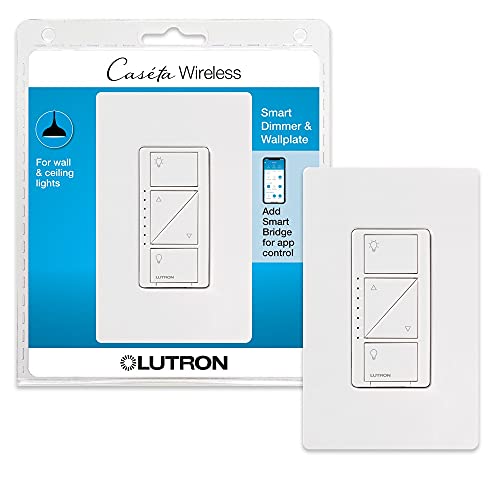
Lutron Caseta Smart Dimmer Switch with Wallplate
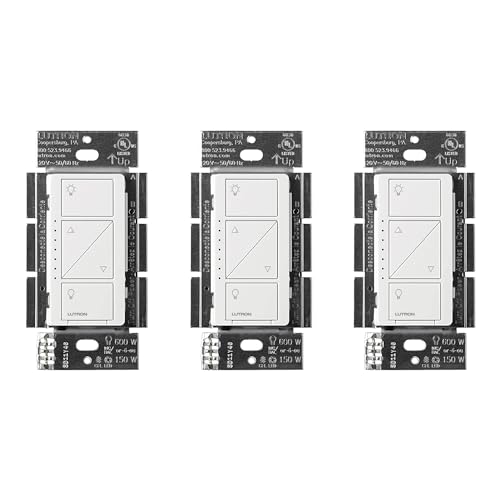
Lutron Caseta Smart Dimmer Switch (No Neutral)

Kasa Smart Motion Sensor Switch ES20MP2

Kasa Matter Smart Dimmer Switch KS225P3

HQL Smart Light Switch 1 Gang (Touch, Wi-Fi)

Kasa Smart Ceiling Fan Control & Dimmer KS240
HQL Smart Switch 3 Gang (Wi-Fi, Neutral Required)
HQL Smart Switch 1 Gang (Wi-Fi, Neutral Required)
HQL Smart Switch 4 Gang (Wi-Fi, Neutral Required)
Why These Options Stand Out
Starting this list with something different actually makes sense: before you add smarts, sometimes you just need safety. The Switch Shield ON clear guards cover standard toggle switches and snap over the existing plate without tools, which is a relief when you’re not ready to rewire anything.
Parents, grandparents, and pet owners who rent or live in older homes get the most out of these. The clear polycarbonate plastic keeps the wall switch visible, so guests still see what they’re flipping, while the dual-tab system lets you restrict access or allow finger operation.
Where It Excels
- Tool-free install takes a few seconds per guard.
- Two security levels let you adapt as kids grow.
- Clear finish blends with any wall plate style.
- Works indoors and outdoors on dimmers too.
Things To Consider
- Only fits standard toggle switches, not decora rockers.
- Doesn’t add any automation on its own.
Right Fit For
Parents and caregivers in homes with curious toddlers who need to childproof existing toggle switches before worrying about voice control.
Skip It When
You want real smart features, in which case the Lutron Caseta Smart Dimmer Switch with Wallplate gives you dimming and app control out of the box.
The Lutron Caseta line has been the standard I recommend when someone is committing to a whole-home system rather than dabbling in one room. This version pairs with a hub (the “Smart Hub Required” detail is right in the name) and ships with a coordinating wallplate so the install looks finished instead of cobbled together.
It’s a better fit for owners of newer homes with a neutral wire who want rock-solid dimming and reliable schedules. The Clear Connect RF wireless protocol (a proprietary radio signal, not Wi-Fi) tends to be more stable than crowded 2.4 GHz networks in dense apartments.
Positive Points
- Smooth, flicker-free dimming for incandescent, halogen, and compatible LEDs.
- Hub-based RF avoids Wi-Fi congestion and dropped commands.
- Includes a wallplate, so no extra matching hardware hunt.
- Pairs with Pico remotes for 3-way control without rewiring.
Trade Offs
- Requires the separate Lutron hub, which adds cost.
- Not the right fit in homes without a neutral wire, where Pick 3 is the better call.
Feature Snapshot
Made For
Homeowners outfitting multiple rooms at once who want dependable dimming, schedules, and broad voice-assistant compatibility through a dedicated hub.
Look Elsewhere When
Your walls lack a neutral wire, in which case the Lutron Caseta Smart Dimmer Switch (No Neutral Required) avoids rewiring entirely.
Older homes built before the mid-1980s often lack the white neutral wire that most smart switches need, and that single detail can shut down a project before it starts. This Lutron variant solves that exact problem while keeping the Caseta ecosystem intact.
It works well in apartments, pre-war condos, and historic properties where running new wire means opening walls. You still need the Lutron hub, but you skip the electrician.
What Earns Its Place
- Operates without a neutral wire, rare in this category.
- Same Caseta dimming smoothness as Pick 3’s sibling.
- Compatible with Pico remotes for wireless 3-way setups.
Worth Noting
- Still requires the Caseta hub for smart features.
- Slightly higher learning curve than the HQL 1 Gang if you only need basic on/off.
Best Suited To
Owners of older homes without neutral wiring who want Lutron-quality dimming without rewiring the circuit.
Swap It Out When
Your home does have a neutral wire and you want to skip the hub entirely, which makes the HQL Smart Switch 1 Gang (Wi-Fi, Neutral Required) a simpler route.
Motion-activated switches quietly solve one of the oldest household problems: forgetting to flip a switch and then bumping your shin on the way back. The Kasa ES20MP2 adds both a motion sensor and an ambient light sensor to a single-pole dimmer, so it knows when the room is already bright from daylight and skips turning on the lights unnecessarily.
I see this fitting into laundry rooms, walk-in closets, basements, and hallways where hands are often full. The smarts live in the switch itself, so no extra bridge is needed, just a neutral wire and a 2.4 GHz Wi-Fi connection.
Features That Help
- Motion and dimming combined in one wall box.
- Ambient light sensor prevents daytime activation.
- Programmable timeouts match how long the room is used.
Honest Caveats
- Requires a neutral wire, so older homes may need an electrician.
- Single-pole only; won’t replace a 3-way hallway switch on its own.
Perfect Match For
Homeowners who want hands-free lighting in utility spaces and don’t mind pulling a neutral wire through the box.
Not Your Match When
You need 3-way control from two switch locations, where the Lutron Caseta Smart Dimmer Switch with Wallplate plus a Pico remote covers that need.
Matter is the cross-platform smart home standard designed to keep devices from different brands talking to each other, and this Kasa dimmer is one of the cleanest Matter implementations on the market. A single switch can live in Apple Home, Google Home, and Samsung SmartThings at the same time.
That makes the KS225P3 a strong match for households that already mix ecosystems, or anyone rebuilding a setup after a platform change. LAN-based control keeps responses snappy even when the internet goes down.
Standout Benefits
- Matter certified, so it works across major platforms.
- Multi-admin support means two people can run it from different apps.
- Guided install reduces wiring mistakes for DIYers.
Points To Keep In Mind
- Still needs a neutral wire in the box.
- Single-pole only, so not a drop-in for 3-way circuits.
Who Will Love This
Tech-forward households using multiple smart home platforms who want one dimmer to play nicely with all of them.
Reach For A Different Pick When
You only need a basic on/off switch without Matter overhead, which makes the HQL Smart Light Switch 1 Gang (Touch, Wi-Fi) a more direct fit.
For a first smart switch, the HQL 1 Gang keeps things simple: no hub, no confusing radio terminology, just a touch panel on the wall and an app. The glassy face plate gives it a more modern feel than a rocker, though the touch surface behaves more like a button than a slider.
It suits renters and homeowners dipping a toe into smart lighting without a permanent investment. UL certification (an independent safety standard from Underwriters Laboratories) provides some peace of mind for the electrical side.
The Good Stuff
- Works directly over 2.4 GHz Wi-Fi, no extra hardware needed.
- Compatible with Alexa and Google Home voice control.
- Schedules and timers run through the Smart Life / Tuya app.
Small Caveats
- Touch surface can be slow to wake in some installations.
- Single-gang only; multi-switch boxes need a different model.
Whose Shelf It Belongs On
First-time smart switch users and renters who want voice and app control without buying a hub.
A Better Fit Elsewhere
Anyone needing multi-switch control from one wall box should look at the HQL Smart Switch 3 Gang (Wi-Fi, Neutral Required) instead.
Bedroom ceiling fans tend to be the awkward case in smart lighting: pull chains feel dated, and separate fan and light switches mean two wall boxes. The Kasa KS240 collapses both controls into a single gang switch with four fan speeds plus light dimming, no pull chain required after install.
For a primary bedroom or guest room, that single box of convenience is genuinely nice. It plays nicely with HomeKit, Alexa, and Google, so voice commands like “set fan to low” actually work.
What Stands Out
- Combines fan speed control and light dimming in one wall switch.
- Voice and app control replace the pull chain.
- Four-speed operation covers most ceiling fan setups.
A Few Limitations
- Single-pole only, so it won’t work in 3-way fan circuits.
- Requires compatible wiring; older fans may need additional setup.
Feature Card
Built With In Mind
Bedrooms and living rooms with combined ceiling fan and light fixtures who want one smart control instead of two.
Where A Sibling Pick Shines
If you only need a dimmer and no fan control, the Kasa Matter Smart Dimmer Switch KS225P3 covers that with broader Matter support.
Multi-gang boxes are the bane of smart switch upgrades, because most dimmers only fit a single switch slot. The HQL 3 Gang unit replaces three switches with one touch panel and keeps the wall box tidy, which is a real relief when you stare at the wall every day.
Each of the three switches can be controlled independently through the Smart Life app, with Alexa and Google voice support layered on top. A useful detail: the relay memory preserves the on/off state after a power outage.
Everyday Perks
- Three independent switches in one wall unit.
- Relay status memory retains state across power loss.
- Works with Alexa and Google Home for voice control.
- Backlight can be turned off in bedrooms.
Less-Strong Areas
- Requires a neutral wire, ruling out some older homes.
- 2.4 GHz Wi-Fi only, no dual-band support.
Who Should Grab It
Anyone with a multi-gang switch box in a living room, kitchen, or hallway who wants a unified smart panel.
Consider Something Else When
Your box only holds a single switch, in which case the HQL Smart Light Switch 1 Gang (Touch, Wi-Fi) is the cleaner choice.
When you want a basic smart switch without voice or hub complications, the HQL 1 Gang (Neutral Required) is the lowest-friction option on this list. It’s a single-pole on/off unit that connects directly to 2.4 GHz Wi-Fi and pairs with the Smart Life app.
It’s well-suited to newer apartments and rental properties where the wiring is modern and you just want one switch to behave smartly. UL certification gives it a leg up on safety-conscious shoppers.
Key Advantages
- Simple on/off control without dimming complexity.
- No hub required, talks directly to your router.
- UL certification for the electrical side.
Points To Note
- Neutral wire required, no workaround for older boxes.
- Not a dimmer, so brightness control requires a different model.
The Right Fit
Renters in newer buildings who want app and voice control for a single fixture without rewiring.
Where Another Pick Suits Better
Anyone wanting dimming should reach for the Kasa Matter Smart Dimmer Switch KS225P3 instead.
Large open-plan spaces often have four switches clustered together, and replacing each one separately ends up looking patchy. The HQL 4 Gang consolidates them into a single touch panel with the same Smart Life app, Alexa, and Google Home integration as the smaller HQL units.
The trade-off is wall box depth: a 4-gang unit is bulkier behind the plate, so the install usually fits best in newer construction. The relay memory feature carries over from the 3-gang sibling.
The Helpful Details
- Four independent switches in one wall plate.
- Remembers last state across power loss.
- Backlight toggle for dark hallways.
- Voice compatible with Alexa and Google Home.
Trade-Offs To Consider
- Requires a deep wall box and neutral wiring.
- Overkill for rooms with only one or two switches.
Built With In Mind
Large kitchens, great rooms, and open-plan living spaces where four switches currently cluster on one wall.
A Better Fit Elsewhere
Single-switch rooms are better served by the HQL Smart Switch 1 Gang (Wi-Fi, Neutral Required), which uses the same app ecosystem.
What To Check Before Choosing Smart Wifi Light Switches
Neutral wire availability is the first fork in the road. Homes built after the mid-1980s almost always have a neutral bundle in the switch box, which lets you pick from the entire category. Older homes without that wire should narrow the search to no-neutral options, like the Lutron Caseta Smart Dimmer Switch (No Neutral Required), since forcing a standard smart switch into an old box usually ends at the electrician.
Hub versus no-hub is the second call. Hub-based systems (Lutron Caseta) tend to be more reliable and faster on the dimming front, because they use a dedicated radio signal instead of competing with every phone, microwave, and baby monitor on 2.4 GHz. Hub-free switches are cheaper to start and easier to uninstall, which makes them a natural fit for renters.
Single-pole versus multi-way matters more than people expect. A hallway with switches at both ends needs a 3-way-compatible solution, not just a smart switch at one location. The Lutron Caseta line solves this with Pico remotes (small battery-powered wireless controllers), while HQL units handle multi-way control through app-based relay pairing.
Voice ecosystem fit is the last thing to verify. If your household already runs on Apple Home, Alexa, or Google, picking a switch that natively supports that platform avoids the lag and frustration of cloud-to-cloud bridges. Matter-certified devices like the Kasa KS225P3 help if you use more than one platform at once.
Dimmer versus on-only is worth a sanity check. Some HQL units are simple on/off switches, while Kasa and Lutron dimmers handle smooth brightness control. Choosing the wrong one means either losing dimming you already have, or paying for dimming hardware you won’t use.
Key Considerations Across These Picks
Wrong Turns To Avoid
The most common slip is buying a switch without checking the neutral wire. Pop the wall plate off and look for a white wire bundle capped off in the back of the box. Skip that step and you may end up with hardware you can’t install. Another trap is buying a hub-based switch and forgetting to budget for the hub itself, which quietly doubles the project cost. Finally, matching the switch count to your gang box (a single switch vs. a 3-gang cluster) saves a return trip.
Where The Extra Money Goes
Premium-tier pricing in this category tends to buy three things: smoother dimming at low brightness, more reliable wireless connectivity, and broader ecosystem support. A Lutron Caseta setup costs more upfront but tends to deliver dimming that doesn’t flicker, even on tricky LEDs. The extra spend also tends to buy better physical buttons and longer-term firmware support, which matters because smart switches are software devices as much as electrical ones.
Frequently Asked Questions
Do smart wifi light switches need a neutral wire?
Most do, because they need constant power to run their radios. The Lutron Caseta Smart Dimmer Switch (No Neutral Required) is one of the few that works without one, which makes it the safer pick in older homes.
Can I install smart light switches without an electrician?
Many homeowners handle single-pole replacements comfortably with basic tools and a voltage tester. Multi-gang boxes, aluminum wiring, or anything without a neutral wire usually benefits from professional help.
Will smart switches work if my internet goes down?
Wi-Fi switches lose most cloud features during an outage but usually keep working as a manual wall switch. Hub-based systems like Lutron Caseta are more resilient because commands can stay local.
Do smart switches work with dimmable LED bulbs?
Dimmer-equipped switches like the Lutron Caseta models and the Kasa KS225P3 are designed for dimmable LEDs, though bulb compatibility varies. Checking the bulb’s dimmer compatibility list before pairing avoids flicker.
How many switches can one app control?
Apps like Smart Life and Kasa Smart handle dozens of devices on one account, so a whole-home rollout is realistic. Grouping rooms in the app keeps daily control from becoming a scrolling chore.
Closing Thoughts
The right smart switch comes down to your wiring, your voice ecosystem, and how many switches actually cluster on one wall. Start there, and the rest of the list sorts itself out into a sensible shortlist.
