

A solid gaming PC draws serious power, and so does everything orbiting it: monitor, speakers, router, headset dock, console, maybe a lamp. One cheap spike through the wall and a GPU can fry before the match ends. I put together this roundup for anyone building or upgrading a battlestation who wants a strip that handles real wattage without flinching, sits where you need it, and shrugs off the random surges an older home or shared circuit tends to throw around.
The Main Contenders

CCCEI 12 Gauge Extension Cord with Multiple Outlets, 50FT

CCCEI 12 Gauge Extension Cord with Multiple Outlets, 100FT

CCCEI Heavy Duty Surge Protector with USB Ports, 6FT

NANOLAKE Surge Protector Power Strip, 4800J, 18 AC Outlets
CCCEI 12 Gauge Heavy Duty Surge Protector, 6FT

CCCEI Magnetic Heavy Duty Surge Protector, 12 Gauge, 6FT

CCCEI 12 Gauge Heavy Duty Power Strip, GFCI, 8 Ports, 6FT

Solidock 20 Outlet Power Strip with USB C, 2700 Joules, 6FT

popowell Power Strip Surge Protector with 8 AC and 6 USB
CCCEI Heavy Duty Surge Protector Power Strip 20 Amp, 12 Gauge, 6 FT
Why These Options Stand Out
Reaching a distant wall outlet is a real headache when your battlestation sits in the middle of a loft or finished basement. The CCCEI 50-foot strip solves that with a long, thick 12-gauge cord that doesn’t choke under load. A 15-amp, 125-volt rating (that’s 1875 watts total) covers a full desktop tower plus monitor and accessories without breaking a sweat.
Eight grounded outlets handle the usual tower-plus-peripherals mix, and a built-in circuit breaker cuts power if anything draws too much. For most desks I picture this strip snaking along the floor trim and disappearing behind the tower, where the bright yellow jacket actually helps me spot it.
A Few Highlights
- 12-gauge cord stays cool under sustained gaming loads
- 50-foot reach handles rooms where the wall outlet sits far from the desk
- Eight outlets with overload and grounding protection
- Flat 3-prong plug fits behind furniture without sticking out
Things To Consider
- Bulkier than a desktop strip, so cable management matters more
- Yellow jacket may clash with darker setups
Built With In Mind
Gamers with rigs placed far from the nearest outlet, especially in basements or older homes with limited wall sockets.
A Better Fit Elsewhere
Compact desktop setups fit the popowell Power Strip better, since shorter cables keep the desk cleaner.
Sometimes 50 feet isn’t nearly enough, especially in finished basements or detached rooms where the nearest outlet is down a hallway. The 100-foot version doubles the same formula: 12-gauge wire, eight outlets, and the same 1875-watt ceiling. It uses the same NEMA 5-15P flat plug as the shorter sibling, so you get the same low-profile fit behind furniture.
The dedicated circuit breaker still lets you cut power to everything in one motion, and the grounded design protects against the kind of spikes that come from older shared circuits. Honestly, for most gaming setups this much cord is overkill, but the people who need it really need it.
Where It Excels
- 100-foot reach covers detached rooms and long basement runs
- Same 12-gauge build as the 50-foot model
- Eight grounded outlets with overload protection
- Flat plug keeps the connection flush against the baseboard
Points To Note
- Coiling 100 feet of cord takes real storage space when not in use
- More cord means more places to trip over it if not managed
Right Fit For
Gamers with setups in basements, lofts, or outbuildings where the wall outlet is genuinely far from the desk.
Skip It When
Anyone with a normal bedroom or office setup should grab the 50-foot CCCEI strip instead and save the extra bulk.
Modern gaming desks aren’t just about the tower anymore. Phones, controllers, headsets, stream lights, capture cards, all want power. The CCCEI 6-foot USB-equipped strip blends the heavy-duty 12-gauge build with two USB-C ports and one USB-A, plus four regular outlets and a master switch on top of the individual switches.
The 1875-watt rating handles a full desktop, and the per-outlet switches let me kill power to the PC without unplugging the headset charger. The black housing fits better in a typical desk setup than the bright yellow industrial models, which most gamers will appreciate.
Key Advantages
- USB-C and USB-A ports cut the need for separate wall chargers
- Individual outlet switches for granular control
- 12-gauge cord handles full gaming loads
- Black housing blends into most setups
Worth Noting
- Only four AC outlets, so expand with daisy-chaining carefully
- USB ports don’t support high-watt laptop charging
Feature Snapshot
Best Suited To
Streamers and multi-device gamers who want USB charging built into the same strip that powers their PC.
Another Choice May Suit
If you mostly need more AC outlets and don’t care about USB, the NANOLAKE 4800J strip gives you nearly five times the plug count.
Multi-monitor rigs, dual-PC streams, console towers, and full peripheral lineups all want outlets, and most strips run out around six or eight. The NANOLAKE goes further with 18 wide-spaced AC outlets plus four USB ports, two of which are USB-C with PD 20-watt charging for phones or tablets.
The 4800-joule rating (joules measure how much spike energy the strip can absorb before sacrificing itself) is the highest on this list, which makes sense for the price bracket. Real-time grounded and protected LEDs tell you the strip is actually doing its job, and the mountable back panel lets me hang it under the desk to clear the surface.
A Few Strong Suits
- 18 outlets eliminate the daisy-chain of smaller strips
- 4800-joule rating covers serious spike energy
- USB-C PD ports charge phones and tablets quickly
- Mountable design keeps the desk clean
Trade Offs
- Larger footprint takes up real desk space if not mounted
- USB-C PD tops out at 20W, so it won’t fast-charge a gaming laptop
Perfect Match For
Gamers running multi-monitor setups, dual systems, or anyone who’s tired of swapping plugs on a six-outlet strip.
Look Elsewhere When
Minimalist single-monitor setups with just a tower and a couple of accessories can save space with the CCCEI USB-equipped 6-foot strip.
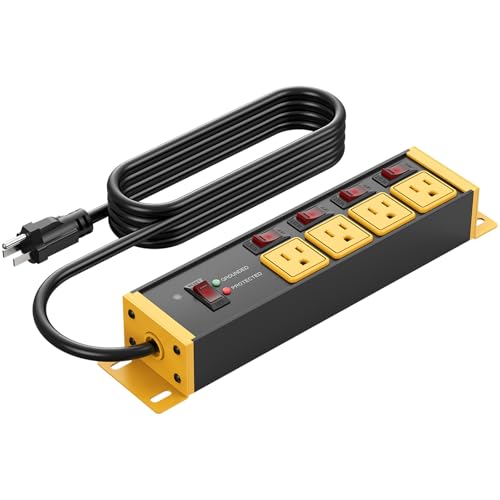
This is the strip I’d reach for when the gaming PC is a top-tier build with a power-hungry GPU and the wall outlet sits a normal distance away. The CCCEI 6-foot 20-amp model uses heavier-duty outlets (NEMA 5-20R and 6-20R, the 20-amp variants of standard receptacles) and individual 20-amp circuit breakers, which together handle sustained loads that would trip a basic 15-amp strip.
The wall-mountable back lets me bolt it under the desk for a clean install, and the standard 3-prong plug means it works in any regular outlet. Yellow housing aside, this is the kind of strip I want behind a serious battlestation.
Benefits That Matter
- 20-amp rating supports high-wattage gaming PCs
- Individual circuit breakers per outlet
- Wall-mountable for a tidier install
- 12-gauge cord stays cool under sustained load
Points To Keep In Mind
- Only four outlets, so plan your device count
- 20-amp outlets require compatible plugs on some PSUs
Whose Shelf It Belongs On
Gamers running enthusiast-tier GPUs and overclocked CPUs who want headroom above a basic 15-amp strip.
Reach For A Different Pick When
Modest mid-range builds get more value from the NANOLAKE’s 18 outlets and 4800-joule rating.
Steel-frame desks and metal shelving are everywhere in gaming setups, and that’s where the magnetic back on this strip earns its keep. Snap it to the underside of a metal desk and the strip stays put, accessible but out of the way. The orange housing makes it easy to spot in a tangle of black cables.
Four outlets with individual switches and a master switch give plenty of control, and the same 12-gauge, 1875-watt foundation as the other CCCEI strips. For most gaming desks, the magnet turns a “where do I put this” problem into a “done” moment.
Everyday Advantages
- Magnetic back mounts to any steel surface
- Individual outlet switches plus master switch
- Same 12-gauge heavy-duty build as siblings
- Bright orange for visibility in cable clutter
Small Caveats
- Magnet won’t grip non-metal desks, so mounting falls back to adhesives or screws
- Only four outlets for the size
Who Should Grab It
Gamers with steel-frame desks or metal shelving who want a strip that mounts without drilling or zip ties.
Consider Something Else When
Wooden or glass desks are a better match for the NANOLAKE, which includes proper mounting holes.
GFCI (Ground Fault Circuit Interrupter) cuts power the moment it detects current leaking where it shouldn’t, and that extra safety matters in older homes with grounded-but-aging wiring. This CCCEI strip integrates GFCI protection alongside the standard surge and overload safeguards, giving you a second line of defense for an expensive GPU.
Eight outlets, a 12-gauge 6-foot cord, and the same 1875-watt rating as the other CCCEI models round out the package. The grey housing looks more office-appropriate than the yellow industrial strips, which fits a gaming setup that’s also a workspace.
The Case For It
- Built-in GFCI protection for older or wet-prone areas
- Eight outlets handle most gaming setups
- 12-gauge cord rated for heavy loads
- Grey housing looks less industrial
Areas To Watch
- GFCI can occasionally trip from large PSU inrush currents on startup
- Single master switch, no per-outlet control
Core Details
Made For
Gamers in older homes, basements, or anywhere the wiring could benefit from an extra layer of fault protection.
Swap It Out When
Newer homes with modern breakers get more raw outlet count from the NANOLAKE 18-outlet strip.
Sharing a gaming space with a workstation, dorm room, or family setup means doubling up on plugs. The Solidock pairs 20 AC outlets with 4 USB-A and 2 USB-C ports (the USB-C delivering up to 18 watts), which covers a tower, monitors, console, laptop, and a pile of phones without resorting to a second strip.
The 2700-joule rating is solid for the class, and the wide-voltage design works on 120V to 240V circuits, which gives it flexibility in older homes. For most users the white housing reads “office” more than “gamer cave,” but it fits behind a desk where it won’t be seen.
Notable Gains
- 20 outlets plus 6 USB ports in one strip
- USB-C delivers up to 18W for fast phone charging
- Wide-voltage design handles 120V to 240V circuits
- ETL safety listing
Honest Caveats
- USB-C wattage is modest for laptop charging
- Large form factor takes up serious desk real estate
Who Will Love This
Gamers sharing a room with work or study gear, dorm residents, or anyone consolidating multiple smaller strips into one.
Where Another Pick Suits Better
Single-user gaming desks look cleaner with the CCCEI Magnetic strip, since it tucks under metal desks.
Tight desk corners and furniture pushed against the wall are where a flat plug earns its place. The popowell strip runs a 5-foot cord with a low-profile flat plug that tucks behind a bookshelf or dresser without shoving the furniture out. Eight AC outlets plus 3 USB-C and 3 USB-A ports give the strip surprising density for its size.
The 1080-joule rating is on the lighter end of this list, so it’s better suited to apartments and newer wiring than to rural or aging homes with frequent surges. For most gaming setups in newer construction, the auto-detect USB charging handles phones and accessories without separate wall warts.
What Earns Its Place
- Flat plug fits tight wall spaces
- 6 USB ports including 3 USB-C
- Auto-detect charging adjusts output per device
- Compact size for small desks
Some Limits To Know
- 1080-joule rating is lighter than the NANOLAKE or Solidock
- USB total output capped at 22W across all ports
Quick Facts
Right Fit For
Gamers with compact desks or furniture pushed against the wall where a standard plug would stick out too far.
Not Your Match When
High-spike environments need the NANOLAKE’s 4800-joule protection.
Custom builders and tinkerers who swap components weekly want fine-grained control, and the individual 20-amp switches on this CCCEI strip deliver exactly that. Four outlets, four switches, and a master cutoff mean I can kill the PSU without powering down the monitor or charger.
GFCI protection adds a fault-detection layer on top of surge and overload protection, and the 12-gauge 6-foot cord stays cool even when everything’s running at full tilt. Yellow housing aside, this is a workshop-grade strip that handles PC hardware with the same care it gives shop tools.
What Pays Off
- Individual 20-amp switches for per-outlet control
- GFCI plus surge and overload protection
- 12-gauge cord rated for full 1875W loads
- Suitable as an outlet extender for varied scenarios
Practical Considerations
- Only four outlets limits simultaneous device count
- Industrial look may clash with minimalist setups
Feature Rundown
Best Suited To
Builders and PC tinkerers who regularly swap components and want to isolate outlets during hardware swaps.
Where A Sibling Pick Shines
Static setups with more devices fit the NANOLAKE’s 18-outlet count better than four individually switched plugs.
What To Weigh Before Choosing Surge Protectors For Gaming Pc
Joule Rating and Spike Headroom
The joule number on a surge protector tells you how much energy the internal MOVs (metal oxide varistors, the sacrificial components that absorb spikes) can take before they fail. For gaming PCs, a higher joule rating means the strip survives more events before it stops protecting. A 1000-joule strip handles routine household noise; anything above 2500 joules is appropriate for gamers running expensive GPUs, and 4800 joules is overkill in clean power but a comfort in storm-prone areas.
Outlet Count and Spacing
Gaming setups grow over time, so picking a strip with at least two extra outlets beyond what you need today prevents the daisy-chain problem (plugging a strip into a strip, which most electricians discourage). Wide-spaced outlets matter when you use chunky wall warts for laptop chargers or console power supplies, because the bulky bricks block adjacent outlets on tight strips. The NANOLAKE’s wide spacing solves that, while most 4-outlet strips don’t.
Cord Gauge, Length, and Plug Shape
A 12-gauge cord carries sustained gaming loads without warming up, while thinner 14 or 16-gauge cords can run hot when a tower and monitor draw near the strip’s limit. Length depends on your room: 6 feet covers most desks, 50 feet handles detached rooms, and 100 feet is for serious distance runs. Flat plugs slip behind furniture, which matters in tight gaming nooks where a sticking-out plug ruins the layout.
USB Charging and Control Features
Built-in USB ports save desk space and wall-wart clutter, especially for streamers and multi-device gamers. Individual outlet switches let you cut power to specific devices without unplugging them, useful for builders swapping parts. GFCI adds fault protection in older homes, while master switches simplify shutdowns at the end of a session.
Picking The Right Strip For Your Setup
Where Shoppers Go Wrong
The most common mistake I see is buying a strip with the right outlet count but a joule rating that’s too low for the environment. Older homes, rural areas, and buildings with shared transformers throw bigger spikes than newer construction, and a 1000-joule strip can wear out within a year in those settings. Another slip is ignoring cord gauge: a 16-gauge strip might handle a tower at idle but warm up under sustained gaming load. Finally, shoppers often grab the cheapest multi-outlet strip and only later realize the outlets are too close together for their chunky charger bricks.
Where The Extra Money Goes
Higher-priced gaming strips earn their cost through heavier internal components, wider outlet spacing, and better surge suppression. A 4800-joule rating, GFCI protection, and 20-amp individual switches all add manufacturing cost, but they translate into longer strip life and better protection for the gear plugged into them. The upgrade is worth it for anyone running an enthusiast-tier GPU, living in older construction, or planning to keep the same strip through several PC builds. For a basic office tower in a new apartment, a mid-range strip covers the same use case at lower cost.
Frequently Asked Questions
How many joules do I really need for a gaming PC?
Aim for at least 2000 joules as a baseline for a mid-range build. Enthusiast GPUs and overclocked systems benefit from 3000 joules or more, especially in older homes where surges are more frequent.
Is GFCI necessary on a gaming surge protector?
GFCI matters most in basements, garages, kitchens, and older homes where ground faults are more likely. In newer construction with modern breakers, standard surge protection is usually sufficient.
Can I plug one surge protector into another?
Most electricians discourage daisy-chaining because it multiplies the load on a single wall outlet and can confuse the surge protection. Choose a strip with enough outlets to avoid the temptation.
Do USB-C ports on surge protectors charge gaming laptops?
Most USB-C ports on strips top out at 18 to 22 watts, which is fine for phones and tablets but slow for laptops. A dedicated USB-C PD charger is faster for laptop charging.
How long do surge protectors last in a gaming setup?
The internal MOVs wear down with every spike they absorb, so a strip in a high-surge environment may need replacement in two to three years, while one in clean power can last five years or longer.
Closing Remarks
The right strip depends on where your setup lives, how much gear you run, and how cautious you want to be about spikes. A single gaming tower in a newer apartment is fine with a mid-range strip like the popowell, while a basement battlestation with multiple monitors deserves the NANOLAKE’s 4800-joule headroom. Pick the strip that fits the room, the rig, and the wiring, and your GPU will thank you the next time the grid hiccups.
