

Solar monitoring gets a lot easier once you match the gear to the system you actually live with, whether that’s a roof array, an RV bank, or an off-grid cabin. The right pick shows voltage, current, capacity, or production data in a way you can act on without digging through a confusing app. Some of these options focus on whole-home visibility, while others are better for charge control, battery status, or panel checks.
The list below sorts that out with a practical eye. You’ll see which models suit daily energy tracking, which ones fit mobile power builds, and which are better for hands-on diagnostics than constant display use.
Quick Look At Our Top Picks
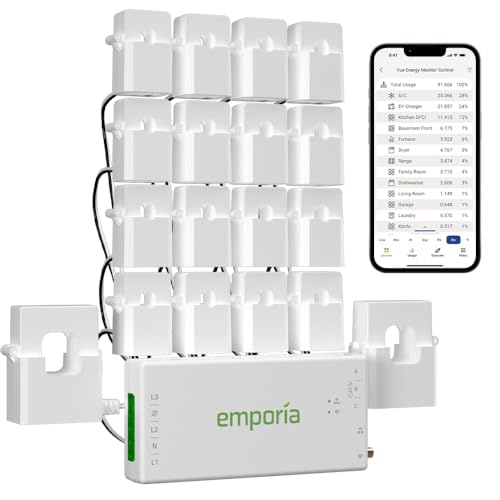
Emporia Vue 3 Home Energy Monitor

Renogy 400 Watt 12 Volt Premium 4 Pcs 100W Panel+40A MPPT Charge Controller
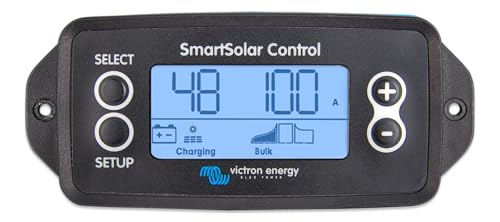
Victron Energy SmartSolar Pluggable Control Display

Victron Energy Cerbo GX MK2 for System Monitoring and Control
LiTime 500A Battery Monitor with M10 Shunt

Victron Energy MPPT Control
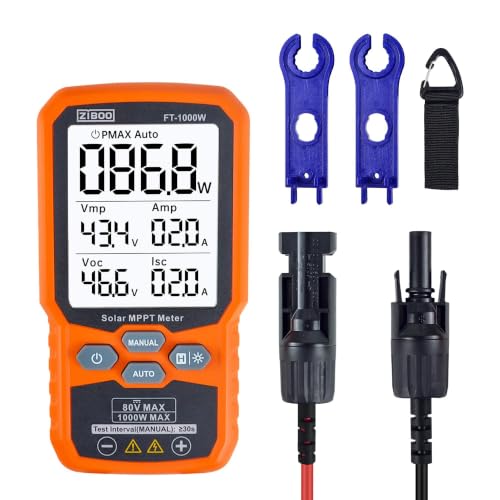
FT-1000W Solar Panel Tester MPPT Meter
More Details On Our Top Picks
The Emporia Vue 3 makes the most sense for you when solar and household loads need to live on the same screen. It tracks real-time electricity use, and that matters in a busy home where you want to see what the panels are doing versus what the appliances are pulling.
Compared with the smaller display-focused picks below, this one leans into whole-home visibility rather than just a quick glance readout. The honest trade-off is that it serves monitoring, not hands-on panel testing, so you get broader insight but less field-level detail.
Strong Points
- Shows current use in a way that helps you spot heavy loads before they pile up.
- Fits solar and net metering use, so you can track both sides of the energy picture.
- Works well for households that want one place to watch power patterns over time.
- The smart-home angle makes sense for daily routines, not just one-off checks.
Things To Consider
- You’re getting system visibility, not a handheld tool for diagnosing a panel in the yard.
- Installation is more involved than a simple plug-in display, so setup time matters.
- It fits best in homes that already treat energy tracking as part of the routine.
Core Details
Who It Suits Best
You benefit most here if your solar setup feeds a home where day-to-day energy visibility matters as much as hardware control.
A Better Fit Elsewhere
Victron Energy Cerbo GX MK2 suits you better when remote access and deeper control matter more than a home-focused monitor.
The Renogy kit is built for you if a full starter setup sounds better than piecing together parts one at a time. Four 100W panels, a 40A MPPT charge controller, Bluetooth support, fuse, brackets, adaptor kit, and tray cables make it a more complete path into 12V solar.
That completeness is the point, and it also explains the trade-off: you’re buying convenience and compatibility in one package, not the smallest or lightest option in the list. For campers, small cabins, and utility sheds, that usually feels like a fair exchange.
What We Like
- The included charge controller saves you from hunting for the matching piece later.
- Bluetooth support makes routine checking easier from a distance.
- The bundled brackets and cables help shorten the install puzzle.
- Four panels give you a clear entry point for modest 12V power needs.
- It suits first-time solar builds that need a cleaner parts list.
Room For Improvement
- The bundle approach can be bulkier than a stripped-down controller-only setup.
- You’ll want enough roof, rack, or ground space for four separate panels.
- It’s a system package, so maintenance and planning take more attention than with a single monitor.
Feature Rundown
Who Should Grab It
You fit this kit well if you want a 12V solar foundation for a camper, shed, or compact off-grid build and prefer one coordinated package.
Swap It Out When
LiTime 500A Battery Monitor with M10 Shunt suits you better when your main concern is battery status instead of panel-and-controller hardware.
For a tighter solar cabinet or a vehicle setup with limited panel space, this Victron display keeps things simple. It is meant to plug into SmartSolar gear, so you get local control without turning the system into a wall of menus.
Compared with the Emporia Vue 3, it’s far more focused on the solar controller itself than on whole-home electricity use. That narrower focus is useful, though it also means this is a better fit for existing Victron owners than for someone building from scratch.
Best Bits
- Pluggable design keeps the setup tidy and easy to place.
- Works as a direct local display for compatible SmartSolar gear.
- Good fit for compact control panels where space is tight.
- Reduces the need to rely only on a phone for quick status checks.
Small Caveats
- It is purpose-built, so its usefulness depends on compatible Victron hardware.
- You get a control display, not a broad energy dashboard.
Details At A Glance
Made For
You’ll get the most from it if your Victron solar gear already sits in a compact system where local readout matters.
Look Elsewhere When
Victron Energy Cerbo GX MK2 is the stronger match for you when remote monitoring and broader system control matter more than a small display.
The Cerbo GX MK2 sits in the more advanced corner of the shortlist, and that shows in how much it can do for a connected system. Remote access through VRM, which is Victron Remote Monitoring, and the VictronConnect app makes it a strong fit for setups you do not want to babysit in person.
Compared with the SmartSolar display above, this one is better for a larger, more layered installation, especially where marine MFD compatibility matters. You may find it more than you need for a small cabin, but that’s also why it makes sense for serious system oversight.
Highlights
- Remote monitoring suits systems that sit in another room, another building, or on a boat.
- VictronConnect support makes day-to-day checking easier from your phone.
- VRM access helps you keep an eye on the system without being on site.
- Marine MFD compatibility broadens its appeal for boat-based solar setups.
- Well matched to users who want one control hub rather than several small displays.
Areas To Watch
- It’s a stronger fit for advanced systems than for very basic solar setups.
- Setup and integration can take more attention than a plug-in display.
- You need compatible Victron gear to make the most of it.
Technical Sheet
The Right Fit
You should look at this model if your solar setup is more complex and you want remote oversight from a phone or onboard screen.
Where A Sibling Pick Shines
Victron Energy SmartSolar Pluggable Control Display suits you better when you want a smaller, more direct local display for a simpler Victron setup.
This LiTime monitor is aimed at the battery side of solar life, which makes it very useful in RVs and off-grid storage banks. The LCD display gives you capacity, percentage, power, and voltage in one place, so you’re not guessing how much usable energy is left.
Unlike the Emporia Vue 3, which looks at broader household usage, this one stays close to the bank itself. That narrower focus is a strength for mobile power setups, and the buzzer alarm adds a plainspoken warning layer that many people will appreciate on the road.
Upsides
- The M10 shunt setup gives you a direct way to track battery behavior.
- Capacity and percentage readings help you plan loads before the bank runs thin.
- LCD output is easy to read in an RV or compact power cabinet.
- Works with LiFePO4 and lead acid batteries, which broadens the use case.
- The buzzer adds a useful reminder in noisy travel or storage environments.
Points To Note
- The shunt-based install asks for more care than a simple clamp-on display.
- You’ll use it most effectively in systems where battery state matters more than panel yield.
Feature Card
Whose Shelf It Belongs On
You’ll like this most if your day-to-day concern is battery condition in an RV, trailer, or off-grid bank.
Reach For A Different Pick When
Emporia Vue 3 Home Energy Monitor is the better fit for you when whole-home electrical visibility matters more than battery-only tracking.
This Victron controller display is a neat fit for people who already live in the Victron ecosystem and want cleaner access to MPPT, which means maximum power point tracking. That matters because the controller can react more intelligently to changing sun and panel conditions than a basic fixed setup.
Compared with the Cerbo GX MK2, it’s narrower in scope and more modest in ambition. The upside is a simpler path to remote configuring and monitoring for panel controllers, which can be exactly what a tidy solar cabinet needs.
Reasons To Buy
- Direct MPPT focus makes it practical for controller-level monitoring.
- Remote configuring suits users who prefer a cleaner control routine.
- Works well in Victron-based solar setups that want less clutter.
- Gives you a dedicated way to watch controller behavior without extra hardware bloat.
Worth Noting
- Its usefulness depends heavily on the right Victron controller setup.
- You’re getting a focused tool, not a broad whole-system dashboard.
Core Details
Built With In Mind
You should consider this if your Victron system already has the controller side in place and you want a dedicated control layer.
Another Choice May Suit
Victron Energy Cerbo GX MK2 suits you better when you want a fuller system hub with remote monitoring across a larger installation.
The FT-1000W is the most hands-on tool in this roundup, and it suits you when panel diagnosis matters more than passive monitoring. It reads open-circuit voltage, or Voc, and short-circuit current, or Isc, which are two of the quickest ways to tell whether a panel is behaving as expected.
Compared with the Victron control pieces, this one is for field checks and troubleshooting rather than ongoing system oversight. The backlight and data hold function make it friendlier in less-than-perfect light, though it still belongs with people comfortable doing direct electrical checks.
Bright Spots
- Useful for checking panel behavior during setup or troubleshooting.
- Handles up to 1000W, which gives it room for larger panel checks.
- Backlight helps in dim sheds, garages, or late-day inspections.
- Data hold keeps a reading visible long enough to note it down.
- The Voc and Isc functions support practical panel comparison work.
Honest Caveats
- It is a diagnostic meter, not a daily dashboard for a living space.
- You’ll get the most value from it in the hands of someone comfortable with test gear.
- Storage matters, because a field tool like this should stay protected between uses.
Feature Rundown
Who Will Love This
You should reach for this if you troubleshoot panels, verify output, or check module behavior during installation work.
Skip It When
Emporia Vue 3 Home Energy Monitor is the better fit when you want everyday household energy visibility instead of field diagnostics.
How To Choose The Right Solar Monitoring Systems
Match The Monitor To The Job
Solar monitoring covers more than one category, so the first step is deciding whether you need whole-home visibility, controller oversight, battery tracking, or panel testing. A home-based monitor like Emporia Vue 3 makes sense for utility tracking, while a shunt monitor such as LiTime 500A stays close to the battery bank. A tester like FT-1000W lives in a different lane entirely, because it helps you inspect panel behavior during setup or troubleshooting.
Check Compatibility Before Anything Else
Victron’s control pieces only earn their keep inside the right Victron environment, and that’s the sort of detail that saves frustration later. The same goes for the Renogy bundle, where the controller, panels, and accessories are meant to work together as one system. Matching the monitor to the rest of your gear is less glamorous than shopping by feature list, but it matters more.
Think About Where You’ll Use It
A cabin wall, an RV cabinet, and a marine dash all ask for different things. Small displays work best where space is tight and quick glances matter, while remote hubs are stronger when the system sits farther away or gets checked from a phone. The setup should fit the place, not fight it.
Choose Detail Depth With Care
Some setups need just a voltage and percentage readout, while others need production data, control access, or panel diagnostics. More detail usually means more setup work and a higher learning curve, so the better choice is the one you’ll actually use week after week. For most people, clear data beats crowded data.
What To Weigh Before You Buy
Mistakes Worth Dodging
Plenty of solar setups go sideways because the monitoring gear doesn’t match the system’s scale. A battery-only meter won’t replace a full home energy monitor, and a panel tester won’t help much as a daily status screen.
Another common miss is ignoring install complexity. Shunt-based or networked gear usually asks for more planning than a simple plug-in display, so the easier-looking option can save you time.
The Upgrade Payoff
Higher-tier models usually cost more because they add remote access, broader compatibility, cleaner system integration, or more complete data handling. You’re also paying for control, not just numbers on a screen, and that matters in larger or more layered setups.
That extra spend makes the most sense when the system is central to your daily routine. A weekend camper may be fine with a compact display, while a full off-grid setup often benefits from the added visibility.
Frequently Asked Questions
What makes a solar monitor different from a solar tester?
A monitor tracks ongoing energy use, production, or battery status over time. A tester is more of a checkup tool for panel output and electrical behavior.
Can you use a whole-home monitor for an RV?
You can, but it usually makes less sense than a battery monitor or compact controller display. RV setups tend to benefit more from gear built around the bank itself.
Why do some systems use a shunt?
A shunt lets the monitor track current flowing in and out of a battery bank. That gives you a more exact picture of capacity and remaining charge.
Do remote monitoring hubs suit small setups?
They can, but the value shows up more clearly in larger or harder-to-reach systems. For a simple build, a direct display may feel easier and cleaner.
What should you prioritize first?
Start with compatibility, then decide how much detail you want. After that, choose the form factor that fits your space and routine.
Closing Thoughts
The best solar monitoring system for you depends on the kind of control you want, not just the label on the box. Whole-home tracking, battery-level visibility, remote access, and field diagnostics all solve different problems, and this shortlist keeps those roles separated in a useful way. Pick the tool that matches your setup today, with a little room for the way you may grow into it later. That keeps the system useful instead of fussy.
