

A UPS (uninterruptible power supply) is one of those things I only ever think about when the lights flicker mid-meeting, or when a storm rolls through and my desktop suddenly goes dark. For anyone working from home, a short outage can mean lost drafts, corrupted project files, and a router that forgets how to talk to the internet. A good UPS gives me enough time to save, shut down properly, and stay online long enough to wrap a call.
The list below covers full desktop battery backups, a couple of wall-mount brackets that keep those brick-sized units off the floor, and a NAS-focused option for folks who run their own storage. I’ve mixed sine wave and stepped-approximation units, traditional and lithium-iron-phosphate batteries, and a few capacity tiers so you can match the pick to your actual gear.
The Shortlist At A Glance

CyberPower CP1500PFCLCD PFC Sinewave UPS
Oeveo UPS Mount 143 Wall Bracket

Glitwing UPS Mount 548 Heavy Duty Bracket

GOLDENMATE 1500VA/1000W Lithium UPS White

GOLDENMATE 1000VA/800W Lithium UPS White

GOLDENMATE 1000VA/600W Lithium UPS White

GOLDENMATE 1000VA/600W Lithium UPS Gray
UGREEN NAS UPS US3000 Battery Backup

GOLDENMATE 600VA/360W Lithium UPS
Inside Each Recommended Option
The CyberPower CP1500PFCLCD is the workhorse tier of the lineup, and it’s the one I’d suggest for a serious home workstation. What sets it apart is pure sine wave output, which matters if your PC uses active PFC (power factor correction). Many modern desktops do, and a stepped-approximation unit can cause them to shut off unexpectedly or behave strangely when the battery kicks in.
The color LCD on the front gives a quick read on load, estimated runtime, and battery health, which is useful when you’re trying to figure out how much time you actually have during an outage. It runs as a mini-tower, so it’ll sit next to a desktop comfortably, and the higher VA rating covers a multi-monitor setup with margin. For someone running a single laptop, it’s likely overkill.
Good Reasons To Consider
- Pure sine wave output protects active PFC power supplies from unexpected shutdowns
- Color LCD panel surfaces load and runtime info at a glance during an outage
- Higher VA capacity covers dual-monitor workstations without strain
- Surge protection kicks in from day one, even if the battery is fully drained
Things To Consider
- Mini-tower footprint takes up noticeable floor or shelf space in tighter setups
- Lead-acid battery typically needs replacement after a few years of heavy use
- Runtime shrinks fast if you’re powering a gaming PC plus peripherals
Who It Suits Best
Home-based professionals running a desktop workstation with active PFC, multi-monitor setups, or anyone whose work can’t tolerate a mid-task crash.
Where Another Pick Suits Better
For a smaller load like a router and laptop, the GOLDENMATE 600VA/360W Lithium UPS keeps the budget lighter and the footprint smaller.
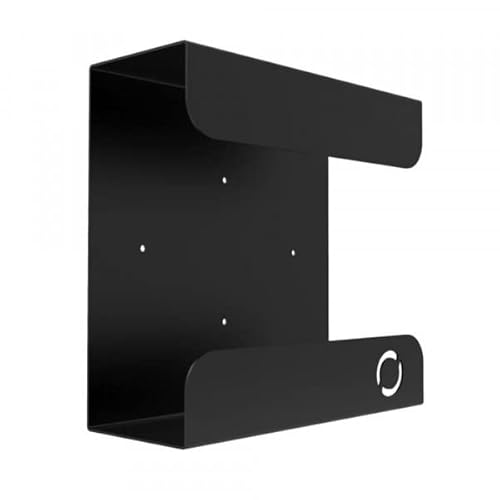
If you’ve ever stubbed your toe on a UPS sitting under a desk, the Oeveo UPS Mount 143 solves a problem most people don’t realize they have. It lifts the unit off the floor and onto the wall, which keeps cables tidy and out of vacuum range. Built in the USA with a flat black powder-coat surface, it pairs with both APC and CyberPower units in the common 1500VA footprint.
The bracket supports up to 70 lbs, and the mounting hardware ships in the box, so there’s no last-minute hardware-store run. For anyone renting, drilling holes is the only real hesitation, and in most cases the studs line up cleanly with the bracket’s footprint. It’s a small accessory that quietly tidies up the whole office.
The Good Stuff
- Frees up floor space and reduces trip-hazard risk in tight workstations
- 70 lb weight capacity covers most mini-tower UPS models comfortably
- Included hardware means no extra trips to the hardware store
- Flat black finish blends with most office setups without drawing attention
Worth Noting
- Wall-mounting means committing to a fixed UPS location before installation
- Not compatible with every UPS model, so checking dimensions beforehand matters
Feature Snapshot
Made For
Home office workers with a smaller UPS who want it off the floor without buying a dedicated shelf or stand.
Skip It When
If you need a heavier-duty steel bracket for a larger UPS, the Glitwing UPS Mount 548 brings a thicker gauge and similar wall-mounting.
The Glitwing UPS Mount 548 takes the same wall-mount idea as the Oeveo bracket and turns it up a notch. It’s fabricated from 16GA cold-rolled steel, which is the kind of spec you usually see on shop equipment, not office accessories. For a heavier UPS that would feel sketchy on a lighter bracket, this one provides real reassurance.
The flat black powder-coat finish matches the Oeveo’s look, so they read as siblings visually. The mount holds the unit vertically, which is often the orientation that maximizes clearance in a corner or under a floating shelf. The honest read is that this is overkill for a small 600VA unit, but for a full-size 1500VA tower, it’s the right amount of bracket.
Useful Strengths
- 16GA cold-rolled steel construction handles heavier UPS units with confidence
- Vertical mounting saves footprint in tight corners or beside a desk
- Powder-coat finish holds up against scuffs during installation and use
- Designed around common APC Back-UPS footprints, a popular form factor
Room For Improvement
- Heavier steel means a sturdier install and possibly wall anchors for drywall
- Larger than minimal mounts, so it stands out on lighter-colored walls
Best Suited To
Offices with a full-size tower UPS where lighter plastic or thin-steel brackets feel underbuilt.
Look Elsewhere When
For a smaller UPS, the Oeveo UPS Mount 143 covers the same job with lighter hardware and easier installation.
The GOLDENMATE 1500VA/1000W switches the chemistry to lithium iron phosphate (LiFePO4), which is a meaningful upgrade over the lead-acid cells in most traditional UPS units. LiFePO4 batteries typically last longer in cycle count, run cooler, and don’t need to be replaced as often. For a home office where the unit sits powered on for years, that translates into less maintenance and a longer service life.
The 1500VA rating at 1000W output gives this unit comfortable headroom for a desktop, monitors, and networking gear combined. The white finish is a small thing, but in a bright office it looks cleaner than the typical beige or black. It does cost more than its lead-acid peers, though, which is the honest trade-off to weigh.
What Helps Most
- LiFePO4 battery chemistry promises a much longer cycle life than lead-acid
- 1500VA/1000W capacity covers a full home office load with margin
- White casing blends into modern and minimalist office setups
- Lower long-term cost of ownership thanks to fewer battery replacements
Points To Keep In Mind
- Higher upfront cost than comparable lead-acid models
- Larger physical footprint than the smaller GOLDENMATE 600VA sibling
Spec Overview
Who Will Love This
Remote workers who want a long-life lithium battery and don’t mind paying more upfront for fewer replacements down the road.
Reach For A Different Pick When
If 600VA of backup for a router and laptop is enough, the GOLDENMATE 600VA/360W Lithium UPS gets the same chemistry in a smaller box.
The GOLDENMATE 1000VA/800W sits in a useful middle ground between the bigger 1500VA flagship and the entry-level 600VA unit. It still uses LiFePO4 chemistry, so the longevity story carries over, but the smaller rating makes it a friendlier match for a typical single-PC-and-monitor office. The 800W output gives real headroom over the 600W units in the same family.
If you run a multi-monitor setup or a more power-hungry desktop, the 600W output on the smaller GOLDENMATE units might feel close to the edge. This one’s extra wattage buys breathing room, which is the kind of margin that pays off when you accidentally add a second monitor or a USB dock later. The white finish matches the rest of the family.
Positive Points
- 800W output gives comfortable margin for multi-monitor and dock setups
- Same LiFePO4 chemistry benefits as the larger 1500VA flagship
- White casing integrates into bright office spaces
- More compact than the 1500VA tier while still covering most home offices
Honest Caveats
- Costs more than the lower-wattage lithium models in the lineup
- May be more UPS than needed for a laptop-only workflow
Right Fit For
Home office workers with a moderately power-hungry desktop and dual monitors who want lithium longevity without the bulk of the flagship.
Swap It Out When
For something lighter that covers a laptop and a router, the GOLDENMATE 600VA/360W Lithium UPS gets the job done in a smaller box.
The GOLDENMATE 1000VA/600W is the sweet-spot pick for most everyday home offices. It carries the same LiFePO4 chemistry as the higher-wattage units, so the long-cycle-life advantage is intact, but it prices into a more accessible band. The 600W output covers a typical desktop plus a single monitor and a router without stress.
For a one-PC, one-monitor, one-router setup, this unit gives enough runtime to save work and shut down cleanly. Owners commonly find the white casing shows less dust than black finishes over time, which is a small but real ergonomic win in a home office. The catch is that adding a second monitor or a gaming GPU might push the load close to the unit’s ceiling.
Practical Pluses
- LiFePO4 battery chemistry at a more approachable price point
- 1000VA capacity handles typical desktop-plus-peripherals loads comfortably
- White finish hides dust better than darker finishes in daily use
- Long cycle life means fewer battery replacements over the years
Trade Offs
- 600W output caps the unit for users planning heavy multi-monitor or GPU loads
- Less wattage headroom than the 800W sibling in the same family
Perfect Match For
Typical home office workers with a single desktop, one monitor, and a router who want lithium chemistry without overspending.
Consider Something Else When
If you’re running dual monitors or a power-hungry GPU, the GOLDENMATE 1000VA/800W Lithium UPS White steps up the wattage headroom.
The gray variant of the GOLDENMATE 1000VA/600W is functionally identical to its white sibling, but the casing choice changes the personality of the unit. Gray reads as more neutral and professional, which matters in a visible home office where the UPS sits next to a desk rather than hidden under it. It also tends to blend better with darker wood or metal desk setups.
If you care about how the unit looks as part of the room, this gray version makes the UPS feel like part of the decor instead of an appliance you tolerate. The electrical specs are unchanged, so the runtime and protection story is the same as the white 600W unit. Choosing between this and its sibling is essentially a question of finish preference.
Well-Handled Touches
- Neutral gray finish pairs with darker wood, metal, or industrial decor
- Identical LiFePO4 longevity and 1000VA capacity as the white version
- Looks more like a deliberate design object than a utility box
- Same long-cycle-life benefit as the rest of the GOLDENMATE lithium line
Small Caveats
- Functionally identical to the white 600W version, so finish is the only real differentiator
Who Should Grab It
Anyone who wants the 600W lithium spec sheet but prefers a darker, more professional-looking finish that blends with darker desks and accessories.
Not Your Match When
If a bright white finish suits your space better or you want extra wattage, the GOLDENMATE 1000VA/800W Lithium UPS White is the natural alternative.
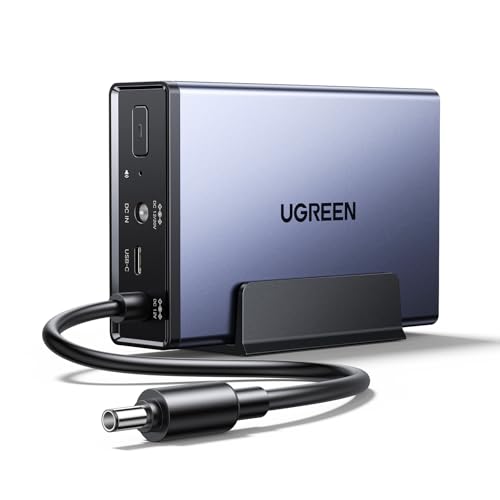
The UGREEN NAS UPS US3000 is a category of its own. Rather than a typical AC-output UPS, it provides DC power specifically to compatible UGREEN NAS units through a dedicated connection. That matters because a NAS (network-attached storage) holding family photos or business files is exactly the kind of device that shouldn’t lose power mid-write.
It’s worth being upfront about compatibility: this unit only fits specific 2-bay and 4-bay UGREEN NAS models, including the DXP2800, DXP4800 family, and the DH2300 and DH4300Plus, but not the DXP6800 or DXP8800 series. If your NAS is on the supported list, the unit gives a quiet, purpose-built buffer against outages. For everyone else, a standard AC UPS is the right tool.
A Few Highlights
- DC-direct design keeps the NAS powered through outages without conversion losses
- 12000mAh internal battery provides meaningful runtime for supported NAS units
- Compact, quiet operation suits a home office or living-room NAS location
- Built-in protection against surges, over-charge, and short circuits
Where It May Fall Short
- Limited to specific UGREEN NAS models, so it doesn’t replace a general UPS
- Not compatible with the DXP6800 or DXP8800 series, despite looking similar
Product Snapshot
Built With In Mind
Home office users running a supported UGREEN NAS who want a quiet, DC-direct battery buffer for their storage device.
A Better Fit Elsewhere
For general desktop and monitor protection, the GOLDENMATE 1000VA/600W Lithium UPS White covers a typical office load with broader compatibility.
The GOLDENMATE 600VA/360W is the smallest unit in the lineup, and it’s the right tool when the goal is keeping just a few essentials alive during an outage. For most home offices, that means the modem, the router, and possibly a laptop or single monitor. The unit uses the same LiFePO4 chemistry as its bigger siblings, so the long-cycle-life benefit shows up here too.
It’s compact enough to tuck behind a monitor or on a small shelf, which matters in tight desk setups. The honest read is that 360W of output caps what you can plug in, so a full desktop workstation is out of scope. For a laptop-centric workflow or a network-only setup, this is the cleanest fit in the list.
Where It Delivers
- Smallest footprint in the GOLDENMATE lithium lineup
- LiFePO4 chemistry provides long cycle life in a compact box
- Cover core networking gear and a laptop through short outages
- Lower price than larger-capacity siblings while keeping lithium benefits
What To Weigh
- 360W output limits use to light loads like networking gear and laptops
- Won’t back up a full desktop workstation or multi-monitor rig
Whose Shelf It Belongs On
Laptop-based workers and minimalists who only need to keep their modem, router, and a single device online during brief outages.
Another Choice May Suit
For a desktop workstation with more demanding loads, the CyberPower CP1500PFCLCD PFC Sinewave UPS covers active PFC hardware more comfortably.
What Matters Most Before Choosing Ups For Home Office
Match VA and Wattage to Your Actual Load
The first real decision is how much power your setup actually draws. VA (volt-amps) is the apparent power the UPS can supply, while watts is the real working power. A typical home office with a desktop, one monitor, and a router usually lands somewhere in the 300 to 500W range, which puts a 1000VA/600W unit in the safe zone. Gaming rigs, workstations, or dual-monitor setups often push higher.
For laptop-only workflows, a 600VA/360W unit is usually plenty. The risk on either side is the same: too small and the UPS overloads immediately, too large and you’ve spent money on capacity you’ll never use.
Sine Wave vs. Stepped Approximation Matters With Modern PCs
Modern desktops with active PFC power supplies can misbehave on stepped-approximation (also called simulated sine wave) UPS units, sometimes shutting off unexpectedly when the battery kicks in. Pure sine wave output, like the CyberPower CP1500PFCLCD provides, mimics wall power more cleanly and avoids that issue. If your PC is older or doesn’t use active PFC, a stepped-approximation unit usually works fine and saves money.
Battery Chemistry Shapes Long-Term Ownership
Traditional UPS units use lead-acid batteries that typically need replacement every few years. LiFePO4 lithium batteries last dramatically longer in cycle count, often running 10+ years before replacement. That advantage shows up in maintenance time and total cost of ownership, even though the upfront price is higher.
Don’t Forget Surge-Only Outlets and Recharge Time
Most UPS units have a mix of battery-backed outlets and surge-only outlets. Plugging printers, desk lamps, or anything non-critical into surge-only outlets preserves runtime for gear that actually needs battery backup. Recharge time after a full discharge also varies, so if your area sees frequent outages, faster recharge matters.
Things Worth Watching Across These Picks
Pitfalls Shoppers Hit
The most common mistake is undersizing the UPS. People often buy based on the number of outlets rather than the wattage draw of what they’re plugging in, and end up with a unit that overloads the moment a monitor wakes up. The other trap is assuming every UPS plays nicely with every computer. Active PFC desktops in particular want sine wave output, not stepped approximation, and pairing the wrong type leads to surprise shutdowns.
A third slip is forgetting about the NAS, router, and modem. Those networking devices are exactly what you want to keep alive during an outage, but they’re easy to overlook when counting outlets on a UPS. Make sure your chosen unit has enough backed-up outlets for both your computer and your network path.
When Paying More Pays Off
Higher prices in this category typically buy three things: pure sine wave output, LiFePO4 battery chemistry, and higher wattage headroom. Sine wave matters most if you have an active PFC desktop, so skipping that savings on those systems often backfires. LiFePO4 batteries cost more upfront but last years longer, which spreads the cost over a much longer ownership window.
Higher wattage tiers mostly buy headroom. If you might add a second monitor, a USB dock, or a faster desktop in the next few years, the upgrade pays off because you won’t need to replace the unit. For static setups that won’t grow, the lower tier is usually the smarter spend.
Frequently Asked Questions
How Long Will a UPS Power My Home Office?
Runtime depends on how much wattage your gear draws versus the UPS capacity. A typical desktop and monitor at maybe 200W might run for 10 to 20 minutes on a 1000VA/600W unit, which is plenty of time to save work and shut down. Lower-capacity units give less runtime, and high-draw setups drain faster.
Do I Need Pure Sine Wave for My Computer?
Modern desktops with active PFC power supplies benefit from pure sine wave output to avoid unexpected shutdowns when the battery takes over. Older PCs and most laptops usually work fine on stepped-approximation units. The CyberPower CP1500PFCLCD is the sine wave option in this list, while the GOLDENMATE units use stepped output.
Can a UPS Protect My Router and Modem Too?
Yes, and it’s a smart use of the unit. Plugging your modem and router into the battery-backed outlets keeps your internet up during an outage, which matters for VoIP calls, VPN sessions, and remote work tools. The smaller 600VA/360W unit is often plenty for that purpose alone.
Where Should I Place a UPS in a Home Office?
Most UPS units want some breathing room around them for airflow, so avoid cramming them into a closed cabinet. Floor placement works, but a wall-mounted bracket like the Oeveo or Glitwing options keeps the unit off the floor and out from underfoot. Either way, keep it accessible so you can read the front panel and reach the outlets.
How Often Will I Need to Replace the Battery?
Lead-acid UPS batteries typically need replacement every 3 to 5 years under normal use. LiFePO4 lithium batteries last much longer, often 10+ years with thousands of charge cycles. If you want to forget about battery replacement for most of the unit’s life, the lithium options earn their higher upfront cost.
Bottom Line
A UPS for a home office is the kind of purchase that quietly pays for itself the first time the power blinks during a deadline. For most people, a 1000VA lithium unit like the GOLDENMATE 1000VA/600W White covers a typical desktop-plus-peripherals load with chemistry that won’t need babying. If you run a heavier workstation, the CyberPower CP1500PFCLCD adds the sine wave output that active PFC desktops actually want. And if the UPS is going to live on the floor, a wall-mount bracket is the cheap upgrade that makes the whole setup feel less cluttered.
