

A single flicker of grid power can fry a workstation, scramble a NAS, or drop a video call mid-sentence. I put this list together for anyone who has watched an outage swallow unsaved work, or who lives somewhere the lights blink more than they should. The picks below span compact desk units to rack-ready battery UPS battery systems, plus a couple of replacement cartridges worth knowing about.
The Picks In Brief

UPSBatteryCenter® Compatible Replacement Battery for APC BN4001

APC External Battery for Back-UPS Pro BR1500G

CyberPower CP1500AVRLCD3 Intelligent LCD UPS

APC BX1500M 1500VA/900W UPS Battery Backup
CyberPower CP1500PFCLCD PFC Sinewave UPS

CyberPower EC850LCD Ecologic UPS

APC BR1500MS2 1500VA Pure Sine Wave UPS
APC BE600M1 600VA UPS Battery Backup

APC APCRBC123 Genuine Replacement Battery

CyberPower CP1500PFCRM2U PFC Sinewave Rackmount UPS
The Details Behind The Selections
Anyone sitting on an aging APC Back-UPS NS Network 40 BN4001 knows the unit can outlive its battery, and swapping the cell is far cheaper than replacing the whole tower. UPSBatteryCenter’s compatible cartridge is built as a direct fit for that specific APC model, so the install is a slide-out, slide-in job rather than a rewiring project.
For someone whose original UPS still works fine but chirps every few seconds because the internal battery has lost capacity, this cartridge answers a real problem. It’s the kind of part that pays for itself the day you avoid replacing the entire UPS unit.
Useful Touches
- Tailored to the BN4001 chassis, so the connectors line up without adapters.
- Restores usable runtime to a still-functional UPS instead of forcing a full replacement.
- Sealed lead-acid chemistry means maintenance-free ownership once installed.
- Cost-effective for home users with one aging unit rather than a fleet.
Trade Offs
- Third-party rather than OEM-branded, which some APC owners prefer to avoid.
- Useful only if your existing UPS is the matching model.
- Sealed cells eventually need another swap, typically every few years.
Who It Suits Best
Home users nursing an older APC Back-UPS NS Network 40 who want a budget-friendly way to extend its useful life.
Where Another Pick Suits Better
Owners of a Back-UPS Pro BR1500G should grab the APC external battery pack further down the list instead, since it is designed for that specific tower.
This is the BR24BPG-style extension pack designed to daisy-chain onto the APC Back-UPS Pro BR1500G. Rather than a standalone UPS, it acts as additional reserve capacity, giving the host unit more minutes when the grid drops out.
The audience here is narrow but real: someone who already owns the BR1500G and finds the built-in runtime a touch short. Adding this pack means graceful shutdowns last longer, which matters in regions where brief outages stretch into hour-long ones.
The Practical Payoff
- Plugs directly into the BR1500G, no separate outlet needed.
- Multiplies runtime so NAS drives can spin down safely.
- Keeps the primary UPS investment relevant instead of forcing an upgrade.
- Useful for anyone in storm-prone or rural-grid areas.
Worth Noting
- Requires the matching BR1500G host unit, useless on its own.
- Adds floor space and weight to the setup.
- Pricier than a basic standalone UPS once you total it with the host.
Core Details
Made For
Existing BR1500G owners who want more headroom during longer blackouts without replacing their primary UPS.
Skip It When
Anyone starting fresh should look at the standalone CyberPower CP1500AVRLCD3 instead, which includes its own battery.
The CyberPower CP1500AVRLCD3 is a mini-tower UPS that leans into its intelligent LCD panel. The screen shows load, battery level, and voltage conditions without needing to log into software, which makes it a friendly middle ground between basic brick units and rack-grade hardware.
It uses line-interactive topology with simulated sine wave output, and Automatic Voltage Regulation (AVR) that fixes minor brownouts without burning battery life. For most home offices, that means the UPS stays out of battery mode during everyday flickers, which extends its overall service life.
Everyday Wins
- Readable LCD front panel reduces guesswork during events.
- AVR handles small dips without dipping into the battery, preserving cycle life.
- Tower form factor fits under a desk or beside a workstation.
- Suitable for desktops, networking gear, and home entertainment centers.
- Plenty of outlets for a typical mixed-device setup.
Some Limits To Know
- Simulated sine wave may not suit very sensitive active-PFC power supplies.
- Bulkier than wall-wart style standby units like the CyberPower EC850LCD.
The Right Fit
Home office workers with mid-range desktops and a router who want clear status feedback without software overhead.
Swap It Out When
Users running modern workstations with active PFC power supplies should pick the CyberPower CP1500PFCLCD further down the list, which delivers true sine wave output.
The APC BX1500M sits in the middle of the Back-UPS Pro family, offering 1500VA / 900W of capacity with AVR to smooth out the kinds of small voltage shifts that wear on electronics over time. It targets prosumers whose setups go beyond a single PC, say a workstation plus a NAS plus a monitor array.
Compared with the smaller APC BE600M1 a few picks down, this unit has the headroom for higher-wattage gaming PCs and the room to spare for graceful shutdowns. The LCD readout on the front keeps users informed about what the UPS is doing without diving into companion software.
Useful Strengths
- 1500VA capacity handles multi-device workstations comfortably.
- Automatic Voltage Regulation addresses brownouts before they hit gear.
- Useful for power users running a PC, monitor, and NAS at once.
- Backed by an established UPS brand with widely available replacement cartridges.
A Few Limitations
- Stepped or simulated sine wave output, so some active-PFC PSUs may not pair cleanly.
- Heavier and bulkier than compact standby units.
At A Glance
Best Suited To
Prosumer households running a primary desktop, external storage, and networking gear that needs serious runtime reserves.
Reach For A Different Pick When
Anyone with active-PFC sensitive gear should trade up to the APC BR1500MS2 for true sine wave output.
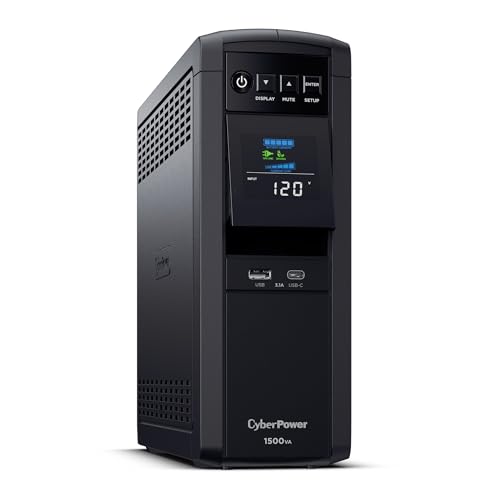
The CP1500PFCLCD earns its place on this list by delivering pure sine wave output, which is the kind of clean power waveform that active-PFC power supplies expect. Active PFC is shorthand for power supplies that actively shape the incoming current for efficiency, and they can misbehave when fed a stepped or simulated sine wave.
The color LCD on the front panel is one of the more informative displays in this category, giving quick visibility into load, runtime estimate, and battery condition. Line-interactive topology with AVR means routine brownouts get corrected without draining the battery.
The Value In It
- Pure sine wave output pairs cleanly with active-PFC desktop PSUs.
- Multifunction color LCD for fast status checks.
- AVR extends battery life by handling small dips automatically.
- 1500VA capacity covers workstation-class loads.
- EMI/RFI filtering reduces line noise reaching sensitive electronics.
Honest Caveats
- Costs more than simulated sine wave units of similar capacity.
- Tower footprint requires deliberate placement.
Feature Snapshot
Whose Shelf It Belongs On
Owners of newer workstations with active-PFC power supplies who need clean, predictable power and hate guessing about battery status.
Look Elsewhere When
Buyers focused on budget basics and simpler gear should consider the CyberPower EC850LCD for a more compact standby option.
The EC850LCD is a compact standby UPS aimed at the smallest practical loads, things like a router, a modem, a low-wattage desktop, or a media streamer. It uses standby topology rather than line-interactive, which keeps the price down and the footprint small.
The Ecologic feature set is worth knowing about. When the UPS detects a connected PC is off or asleep, it cuts power to its energy-saving outlets, which is genuinely useful for anyone who wants to shave phantom load without remembering to flip a switch.
A Favorable Mix
- Compact size fits behind a desk or on a small shelf.
- Ecologic outlet management reduces idle power waste.
- Front LCD gives basic status without software.
- Reasonable price for entry-level protection.
- Surge protection for non-battery outlets covers accessories.
Possible Compromises
- Standby topology, not line-interactive, so it skips AVR.
- Simulated sine wave output may not suit active-PFC PSUs.
- Lower runtime on heavier loads than tower units.
Right Fit For
Anyone who mainly needs to keep internet gear alive during a brownout, especially in apartments or small offices.
Consider Something Else When
Power users with high-wattage gaming rigs or workstations should step up to the CyberPower CP1500PFCLCD for real runtime headroom.
The APC BR1500MS2 is the pure sine wave sibling of the BX1500M we covered earlier. Where that unit uses a stepped waveform, this one delivers clean output that matches what the wall provides, which is the right call for active-PFC power supplies in modern desktops and workstations.
Capacity lands at 1500VA / 900W, the same headroom as its simulated-sine sibling, so pairing it with a high-end gaming rig or audio production workstation feels natural. Surge protection comes first in the chain, which is a small but meaningful detail for anyone running expensive kit.
Practical Advantages
- Pure sine wave output for clean, predictable power delivery.
- 1500VA capacity matches demanding gaming and workstation rigs.
- Surge-first protection helps shield expensive components.
- Replacement battery cartridges are widely available from APC.
- Front display gives clear load and battery readouts.
Points To Keep In Mind
- Higher cost than simulated sine wave units of similar capacity.
- Heavier and larger than compact standby picks.
Quick Facts
Who Should Grab It
Gamers, audio producers, and creative professionals running sensitive gear who need sine wave output without stepping up to rackmount hardware.
Where A Sibling Pick Shines
Anyone focused on networking closets and AV racks should consider the CyberPower CP1500PFCRM2U instead, since it offers the same waveform in rack-friendly 2U form.
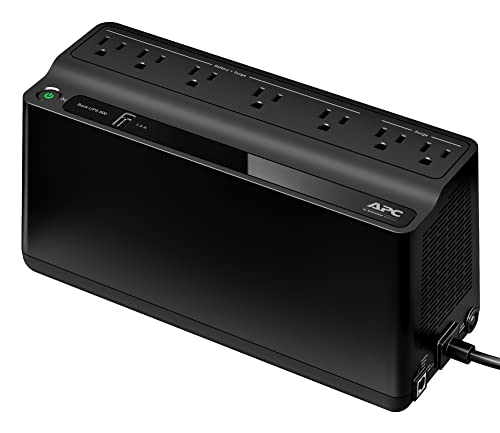
The APC BE600M1 is the entry-level Back-UPS for people whose main concern is keeping a router, modem, or modest desktop alive during short outages. At 600VA / 330W, it is not the right size for gaming rigs or workstations, but it absolutely covers the gear most households actually rely on every day.
Seven NEMA 5-15R outlets split the load between battery-backed and surge-only, which is useful when a printer or lamp needs protection but does not need to stay on during a power cut. The USB charging port on the front is a small touch that has saved my phone during a long outage more than once.
A Few Strong Suits
- Compact form fits behind furniture or on a small shelf.
- Mix of battery-backed and surge-only outlets for flexible setups.
- Front USB port for charging phones during outages.
- Accessible price point for first-time UPS shoppers.
Things To Consider
- 600VA capacity is too small for power-hungry desktops.
- Simulated sine wave output, so very sensitive PSUs may not pair well.
- Short runtime under heavier loads.
Perfect Match For
Apartment dwellers and remote workers who want to keep internet and a low-wattage PC running through short grid events.
Not Your Match When
Anyone running a full workstation should look at the APC BX1500M instead, which has the headroom for bigger loads.
The APC APCRBC123 is a genuine OEM replacement cartridge, the kind APC-branded parts that the manufacturer builds and tests for the UPS units it sells. It targets the SMT750RM2UC and BX1350M models in particular, and APC-branded cartridges are what most owners trust to restore original performance specs.
This is the pick for someone whose existing UPS still runs fine on the outside but has started chirping or showing a red battery indicator. A VRLA, or valve-regulated lead-acid, cell like this one is sealed, so it requires no watering or scheduled maintenance once installed.
A Few Highlights
- APC-branded cartridge, designed to restore original runtime specs.
- Sealed VRLA cell with no routine maintenance needed.
- Recyclable through standard battery return programs.
- Right-sized for SMT750RM2UC and BX1350M towers.
Less Ideal Details
- Useful only for matching APC UPS models.
- Premium pricing compared with third-party compatible cells.
Built With In Mind
APC owners who already trust the brand and want a like-for-like replacement rather than a third-party swap.
A Better Fit Elsewhere
Anyone on a tighter budget should consider the UPSBatteryCenter compatible cartridge earlier in the list for the BN4001 model, which costs less.
The CP1500PFCRM2U trades the tower footprint for a 2U rackmount chassis, which puts pure sine wave output into a form factor that fits standard server and AV racks. For small studios, network closets, or home server builds, that is a meaningful upgrade in tidy cable management.
The internal hardware matches the CP1500PFCLCD in spirit: AVR for minor voltage corrections, pure sine wave for sensitive gear, and EMI/RFI filtration to clean line noise. The rack ears make it a natural fit for security systems, network switches, and AV receivers that already live in a rack.
Bright Spots
- Pure sine wave output for active-PFC equipment in a rack form factor.
- 2U rackmount chassis integrates cleanly with existing rack hardware.
- EMI/RFI filtering reduces line noise on shared circuits.
- AVR handles routine voltage dips without burning battery cycles.
Worth Bearing In Mind
- Requires an actual rack or shelf rated for the weight.
- Costs more than tower equivalents with similar capacity.
Feature Rundown
Who Will Love This
Home server builders and AV rack owners who want sine wave output in a form factor that fits their existing setup.
Another Choice May Suit
Anyone without a rack should grab the tower-style APC BR1500MS2 for the same waveform in a friendlier footprint.
What To Weigh Before Choosing Battery Ups Battery
Capacity Matches Your Real Load
The first thing to figure out is how much wattage the UPS actually needs to support. A router and modem pull well under 100W combined, while a gaming PC plus monitor can easily cross 500W. Picking a UPS whose capacity comfortably exceeds your normal load means it does not run constantly at 90%, which extends battery life and runtime.
Most mid-range home setups sit in the 600VA to 1500VA range. Erring slightly above your load is the safer move, especially if you plan to add gear later. The trade-off shows up in size and price, but it pays off the first time a multi-hour outage hits.
Sine Wave Matters For Sensitive Gear
Pure sine wave output mirrors what the grid provides, while simulated sine wave is a stepped approximation that works fine for most basic electronics. Active PFC power supplies in modern desktops, however, can misbehave or shut down under simulated sine wave output.
Anyone running a workstation built in the last several years should look for a unit with pure sine wave output. The extra cost is real but usually worth it to avoid mysterious reboots during a battery event.
Runtime And Replacement Cycles
Runtime on a UPS depends on the load you actually plug in. A 1500VA unit might give a router setup an hour or more, while a heavy workstation might drain it in a handful of minutes. Manufacturers often quote runtime at half-load, which is worth keeping in mind when reading spec sheets.
Sealed lead-acid batteries in UPS units typically last three to five years before capacity drops noticeably. Choosing a model with widely available replacement cartridges, like the APC units on this list, makes future swaps easier than tossing the whole UPS.
Picking Up On Common Buyer Slip Ups
Traps First Timers Fall Into
The most common slip-up is sizing a UPS by outlet count instead of load. A unit with eight outlets does no good if its total wattage rating is too low for what gets plugged in. Always add up the watts on devices you actually plan to protect, then add a 20 to 25 percent buffer.
Another easy mistake is treating a surge protector as a battery backup. Surge-only outlets protect against spikes but drop offline the instant the grid does. Plugging a workstation into a surge-only outlet during setup means the UPS does nothing during a brownout, which is the whole reason to own one in the first place.
Where The Extra Money Goes
Stepping up from a 600VA standby unit to a 1500VA line-interactive unit usually means AVR, more outlets, longer runtime, and a real LCD readout. The upgrade payoff shows up in the second year of ownership, when the cheaper unit’s battery wears out faster because it lacks voltage regulation.
Moving further up to pure sine wave output adds compatibility with active PFC power supplies. Anyone running modern workstations or AV gear will find the smoother waveform is worth the higher sticker price, especially since it tends to extend the life of connected equipment.
Frequently Asked Questions
How long does a UPS battery actually last before it needs replacing?
Most sealed lead-acid UPS batteries last three to five years, depending on how often they cycle and how warm the unit runs. Frequent brownouts or high ambient temperatures shorten that window. Once a UPS starts chirping or the runtime suddenly drops, the battery is usually the culprit.
Can I plug any device into a battery backup outlet?
You can, but it is rarely a good idea. Laser printers, space heaters, and vacuum cleaners draw huge startup surges that can overload a UPS or trip its protection circuits. Reserve battery-backed outlets for computers, networking gear, and similar electronics.
What is AVR and do I need it?
AVR stands for Automatic Voltage Regulation, and it lets the UPS correct minor brownouts and overvoltages without switching to battery power. For most users in regions with even mildly unstable power, AVR means fewer battery cycles and longer service life. It is worth having on any unit you keep plugged in for years.
Why does sine wave output matter for some PCs?
Modern power supplies with active PFC expect a smooth sine wave input. A simulated or stepped sine wave can cause those supplies to misread the input, leading to unexpected shutdowns or stress on components. Pure sine wave output avoids that mismatch entirely.
Is a UPS worth it for just a router and modem?
Yes. Keeping internet alive during an outage lets a phone still work on Wi-Fi calling, and it preserves any active VPN sessions or smart home routines. A compact standby unit like the CyberPower EC850LCD handles that load easily and pays for itself the first time it kicks in.
Closing Remarks
Choosing the right battery UPS battery comes down to matching capacity, waveform, and form factor to the gear you actually need to keep running. For most home offices, a mid-range line-interactive unit covers daily life. For sensitive workstations or rack builds, stepping up to pure sine wave output is the move that pays off long term. Whichever pick fits, the day it quietly carries a load through an outage is the day it earns its shelf space.
