

A good battery bank turns a brownout from a stressful event into a non-event, keeping your router alive, your fridge cold, and your laptop charged through a long work call. I put together this list for homeowners who want dependable backup without getting lost in spec sheets or marketing buzz. Most folks don’t need kilowatts of capacity. They need the right capacity for their gear, the right outlets for their situation, and honest expectations about runtime.
A Fast Comparison Of The Options

EF ECOFLOW Delta 3 Portable Power Station, 1024Wh 1800W

CyberPower CP1500AVRLCD3 Intelligent LCD UPS

BLUETTI AC200L Portable Power Station 2048Wh 2400W
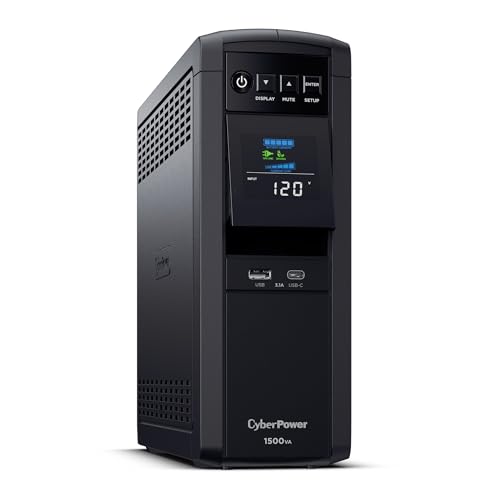
CyberPower CP1500PFCLCD PFC Sinewave UPS

CyberPower EC850LCD Ecologic UPS

CyberPower ST425 Standby UPS Battery Backup

CyberPower ST625U Standby UPS Battery Backup

CyberPower CP2000PFCRM2U PFC Sinewave UPS

CyberPower OR500LCDRM1U Smart App LCD UPS

CyberPower CP1500PFCRM2U PFC Sinewave UPS
The Strengths Of Each Pick
The EcoFlow Delta 3 stands out from the CyberPower units higher on the list because it’s a true portable power station, not an in-place UPS. A 1024Wh battery paired with 1800W continuous output means it can run a full-size refrigerator for several hours during an outage, which the CyberPower CP1500AVRLCD3 can’t realistically touch. For homeowners who want to keep a small fridge cold and a few devices charged at the same time, this is the step up.
The unit supports both AC wall charging and solar input, so it’s a solid match for anyone who might also take it camping or use it on a porch project. It weighs more than a traditional UPS, which is worth knowing if you plan to move it often.
Useful Highlights
- 1800W output handles demanding appliances that smaller UPS units cannot.
- 1024Wh capacity translates to roughly 8 to 12 hours on a typical home router setup.
- Solar-compatible for off-grid or extended outage situations.
- Portable design makes it useful beyond just home backup.
Things To Consider
- Heavier than a stationary UPS, so it isn’t ideal as a permanent plug-in-and-forget device.
- Larger physical footprint requires dedicated floor space.
- Battery replacement is more involved than swapping a UPS battery.
Key Specs
Who It Suits Best
Homeowners in storm-prone regions or anyone wanting whole-room backup instead of just device backup.
Consider Something Else When
Shoppers protecting only a desktop tower and modem should look at the CyberPower CP1500AVRLCD3 instead, since it’s lighter and purpose-built for that job.
The CyberPower CP1500AVRLCD3 sits in a different category than the EcoFlow above. It’s a line-interactive UPS, meaning it sits between your wall outlet and your gear, automatically correcting small voltage fluctuations without switching to battery. For a home office with a desktop computer, monitor, and cable modem, it gives you enough runtime to save work and shut down cleanly during a power cut.
The simulated sine wave output works fine for most standard electronics, though it may not be ideal for certain active PFC power supplies (those are high-end power supplies that require a cleaner signal). The LCD panel on the front makes it easy to check load and battery status at a glance.
Notable Upsides
- Automatic Voltage Regulation handles minor power dips without draining the battery.
- Front LCD display shows load level and battery status in real time.
- Enough outlets to cover a typical desktop-plus-accessories setup.
- Plug-and-play setup that works out of the box for most home users.
Worth Noting
- Simulated sine wave may not match the cleaner pure sine wave needed by some sensitive or high-end equipment.
- Battery is built-in and typically needs professional replacement after several years.
Made For
Remote workers with a desktop PC and a home network setup who need clean shutdown capability.
Not Your Match When
Anyone running active PFC workstation power supplies should consider the CyberPower CP1500PFCLCD for its pure sine wave output.
The BLUETTI AC200L goes a step beyond the EcoFlow Delta 3 covered earlier. It doubles the capacity to 2048Wh and pushes continuous output to 2400W, with a LiFePO4 battery chemistry that generally lasts longer than traditional lithium-ion in cycle count. For someone wanting multi-day partial home coverage, this is a serious contender.
It’s still a portable power station rather than a plug-in UPS, so the experience of using it differs from the CyberPower units. You carry it where you need it and plug devices directly into it rather than relying on wall passthrough.
Good Reasons To Consider
- 2048Wh capacity covers extended outages for essential devices.
- 2400W output handles power tools and kitchen appliances.
- LiFePO4 chemistry typically offers a longer cycle life than older lithium-ion designs.
- Expandable with additional battery packs for growing needs.
Trade Offs
- Bulky and heavy; not something you tuck under a desk.
- Higher upfront cost than smaller UPS alternatives.
- Requires manual setup and load management during extended use.
Key Specs
Best Suited To
Homeowners in regions with frequent multi-hour outages who want appliance backup rather than just electronics backup.
Look Elsewhere When
A household only needing a router and laptop to stay alive for an hour or two will find the CyberPower ST625U much easier to live with.
Where the CP1500AVRLCD3 uses simulated sine wave, this CP1500PFCLCD delivers true sine wave output. That’s an important distinction for anyone running an active PFC power supply, which is common in higher-end workstations and gaming PCs. Without clean sine wave, those systems can fail to switch over to battery, leaving you unprotected exactly when you need it most.
The mini-tower form factor keeps it close to the floor next to your desk or media center. It’s been on the market a long time, which usually means proven reliability and wide community support.
Practical Advantages
- Pure sine wave output compatible with active PFC power supplies.
- Color LCD panel gives a clear read on power conditions.
- Automatic Voltage Regulation handles brownouts smoothly.
- Proven track record over many years of home use.
Room For Improvement
- Costs more than simulated sine wave alternatives with similar capacity.
- Fan noise can be noticeable under heavier loads.
Right Fit For
Owners of high-end workstations, gaming PCs, or sensitive A/V equipment needing a clean power signal.
A Better Fit Elsewhere
A homeowner running only a router and cable modem will save money choosing the CyberPower EC850LCD instead.
The EC850LCD is a smaller, simpler unit than the CP1500 models above. It uses standby topology, which means it only kicks in when power actually drops, and includes an eco-mode feature that reduces wasted energy when your computer is off. For a modest home office, this is plenty of protection.
The LCD readout is small but functional. Where this unit shines is in its footprint; it fits where a mini-tower UPS would feel oversized.
Key Advantages
- Compact form fits under a desk or behind a media center.
- Eco-mode reduces idle energy use when devices are powered down.
- Simulated sine wave output is fine for standard desktops and networking gear.
- Lower cost than larger line-interactive units.
Small Caveats
- Smaller battery means shorter runtime under heavy loads.
- Standby topology doesn’t condition minor voltage dips the way AVR units do.
Feature Snapshot
Who Will Love This
Someone with a small home office running a basic PC and a few peripherals.
Skip It When
Power users with multiple monitors or a workstation drawing heavy wattage should step up to the CP1500AVRLCD3.
The ST425 is the entry point of the lineup. It’s a small standby UPS designed to keep your modem, router, and a phone alive long enough to ride out a brief outage or save what you’re doing on a laptop. It won’t power a desktop for long, and that’s by design.
Surge protection covers lightning strikes and other sudden power events, which alone justifies the modest price for many households.
Where It Delivers
- Affordable entry-level backup for low-draw devices.
- Compact size fits on a shelf or beside a router.
- Surge protection is genuinely useful for connected home gear.
- Simple setup with no software required.
A Few Limitations
- Limited runtime under any meaningful load.
- No LCD readout; status requires indicator lights only.
Perfect Match For
Apartment dwellers who just need their internet connection alive through short power blips.
Reach For A Different Pick When
Anyone trying to keep a desktop computer running through an outage needs more capacity than this offers, so the CyberPower EC850LCD is the better match.
The ST625U sits just above the ST425 in capacity, giving you a few extra minutes of runtime and a USB monitoring port so you can connect it to a computer for graceful shutdown software. For a household that just wants a little insurance for the modem and router, this is the kind of “set it and forget it” device that quietly does its job.
The simulated sine wave output is fine for networking gear and basic electronics. It’s not the right tool for a high-end desktop workstation.
Everyday Wins
- USB port enables automatic file-saving shutdown on connected computers.
- Plug-and-play design with no learning curve.
- Surge protection covers common household power events.
- Compact wall-friendly form factor.
Honest Caveats
- Still modest in capacity compared to AVR-equipped models.
Built With In Mind
Casual users new to UPS products who just want basic backup for internet equipment.
Swap It Out When
Anyone needing to back up a full desktop tower should look at the CyberPower CP1500AVRLCD3 further up the list.
The CP2000PFCRM2U shifts the conversation from home desks to server closets and home labs. It’s a rackmount unit at 2U height, designed to slide into a standard equipment rack. The 2000VA rating and pure sine wave delivery suit environments with active PFC power supplies running networking gear, security systems, or A/V equipment.
For most households, this is overkill. But for someone with a home rack running multiple devices, it consolidates backup into a clean, organized form factor.
Benefits That Matter
- 2000VA capacity covers multiple rack-mounted devices at once.
- Pure sine wave output protects sensitive networking and A/V hardware.
- Rackmount form factor keeps installations tidy and organized.
- EMI/RFI noise filtering reduces line interference.
Factors To Consider
- Rackmount design requires owning or installing an equipment rack.
- Higher cost than tower-style alternatives.
- Overkill for typical household needs.
Feature Card
Whose Shelf It Belongs On
Home lab enthusiasts and households with dedicated networking or A/V racks.
Another Choice May Suit
A household without a rack setup will find the CP1500PFCLCD tower unit a much better fit for the same protection.
The OR500LCDRM1U is the smallest rackmount unit in this lineup. At 1U height and 300W of output, it handles a handful of network devices in a small rack. The smart app connectivity lets you monitor the unit remotely, which is useful for someone managing their home network from a separate machine.
It’s not designed to back up a power-hungry setup, but for keeping a switch, modem, and a small server alive during brief outages, it does the job in a tidy form factor.
Advantages To Know
- 1U rackmount form factor saves vertical space in a rack.
- Smart app support allows remote status monitoring.
- Automatic Voltage Regulation handles minor dips smoothly.
- Six outlets cover multiple small rack devices.
Less Ideal Details
- Limited capacity means heavy loads drain it quickly.
- Rackmount only; not a fit for households without an existing rack.
Who Should Grab It
Network hobbyists with a 1U space available who need basic remote monitoring of their UPS.
Where A Sibling Pick Shines
Households wanting more capacity in the same rack footprint should consider the CP2000PFCRM2U further up the list.
The CP1500PFCRM2U rounds out the list as a compact rackmount option. It sits between the OR500 and the CP2000, offering pure sine wave output in a 2U form factor. For security systems and A/V installations, the rackmount design with sine wave protection hits a real sweet spot.
It’s the smallest rackmount unit on this list that still provides genuine active PFC compatibility. If your home rack mixes networking, security, and A/V gear, this one is worth a close read.
Practical Pluses
- 2U rackmount fits where taller units won’t.
- Pure sine wave output supports active PFC hardware.
- EMI/RFI filtering reduces noise on shared circuits.
- Automatic Voltage Regulation for smoother brownout handling.
Points To Keep In Mind
- Rackmount form factor requires dedicated rack space.
- Mid-tier capacity may run short for larger A/V racks.
Feature Card
The Right Fit
Households running home security or A/V racks that need compact, clean power backup.
Where A Sibling Pick Shines
Anyone needing more headroom for additional rack devices should look at the CP2000PFCRM2U instead.
What Matters Most When Picking A Home Battery Bank
Capacity Versus Your Actual Load
The first honest question is what you need to keep running. A modem and router draw under 30W combined, while a full refrigerator pulls around 100 to 200W running and spikes higher on startup. Don’t size for the lowest possible draw; size for what you’d actually miss. Oversizing wastes money and space. Undersizing leaves you frustrated when the lights come back and your gear died ten minutes earlier.
Sine Wave Output And Sensitive Electronics
Pure sine wave output mimics the clean signal your wall outlet delivers. Simulated sine wave, sometimes called stepped or modified sine wave, is a rougher approximation. Most basic electronics tolerate the simulated version fine, but active PFC power supplies in modern workstations and gaming rigs often do not. If you’re protecting that kind of gear, the pure sine wave units on this list are worth the extra cost.
Topology And How It Responds To Dips
Standby UPS units only kick in when power cuts out completely. Line-interactive units go further: they regulate small voltage fluctuations without draining the battery at all. For areas with frequent brownouts, a line-interactive or AVR-equipped unit generally saves battery cycles and extends service life.
Portability Versus Permanent Installation
The portable power stations on this list, the EcoFlow Delta 3 and the BLUETTI AC200L, double as gear you can grab and take to a job site or campsite. The CyberPower units are designed to live in one place and protect a fixed setup. Decide whether you want flexibility or a dedicated station.
Runtime Expectations
Manufacturer runtime estimates assume specific loads and fresh batteries. Real-world runtime shrinks as batteries age. For desktop and networking gear, expect roughly half the published number after a few years of use. Plan ahead for battery replacement rather than treating the unit as a forever device.
Key Considerations Across These Picks
Mistakes Worth Dodging
The most common trap is sizing for the battery capacity listed in watt-hours without thinking about peak surge draw. Appliances with motors, like refrigerators or space heaters, briefly pull several times their running wattage on startup. A unit with 1800W continuous output might still struggle with a high-surge device. Check both numbers before committing.
The second slip is ignoring outlet type and count. A UPS with six outlets sounds like plenty until you count your actual devices and remember each power brick can block two outlets. Some users end up adding a power strip, which can compromise the surge protection the UPS was meant to provide.
Where The Extra Money Goes
Higher-tier units on this list, like the CyberPower CP1500PFCLCD or the BLUETTI AC200L, charge more for genuine engineering improvements rather than just brand markup. Pure sine wave output costs more to build. LiFePO4 battery cells cost more per watt-hour than older lithium-ion but last several times longer in cycle count. AVR and EMI/RFI filtering add components. None of it is theoretical; each adds real protection or longevity for users who need it.
Frequently Asked Questions
How long do these battery banks typically last on a single charge?
Runtime varies with load. A modem and router on a small UPS can run for an hour or more, while a full desktop workstation will drain a mid-size unit in ten to twenty minutes. The portable power stations on this list stretch those numbers considerably for lighter loads.
Can I leave a battery bank plugged in all the time?
Most modern UPS units and portable stations are designed for continuous connection. They float-charge the battery and switch over automatically when needed. Just plan on a battery replacement every three to five years for typical UPS units.
What’s the difference between a UPS and a portable power station?
A UPS sits between your wall outlet and your gear, switching over instantly during an outage. A portable power station stores energy that you draw from manually, usually by plugging devices directly into it. UPS units are better for always-on protection; portable stations are better for flexibility and longer runtime.
Do I need pure sine wave output for my home setup?
Most household electronics run fine on simulated sine wave. Active PFC power supplies, which are common in higher-end workstations, gaming PCs, and some A/V gear, generally require pure sine wave to switch over cleanly during an outage.
How do I know what capacity I need?
Add up the wattage of the devices you want to protect. Multiply by the number of hours of coverage you want. That gives you a rough watt-hour target. Add at least 20 percent headroom for battery aging and conversion losses.
Bottom Line
The right battery bank depends entirely on what you need to keep running and for how long. Apartment dwellers protecting just a modem will find the small CyberPower units plenty. Remote workers with desktop workstations should look at the line-interactive or pure sine wave models in the middle of the list. Homeowners facing longer outages or heavier appliances will benefit most from the portable power stations toward the top. Pick the unit that matches your real-world scenario, and you’ll rarely think about it again until you need it.
