

Somewhere between the TV remote, the kid’s toy bin, and the flashlight in the kitchen drawer, batteries quietly run a household. Mine get chewed through faster than I’d like, which is exactly how I landed on the rabbit hole of alkaline battery chargers. These are smart little stations built to revive spent alkalines, top off NiMH cells, or quietly sort an entire collection into shape. If you’re tired of tossing half-used cells and want a tidier way to stay powered, the picks below are a great place to start.
A Fast Comparison Of The Options

Ostation 2 Pro AA AAA Rechargeable Battery Charging Station w/ 24 Batteries
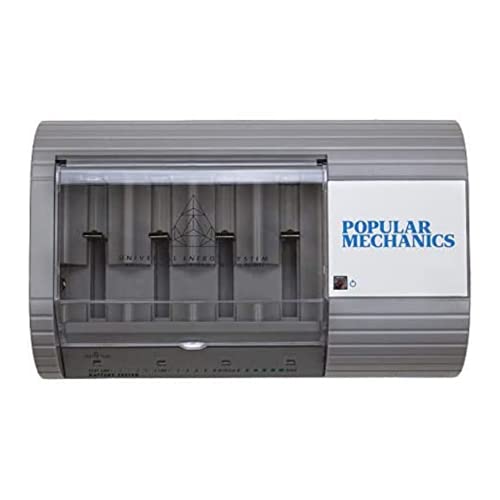
Popular Mechanics Battery Recharger for Alkaline & NiMH Batteries

MaximalPower Universal Battery Charger Station FC999

Shitanchao Universal Charger with 5 Independent Slots

Universal Rapid Battery Charger for Alkaline and NiMH Cells

1.5V Alkaline Battery Charger 4 Slot USB Powered
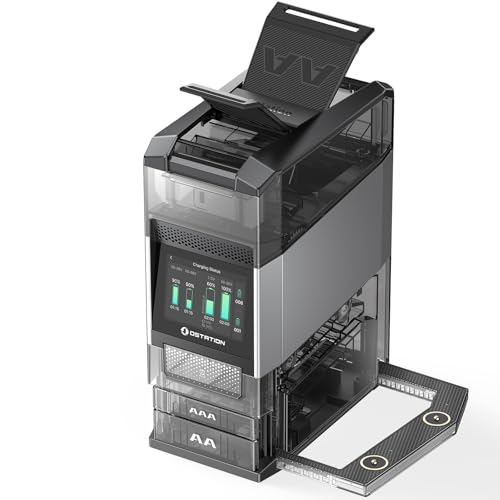
Ostation 2 Pro AA AAA Battery Charging Station NiMH and Lithium

Ostation 2 Smart AA AAA Charging Station 3-in-1
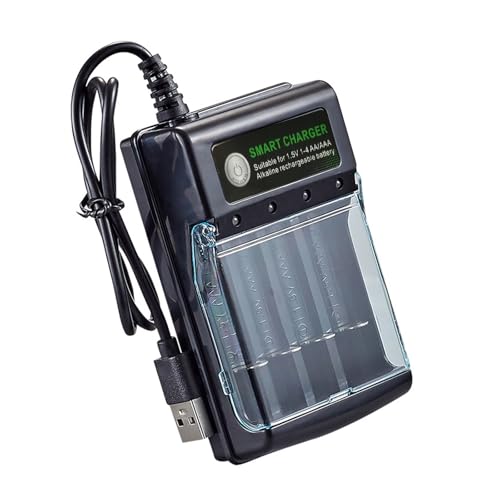
1.5V Alkaline Battery Charging Box 4 Slot Sliding Type

Tinyfish PPU9600 Universal Battery Charger
Meet The Standout Selections
If your household runs through AA and AAA cells the way mine does, the Ostation 2 Pro feels like a tidy little vault for the chaos. It bundles a charger, a tester, and an organizer for up to 24 batteries in one block, with smart sorting that decides what needs work without you hovering over it.
Thermal-adaptive charging and real-time monitoring quietly adjust to each cell, and dual MCC magnetic charging ports (a compact magnetic contact system) come in handy if you own Olight flashlights. Compared to the simple four-slot units coming up, this is more of a command center than a charger.
What Makes Sense
- Three functions in one device, removing the need to own a separate tester or organizer.
- Stores up to 24 batteries at once, keeping a working set always on hand.
- Thermal-adaptive charging helps protect cells from heat stress during long sessions.
- Real-time monitoring gives you a clear read on progress at a glance.
Things To Consider
- It runs on AA and AAA only, so C, D, and 9V batteries will need a separate station.
- The 24-cell capacity takes up more counter space than the smaller chargers.
Key Product Details
Best Suited To
Families with a steady stream of small electronics and mixed device demand, where keeping 20-plus AA and AAA cells organized actually matters.
A Better Fit Elsewhere
Gamers who want plug-and-play convenience for controllers may prefer the Ostation 2 Smart, which leans into the same idea with a friendlier interface for entertainment setups.
The Popular Mechanics unit is one of the few chargers that openly welcomes disposable-style alkalines, which sets it apart from the NiMH-only crowd. It accepts AAA, AA, C, D, N, and even 6V or 9V sizes, so you can attack a mixed drawer in one pass.
A built-in tester helps you weed out cells that are too far gone, and the compact shell feels right at home on a workbench. For someone juggling both rechargeable and standard cells, this is a quiet workhorse.
The Upside
- Supports alkaline, NiMH, and other rechargeable chemistries in one unit.
- Wide format support from AAA through 9V covers nearly every household cell.
- Built-in tester saves you from guessing which batteries are worth reviving.
- Compact footprint compared to the Ostation’s larger capacity.
Worth Noting
- Alkaline recharging tends to yield fewer cycles than NiMH, so don’t expect miracles.
- Charging times for larger D and 9V cells can run longer than smaller formats.
Right Fit For
Anyone with a deep mixed drawer of cells from years of gadget collecting, including older N and 6V batteries many modern chargers skip.
Where Another Pick Suits Better
If you mostly own AA and AAA rechargeables, the MaximalPower FC999 offers broader chemistry coverage with faster throughput for standard rechargeable sizes.
The MaximalPower FC999 leans hard into the universal brief, accepting alkaline, RAM (rechargeable alkaline manganese), NiMH, and NiCd chemistries across AA through 9V sizes. That chemistry list alone is wider than what most consumer chargers offer.
An 8-bit microprocessor with RISC architecture (a streamlined instruction set that helps the chip process battery data efficiently) handles real-time monitoring, which keeps each cell on its own optimized path. For a workshop shelf or a gear-heavy garage, this is a confident pick.
A Few Strong Suits
- Four different chemistries supported in a single charger.
- Seven size slots from AAA up through 9V cover nearly any cell you can name.
- Microprocessor-based monitoring adjusts charge per slot in real time.
- Solid build quality that feels ready for repeated workshop use.
Trade Offs
- Interface and documentation lean technical, which may overwhelm casual users.
- Larger footprint than the four-slot home chargers.
Technical Sheet
Who It Suits Best
Hobbyists and tinkerers with a deep bench of mixed cells, including older NiCd gear and odd chemistries that most modern chargers skip.
Consider Something Else When
Light-use households may find the Shitanchao charger easier to live with day to day, since it focuses on straightforward AA and AAA work.
The Shitanchao universal charger takes a more granular approach with five independent slots, each capable of running its own cycle. You can mix NiCd, NiMH, and alkaline cells without waiting for the slowest one to finish.
The built-in LCD shows progress in plain language, and automatic type detection handles the chemistry guesswork for you. Compared to the bulkier MaximalPower station above, this is a cleaner desk-side companion.
Where It Helps
- Five independent slots let you run mixed chemistries without bottlenecking.
- Automatic battery detection takes the guesswork out of charging modes.
- LCD screen gives a per-cell readout of charging status.
- Supports D, C, AA, AAA, and 9V formats in one body.
Minor Gripes
- Menu navigation takes some patience if you’ve never used a multi-mode charger.
Feature Snapshot
Who Should Grab It
Multi-device households where one person needs to charge a 9V smoke alarm battery while another tops off AA game controllers at the same time.
Look Elsewhere When
Smart-home enthusiasts who want a tidier charging hub might prefer the Ostation 2 Smart, which combines charging with storage in a more elegant housing.
This universal rapid charger aims straight at the heart of a typical family charging drawer. Four independent slots run NiMH, NiCd, and alkaline cells side by side, while an LCD display flags bad or non-rechargeable cells so you stop wasting time on duds.
The rapid charge function shortens the wait compared to basic overnight chargers, which matters when the game controller dies mid-session. For most homes, this is a balanced pick that doesn’t try to do too much.
Useful Highlights
- Independent slots let you run different sizes simultaneously.
- Bad-cell detection protects the charger from problematic batteries.
- LCD shows model and status clearly even across the room.
- Rapid charge mode reduces waiting time for AA and AAA cells.
Room For Improvement
- Plastic housing feels light, so you’ll want a stable spot out of reach of kids.
- Display brightness may be too high in dim bedrooms.
Perfect Match For
Families rotating through TV remotes, kids’ toys, and gaming controllers who want one station that handles almost everything.
Reach For A Different Pick When
Heavy users with dozens of cells in rotation may find the Ostation 2 Pro’s 24-cell capacity saves more time than four slots can.
This 4-slot USB charger focuses on the 1.5V alkaline rechargeable world, which is a different lane than the NiMH-first crowd. A USB-A cable pulls power from a laptop, power bank, or car charger, so you’re not hunting for a wall outlet on the road.
The ABS shell (a tough, lightweight plastic used in lots of consumer electronics) holds up to drops, and a clear cover keeps dust off the cells between trips. For travel kits and remote workstations, this earns its spot in the bag.
Positive Points
- USB power makes it genuinely portable and outlet-independent.
- Independent slots accept mixed AA and AAA sizes at once.
- Clear dust cover protects cells between uses.
- ABS shell shrugs off daily bumps and travel wear.
Points To Note
- Charging speed depends entirely on the USB source you plug into.
- Limited to AA and AAA, so larger batteries need a separate charger.
Built With In Mind
Frequent travelers and digital nomads who charge from a power bank in airports, cafes, or rental cars.
Skip It When
Home users with a deep pile of C, D, and 9V cells will want the broader MaximalPower FC999 instead.
Without the 24-cell starter pack, the Ostation 2 Pro keeps the same hands-free charging station design and points it at NiMH and 1.5V lithium rechargeables. Gamers cycling through controllers and headsets will appreciate never hunting for fresh AAs again.
Thermal-adaptive charging keeps cells cool even when you swap in cells of different ages back to back. Compare this to the USB-powered charger above, and the difference is more like a service counter than a travel kit.
The Case For It
- Polarity-free slots mean you can’t put a battery in the wrong way.
- Thermal-adaptive charging keeps cells from heating up during long sessions.
- Auto sorting tells you which cells are ready, charging, or retired.
Honest Caveats
- No bundled starter cells means you need to supply your own NiMH or lithium rechargeables.
- AA and AAA only, with no room for larger sizes.
Feature Rundown
Made For
Console and PC gamers burning through controller batteries who want the swap-and-go feeling without a pile of disposables.
Swap It Out When
Travelers should still consider the 1.5V Alkaline USB Charger since this station is tied to a wall outlet.
The Ostation 2 Smart is the more design-forward sibling of the Pro line. Polarity-free slots, auto detection, and a built-in organizer aim to make battery management feel less like a chore and more like another smart-home accessory.
Fast charging pairs with a storage bin that keeps the working set ready to grab. For smart-home owners with a dozen sensors and remotes scattered around, this is the tidiest option in the lineup.
Where It Delivers
- Polarity-free slots remove the most common charging mistake.
- Auto detection figures out battery type without manual selection.
- Integrated storage bin keeps charged cells from disappearing into junk drawers.
- Fast charging speeds up turnaround for high-drain remotes and sensors.
Softer Spots
- Designed around AA and AAA, so larger cells still need a different unit.
- Premium feel comes with a higher entry point than basic four-slot chargers.
Whose Shelf It Belongs On
Smart-home owners with motion sensors, doorbells, and other AA-powered gadgets spread across rooms.
Not Your Match When
Shoppers who need D and 9V support will want to keep the MaximalPower FC999 on the shortlist instead.
This charging box keeps things simple. Four slots handle 1.5V alkaline cells, LED indicators tell you when each one is topped off, and a sliding cover protects the bays from dust when the unit sits idle.
It’s the kind of charger you tuck in a drawer and forget about until the next remotes die. For light daily use, this earns its place without overcomplicating the routine.
Everyday Wins
- Compact footprint fits easily on a counter or inside a drawer.
- LED indicators give a clear at-a-glance charge status.
- Sliding cover keeps dust off cells between charges.
- Approachable price for households just starting to recycle alkalines.
A Few Limitations
- Limited to AA and AAA, so C, D, and 9V batteries need another charger.
- Four slots fill up fast in busy homes.
Who Will Love This
Anyone dipping a toe into alkaline recharging with a handful of remotes and small gadgets, no chemistry deep dive required.
Where A Sibling Pick Shines
Households with more cells in rotation will appreciate the larger Ostation 2 Pro capacity for less frequent swaps.
The Tinyfish PPU9600 rounds out the list with a real workshop flavor. It handles alkaline, NiCd, and NiMH cells across AA, AAA, C, D, and 9V sizes, with a discharge mode for NiCd batteries that helps restore full performance.
Five independent slots and a large screen give clear readouts, and the unit ships without cells so you bring your own. For a garage bench or a hobby corner, this is a flexible final pick.
What Earns Its Place
- Discharge function for NiCd helps reset memory effect.
- Five independent slots handle mixed sizes at once.
- Large display screen makes status easy to read across the bench.
- Wide size and chemistry coverage for garage use.
What To Weigh
- Batteries not included, so factor that into your setup.
- Discharge cycles add time compared to straight charge mode.
The Right Fit
Garage tinkerers and hobbyists with a stock of legacy NiCd cells, plus a family charger for everyday alkalines.
Where Another Pick Suits Better
Travelers should look back at the 1.5V Alkaline USB Charger, since this unit wants a wall outlet and a dedicated bench spot.
What To Weigh Before Choosing Alkaline Battery Chargers
Start with the battery sizes you actually cycle through, since chargers that cover AAA through 9V are useless if you only run AA cells. Match the format list to your drawer first, then layer on chemistry support like NiMH, NiCd, or alkaline rechargeables. If you mostly own modern rechargeables, an NiMH-focused unit will treat your cells better than an alkaline-first model.
Slot count and independence matter more than raw marketing numbers. A charger with four independent bays lets you mix sizes without bottlenecking the slowest cell, while an eight-pack unit that charges in pairs may feel restrictive. Households cycling through dozens of AAs at a time should prioritize total capacity to avoid daily babysitting.
Consider real-world use scenarios: a USB-powered unit thrives in travel bags, while a wall-bound station with a big display earns its spot on a workbench. Thermal-adaptive charging and bad-cell detection are worth prioritizing for safety and longevity, especially if you tend to forget what’s been on the charger.
Reader profile shapes the right pick. Beginners usually want plug-and-play simplicity, while hobbyists and gamers want capacity, monitoring, and fast turnaround. Parents juggling remotes and toy batteries need an organizer as much as a charger.
Key Considerations Across These Picks
Common Shopping Slip Ups
The most common trap in this category is buying a charger that looks universal but only handles NiMH cells, leaving your stash of alkalines stranded. Check the chemistry list before you commit, especially if you still keep disposable cells in rotation. Another mistake is ignoring slot independence: many budget units force two cells to charge as a pair, which slows down mixed loads and frustrates anyone juggling different sizes.
What The Higher Tier Buys
Stepping up to a premium station like the Ostation 2 Pro usually brings thermal-adaptive charging, auto sorting, and integrated storage. Those features save time and reduce wear on cells over the long haul, especially if you charge dozens of batteries per month. For most casual users, a mid-tier four-slot unit is plenty, but heavy households and gamers feel the upgrade payoff in convenience rather than raw charging speed.
Frequently Asked Questions
Can alkaline batteries really be recharged safely?
Modern alkaline-recharge chargers handle the chemistry gently, but rechargeable alkalines still wear out faster than NiMH. The trade-off is convenience: you revive cells you already own instead of buying new rechargeables.
Will these chargers work with any brand of NiMH batteries?
Most universal chargers accept any reputable NiMH AA or AAA, regardless of brand. Check the supported chemistry list before mixing brands, especially if you want auto-detection to handle it for you.
How long does a full charge usually take?
Typical AA or AAA NiMH cells take two to four hours on a standard charger, while alkaline recharge cycles run longer. Larger C and D cells often take several hours because of their higher capacity.
Are universal chargers safe to leave plugged in?
Most modern units include overcharge protection and bad-cell detection, so leaving them plugged in is generally fine. Still, unplugging during long absences is a small habit that reduces wear on the charger.
Can I charge different battery sizes at the same time?
Chargers with independent slots let you mix AA, AAA, C, D, and even 9V cells in the same session. Paired-slot units force identical sizes per bay, which slows down mixed loads.
Closing Remarks
The right charger turns a frustrating drawer of half-dead cells into a quietly managed supply. Match the format and chemistry list to your actual drawer, decide how many slots you really need, and pick the unit that fits your routine rather than chasing the longest feature list. With one of these stations on the counter, batteries stop being something you toss and start being something you actually use.
