

You have old tapes, a working VCR or camcorder, and a pile of family clips that deserve a safer format. A good VHS to digital converter helps you move those memories onto a computer, an SD card workflow, or a modern screen without turning the process into a weekend headache. Some picks are built for desk use, while others make more sense beside a TV in a living room or archive corner. The right match depends on how hands-on you want the capture process to feel.
Quick Look At The Shortlist

ClearClick Video to Digital Converter 3.0
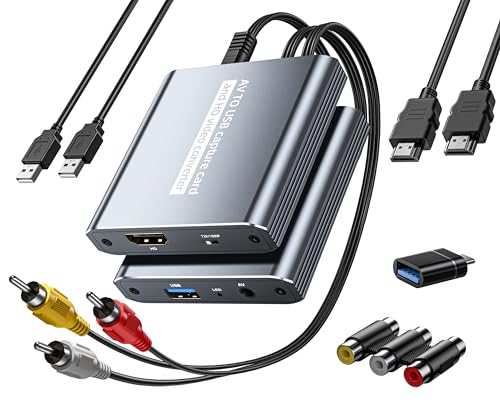
VHS to Digital Capture Card with HDMI Loop Out

ClearClick Video to Digital Converter 3.0 Bundle

VHS to Digital Converter 2.0 with Remote

Portta VD22P VHS to Digital Converter 5″ Screen

Oassuose VHS to Digital Converter USB-A/USB-C

Portta VD20P VHS to Digital Converter 5″ Screen

VHS to Digital Converter with 4″ HD Screen
More Details On Our Top Picks
ClearClick’s broad source support makes this one feel like the most forgiving starting point for mixed attic boxes. It handles VCRs, VHS, AV, RCA, Hi8, camcorders, DVDs, turntables, and cassette tapes, so you can work through different old formats without bouncing between devices.
The catch is simple, you still need a working playback machine and the right tapes or discs. That makes it a smarter fit for households that already have decent legacy gear and want a single converter to sit between the old source and your modern archive folder.
Strong Points
- Wide format support reduces the need for separate adapters.
- Handles both video and audio sources, which helps with mixed home archives.
- Feels well suited to families sorting decades of recordings in one pass.
- ClearClick’s long-form product line gives it a familiar, established feel.
Things To Consider
- You still need functioning playback equipment, so dead hardware stays a dead end.
- Working across many media types can slow setup a bit the first time.
- Best used as a conversion bridge, not as a replacement for your source deck.
Feature Snapshot
Who It Suits Best
Home archivists with a stack of mixed-format media will get the most from this one.
Where A Sibling Pick Shines
Fulfalic’s VHS to Digital Capture Card with HDMI Loop Out suits you better when you want PC-focused capture and live preview on a display.
Desk users usually notice the HDMI loop out first, because it lets you preview the source on a separate screen while the USB path feeds your computer. That setup suits a small edit corner, especially when you want a clearer look at old tapes before committing them to a file.
It also reaches past VHS and VCR gear into DVD, Hi8, PS2, and Wii use, so the unit makes sense in homes with a mixed stack of legacy devices. The trade-off is that it leans more toward a capture workstation than a grab-and-go box, which is fine for anyone comfortable sitting at a PC.
What We Like
- HDMI loop out supports live viewing on a separate display.
- USB capture keeps the workflow tied to a computer archive.
- Device compatibility reaches into several older console and video sources.
- 1080p and 30fps make the listed capture path feel current for archive work.
- Good fit for a desktop setup with room for cables and a monitor.
Room For Improvement
- Needs a more hands-on desktop setup than a self-contained screen unit.
- Cable management matters here, especially around a busy PC desk.
- Less appealing for someone who wants a simple stand-alone recorder.
Core Details
Made For
PC-centered hobbyists and home editors who want a monitored capture path will appreciate this setup.
Another Choice May Suit
Portta’s VD22P VHS to Digital Converter fits better for you when a built-in screen matters more than computer-based preview.
The bundle version keeps the same broad ClearClick format support, but the package angle matters for anyone starting from scratch. Compared with the single-unit ClearClick pick, this one is more about giving you a fuller setup path without changing the core job.
That makes it a sensible option for basement cleanup days, especially when you want to gather gear once and then work through tapes steadily. The honest read is that the bundle angle only pays off when you actually need the extra contents, not just the converter itself.
Positives
- Bundle format can reduce the need for separate accessory hunting.
- Retains the wide format support that helps with mixed archives.
- Good fit for a first archive setup with several kinds of legacy media.
- Feels practical for long, staged conversion projects at home.
Softer Spots
- Bundle value depends on whether you use the included extras.
- Still requires functioning source equipment and the right media.
- Not the leanest choice for someone who only wants a basic converter.
Details At A Glance
Best Suited To
First-time digitizers who want a fuller starting kit without changing to a different workflow will like this package.
Look Elsewhere When
Fulfalic’s VHS to Digital Capture Card suits you better when your priority is HDMI preview and a tighter desktop capture setup.
The remote changes the feel of this one, especially in a living room or media cabinet where reaching the front panel gets awkward. Compared with the PC-leaning Fulfalic card, DigitPro’s model suits a more self-contained capture routine.
Tapes players still need to be in place, so this is not a shortcut around old hardware. That said, households that want to pause, resume, and manage playback from a seat will find the remote a useful everyday comfort.
Upsides
- Remote control adds convenience during long capture sessions.
- Works well for room setups where the unit sits away from the chair.
- Supports a wide range of older video and gaming sources.
- Good fit for home use where simplicity matters more than desktop editing.
Areas To Watch
- Needs compatible source players, so the old deck still does the heavy lifting.
- Remote-focused use can feel unnecessary for a cramped desk.
- Best suited to people who like a more appliance-like setup.
Feature Rundown
The Right Fit
Home users who want an easy chairside capture routine will get the most from this model.
Swap It Out When
Portta’s VD22P VHS to Digital Converter is the better match when a built-in screen matters more than remote control.
The built-in 5-inch display gives this Portta a different personality from the previous two picks. You can monitor the source without tying yourself to a monitor or a second room, which helps in a den, storage room, or small archive shelf.
That screen can make day-to-day use feel more immediate, though it also means you’re carrying a larger unit than the USB card style. For most home setups, that’s a fair trade when you want fewer moving parts in the middle of a tape transfer.
Highlights
- Built-in 5-inch screen keeps preview and capture in one unit.
- Useful for rooms where a TV or computer monitor isn’t handy.
- Works as a self-contained option for simple tape transfers.
- Good choice for users who like direct on-device control.
Small Caveats
- The larger body takes more shelf space than the USB-style picks.
- Screen-first design can feel heavier for travel or packing away.
- Still depends on compatible source equipment for the original playback.
Spec Overview
Whose Shelf It Belongs On
Home archivists who want a display built into the same box will appreciate this design.
A Better Fit Elsewhere
Fulfalic’s VHS to Digital Capture Card suits you better if your workflow revolves around a PC and HDMI loop out.
This Oassuose pick trims the setup down to a small capture card, which makes sense for a laptop desk or a travel-friendly archive kit. Compared with the larger Portta units, it asks less of your shelf space and more of your computer workflow.
The USB-A and USB-C support matters because modern laptops often vary in port type. That flexibility helps, though the compact body also means you’re giving up the comfort of a built-in screen or a remote.
Best Bits
- USB-A and USB-C support widens compatibility with newer computers.
- Small form factor keeps the desk uncluttered.
- 1080p capture support gives it a clear archival use case.
- Works well for portable setups, spare rooms, or dorm desks.
Worth Noting
- No built-in screen, so you’ll depend on your computer for preview.
- Compact capture gear can be easier to misplace among other cables.
- Best for people already comfortable recording through a PC.
Feature Card
Built With In Mind
Laptop users and compact workspace setups will appreciate how little room this one asks for.
Where Shoppers Go Wrong
Portta’s VD22P VHS to Digital Converter is the better route when you want preview on the unit rather than on a computer.
Portta’s VD20P keeps the same screen-first appeal as the VD22P, but it reads like a straightforward home-use option rather than a feature-packed workstation. That makes it a comfortable fit for living rooms, spare bedrooms, or a family media shelf where the goal is steady, easy capture.
Compared with the Oassuose adapter, this one asks less of your computer setup and gives you more direct on-unit control. The trade-off is the same one you get with most screen-based units, a larger footprint that rewards you with simpler daily handling.
Bright Spots
- Built-in 5-inch screen keeps the process self-contained.
- Good for households that want a simple, visible workflow.
- Works well when the computer sits in another room.
- Comfortable fit for occasional digitizing sessions at home.
Points To Note
- Takes more space than a slim capture card.
- Screen size helps convenience, but it adds bulk.
- Still depends on working source players and tapes or discs.
Key Specs
Perfect Match For
You’ll like this most when you want an easy, screen-included setup for home tape transfers.
Reach For A Different Pick When
Fulfalic’s VHS to Digital Capture Card suits you better if a USB-centered desk workflow matters more than on-device viewing.
The 4-inch screen makes this Qonakism model feel a bit tighter and lighter in layout than the Portta 5-inch picks. That smaller display can be enough for a shelf setup, a bedroom corner, or a modest home office where space is the main constraint.
It still covers a long list of legacy gear, including VHS, VCR, DVR, DVD, Hi8, Mini DV, camcorders, and retro consoles. The honest read is that the smaller screen trades some viewing comfort for a more compact footprint, which makes sense for cramped spaces.
Reasons To Buy
- 4-inch HD screen keeps the unit compact and self-contained.
- Good match for small shelves and modest capture corners.
- Broad source support handles tapes and several older devices.
- Works well for users who want an on-device preview without a full workstation.
Minor Gripes
- Smaller screen gives you less room for on-unit viewing than the 5-inch Portta picks.
- The source list still depends on functioning playback hardware.
- Best suited to simple household transfers rather than elaborate editing setups.
Quick Facts
The Right Fit
Space-conscious households and small apartment setups will get the most from this compact screen design.
Not Your Match When
Portta’s VD22P VHS to Digital Converter is the smarter choice if you want a larger 5-inch display for easier on-device viewing.
How To Choose The Right Vhs To Digital Converter
Source Compatibility Comes First
Your old gear sets the limits, so the converter has to match the output from your VCR, camcorder, or console before anything else. RCA and AV are the common analog paths, while USB cards and screen-based recorders simply handle the handoff in different ways. Mixed tape collections usually benefit from the broader ClearClick options, while a desk setup can make better use of the Fulfalic card’s USB workflow.
Screen, Card, Or Remote?
Built-in screens make the process more direct because you can monitor playback without a separate display. USB capture cards lean toward a computer-centered archive, which suits you better when you want file management and PC editing in the same place. Remotes add comfort for couch-side use, especially with models like DigitPro’s VHS to Digital Converter 2.0.
Format And Workflow Fit
MP4 output matters because it gives you a common digital file that stores cleanly and moves easily between devices. A 1080p capture path also helps set expectations for detail, though your source tape quality still shapes the final result. Standalone screen units are usually more convenient for home transfers, while adapter-style devices stay lighter and more portable.
Think About Space And Handling
The larger Portta units make more sense on a shelf or media cart, while the Oassuose capture card disappears into a bag much more easily. A compact body helps in small apartments and dorm desks, but a built-in display often justifies the extra size. For occasional projects, convenience usually beats a clever-looking spec sheet.
What To Weigh Before You Choose
Wrong Turns To Avoid
A common mistake is buying a converter before checking the condition of the VCR or camcorder. Another is choosing a PC-only capture card and then realizing you wanted a screen beside the TV instead of a computer workflow. Matching the source equipment to the capture style saves more time than any feature line.
The Upgrade Payoff
Higher-tier models usually spend the extra money on better convenience, not magic. Built-in HD screens, HDMI loop out, and remote control all make long transfer sessions easier to live with, especially when you’re moving through boxes of tapes. That upgrade pays off most when you digitize often or want a setup that feels less fiddly day to day.
Frequently Asked Questions
Do You Need A Working VCR For These Converters?
Yes, most of these options still depend on a working playback device and usable tapes or discs. The converter handles the transfer path, not the source repair.
Which Type Is Easiest For A Beginner?
A screen-based recorder is usually the least fussy starting point. Portta’s VD22P or VD20P keeps preview and capture in one unit.
Is A USB Capture Card Better Than A Standalone Recorder?
A USB card works better for a computer-centered archive workflow. A standalone recorder suits you better when you want fewer cables and less desktop setup.
Why Does A Larger Screen Matter?
A larger screen makes preview easier during long sessions. It also adds size, so you trade compactness for comfort.
Can These Also Handle Other Retro Sources?
Several of these picks support Hi8, Mini DV, camcorders, DVDs, turntables, or older consoles. The best match depends on which source types you actually own.
Closing Thoughts
A VHS to digital converter works best when it matches your real setup, not just the longest feature list. If your shelves hold mixed formats, ClearClick is the easy place to start. If your priority is a screen on the unit, Portta makes the process simpler to live with. For a computer-first workflow, the Fulfalic card has the cleanest desk-friendly appeal. Choose the one that fits your room, your old gear, and the way you like to work.
