

A messy HDMI setup can leave you with sharp picture and thin audio, which is exactly where these converters earn their keep. You’re likely here because a soundbar, amp, headset, or older speaker system needs a cleaner path from HDMI, ARC, or eARC. The right match depends on your TV, your source device, and whether you need optical, coaxial, RCA, or 3.5 mm output. A good choice feels invisible once it’s in place, like the missing link finally showed up.
The Shortlist At A Glance
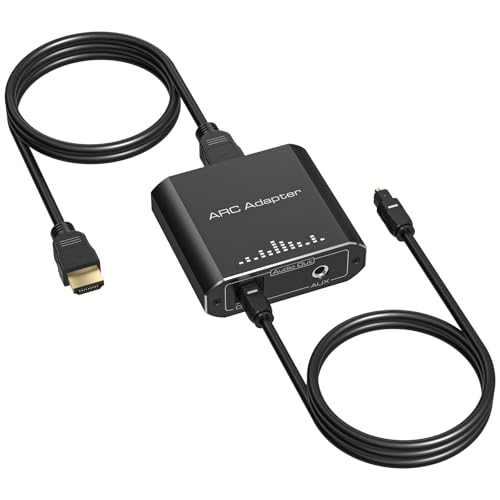
VPFET HDMI ARC Audio Extractor ARC to Optical RCA

VPFET HDMI Audio Extractor Splitter 4K 3.5mm RCA
HDMI Audio Extractor Splitter HDMI to 3.5mm Adapter

J-Tech Digital HDMI Audio Extractor 4K 60Hz ARC

OREI 18Gbps HDMI eARC Audio Extractor 4K 60Hz
VPFET HDMI eARC Audio Extractor ARC eARC Toslink Coaxial
More Details On Our Top Picks
ARC extraction keeps this VPFET unit focused on TV-to-audio-system jobs, and that focus helps. The listing points to optical, RCA, and 3.5 mm paths, so you can feed a soundbar, headphone amp, or older stereo without wrestling with a pile of adapters.
The no-CEC note matters because some home setups get fussy about remote control handoff, and this one avoids that layer. Compared with the more feature-heavy OREI and J-Tech options, this looks better suited to a straightforward living-room setup where clean routing matters more than format extras.
What We Like
- ARC-focused design keeps the signal path simple for TV audio extraction.
- Optical, RCA, and 3.5 mm outputs give you room to match older gear.
- 192 kHz support is a useful ceiling for common home audio connections.
- No-CEC behavior suits setups where remote control handshakes cause friction.
Areas To Watch
- It is built around ARC, so it is not the right fit for non-ARC source routing.
- Rear-panel cable management may feel crowded in tight TV cabinets.
- The broad compatibility story is narrower than the HDMI 4K pass-through style options.
Feature Snapshot
Who It Suits Best
TV owners with a soundbar, compact speaker setup, or headphone amp will get the most from this model.
Where A Sibling Pick Shines
J-Tech Digital JTECH-AE4KA suits you better for 4K 60 Hz living-room chains that need more signal headroom.
This VPFET splitter leans into simple stereo extraction, with HDMI in and HDMI plus analog audio out. That makes it handy for a family room where a console or streaming stick needs picture on one screen and audio sent separately to a receiver.
The 4K at 30 Hz ceiling is fine for plenty of media uses, but it is not the same conversation as J-Tech’s 4K 60 Hz model. You also need PCM output from the source, so this is a cleaner fit for gear you already know how to configure.
Highlights
- HDMI plus AUX and RCA output gives you flexible hookup options.
- Separate audio routing lets your display stay on while sound goes elsewhere.
- Support for 1080p and 3D keeps older home theater gear relevant.
- The included 3.5 mm to RCA cable helps with quick desk or media-room installs.
Worth Noting
- PCM audio output is required from the source, so setup matters.
- Its 4K2K@30Hz limit trails the 60 Hz class options for smoother high-refresh use.
- Some consoles may need resolution changes before the picture appears cleanly.
Core Details
Built With In Mind
Media-room owners who want a simple split between HDMI video and analog sound will get along with this one.
Look Elsewhere When
J-Tech Digital JTECH-AE4KA fits you better for newer 4K setups that need 60 Hz handling and ARC support.
Small form factor is the main story here, and that makes sense for travel kits, desk setups, or a spare adapter drawer. You get HDMI input with HDMI output and analog 3.5 mm audio extraction, so the box handles basic separation without taking much space.
Compared with the VPFET ARC model, this one is less about TV-specific return-audio workflows and more about general HDMI-to-headphone or speaker use. For a spare console bag or a compact PC corner, that narrower focus can actually be the smarter fit.
Best Bits
- Very small footprint makes it easy to pack or hide behind a monitor.
- Plug-and-play behavior keeps setup simple in temporary installs.
- Includes a USB cable for low-power source scenarios.
- Works across TV, PC, and gaming gear, which helps in mixed-use spaces.
Small Caveats
- Some low-power HDMI ports need extra USB power for stable operation.
- It is not built around ARC or eARC television return-audio use.
- The 4K at 30 Hz ceiling is fine for many setups, but not for higher-refresh needs.
Quick Facts
Whose Shelf It Belongs On
Gamers, PC tinkerers, and travelers who want a small, plain adapter will appreciate this one most.
Swap It Out When
VPFET B0GSXSS33F is the better fit for TV ARC audio and broader output choices at home.
Once you move into 4K 60 Hz territory, the conversation changes a bit, and this J-Tech unit speaks that language more comfortably. ARC support plus HDMI to RCA and optical output gives it a broader job description than the simpler VPFET ARC model, especially in a living room with newer sources.
The Dolby Digital and DTS compatibility notes matter for home theater chains where your receiver expects those common surround formats. For a laptop dock, Blu-ray deck, or game console setup, that extra signal flexibility helps keep the audio path from feeling boxed in.
Upsides
- 4K 60 Hz support suits newer displays better than 30 Hz-only options.
- ARC support broadens the ways your TV can feed sound outward.
- Optical and RCA outputs cover both modern and legacy audio gear.
- Compatibility with Dolby Digital and DTS helps in home theater setups.
- Useful for several source types, including laptops and consoles.
Things To Consider
- The higher feature set can feel like more than you need for a basic TV-to-soundbar link.
- More output paths usually mean more cable planning behind the cabinet.
- Gear with simple stereo needs may not use its full feature spread.
Details At A Glance
Perfect Match For
Home theater users with newer TVs and mixed audio gear will get the most from this model.
A Better Fit Elsewhere
OREI B0DZY35PRC suits you better for a more format-heavy chain that leans into premium audio support.
OREI sits at the premium end of this group, and the spec list makes that clear. You get 18 Gbps bandwidth, HDCP 2.2, HDR10, Dolby Vision, Dolby Atmos, DTS:X, eARC, ARC, and CEC, so this is for a system where the audio chain is only one part of a bigger 4K setup.
That breadth is useful in a home theater with newer sources and a display that passes complex formats without drama. The trade-off is simple, more capability means more setup awareness, so this is easier to appreciate in a deliberate install than in a quick living-room swap.
Reasons To Buy
- 18 Gbps bandwidth supports demanding 4K video paths.
- eARC and ARC compatibility gives you flexibility with newer and older TV audio routing.
- HDR10 and Dolby Vision support help preserve modern picture formats.
- Dolby Atmos and DTS:X support make it appealing for fuller home theater chains.
- CEC support can simplify control flow in integrated systems.
Points To Note
- The larger feature list makes it better suited to a planned setup than a casual plug-in.
- Some simpler speaker systems will not need the premium format support.
- Cable and device matching matter more here because the chain is more advanced.
Technical Sheet
The Right Fit
Home theater owners building a serious 4K system will appreciate the extra format support most.
Reach For A Different Pick When
J-Tech Digital B0DRZ3GY2Q is the simpler match for a living room that needs strong basics without the premium stack.
This VPFET version is more about flexible digital output than fancy video extras, and that makes it a tidy fit for a soundbar or home-theater upgrade. The Toslink and coaxial ports give you two common digital routes, which is useful when the rest of the system already has its own habits.
Compared with the ARC-only VPFET at the top of the list, this one is a better match for more involved TV audio chains. The no-CEC note keeps the behavior straightforward, though you still want to confirm your TV’s ARC or eARC menu settings before you settle it into place.
Bright Spots
- ARC and eARC support broadens compatibility with newer television audio paths.
- Toslink and coaxial outputs make it easier to match existing receivers and sound systems.
- 192 kHz support gives the digital path useful headroom for common audio jobs.
- Simple format focus helps the unit stay manageable in a daily-use setup.
Honest Caveats
- No CEC means it will not help with control handoff between devices.
- Digital-output focus is great for some systems, less useful for analog-only gear.
- TV settings still matter, so the installation can take a little menu work.
Core Details
Who Should Grab It
TV owners linking to a receiver or soundbar with digital inputs will make the most of this model.
Another Choice May Suit
VPFET B0GSXSS33F suits you better for a more analog-friendly setup with RCA and 3.5 mm paths.
How To Choose The Right Hdmi Audio Extractor Converters
Match The Audio Path To Your Gear
The first question is not video quality, it’s where the sound needs to go. ARC and eARC models pull audio back from a TV, while splitters and adapters that take HDMI in and send out analog or digital audio work better for consoles, streamers, and older receivers.
Connector type matters just as much. Optical suits many soundbars, coaxial helps certain receivers, RCA still makes sense for older stereo gear, and 3.5 mm is handy for compact speakers or headphone amps.
Check The Video Chain Before You Commit
A 4K label does not tell the whole story. Some models handle 4K at 30 Hz, while others reach 4K at 60 Hz, and that difference matters more for smooth menus, newer consoles, and living-room setups where the display is doing more work.
You also want to match the source output format. One unit in this list needs PCM, and that detail can make or break the handoff from a streaming stick or console.
Choose For The Room You Actually Use
A bedroom TV, a media cabinet, and a travel kit all ask different things from the same category. Small adapters work well behind a monitor or in a bag, while premium extractors make more sense in a permanent theater rack where cable routing and format support matter.
Think about control behavior too. Models with CEC can simplify the day-to-day routine, but a no-CEC unit can be easier to live with in setups where automatic handshakes cause confusion.
Pay For Complexity Only When You Need It
Basic extractors usually fit the shopper who wants sound routed cleanly with minimal setup. Higher-tier models add broader format support, stronger video handling, and better compatibility with modern home theater stacks, and that can save hassle in a fully built system.
That extra cost is easiest to justify for newer TVs, multi-device theaters, and homes where you do not want to revisit the wiring every few months. For a simple soundbar link, the middle of the list often makes more sense.
What To Weigh Before You Click Amazon
Common Shopping Slip Ups
A lot of mismatches start with the wrong audio path, not the wrong brand. ARC-only units belong on ARC-capable TVs, while HDMI splitters and converters suit source devices that need audio pulled off the HDMI line.
Another common miss is ignoring source settings. PCM, resolution limits, and low-power HDMI ports can all affect whether the adapter behaves cleanly in your setup.
The Upgrade Payoff
Higher-tier models usually cost more because they handle more formats at once. You’re paying for broader video support, better copy-protection compatibility, and audio handling that works across more rooms and more devices.
That extra spend makes sense in a home theater, a newer 4K setup, or a cabinet full of mixed gear. For a simple TV-to-soundbar bridge, the premium features may stay unused.
Frequently Asked Questions
What does an HDMI audio extractor do?
It pulls sound from an HDMI signal so you can send it to speakers, soundbars, or receivers. The video keeps going to the display while the audio takes a separate route.
Do you need ARC or eARC for every setup?
No, only TV-return-audio setups depend on ARC or eARC. Source-device splitters and converters can work without either one.
Why do some models need PCM output?
PCM is a common uncompressed audio format that some extractors handle more cleanly than encoded surround formats. If the source menu offers PCM, it often makes setup easier.
Is 4K 60 Hz better than 4K 30 Hz?
Yes, 4K 60 Hz gives smoother motion and a better fit for newer displays and consoles. 4K 30 Hz still works for many media tasks, though.
Should you choose optical, coaxial, RCA, or 3.5 mm?
Choose the connector your sound system already accepts. Optical and coaxial suit digital gear, while RCA and 3.5 mm fit many older or compact analog setups.
Closing Thoughts
The right HDMI audio extractor depends less on buzzwords and more on the rest of your system. A simple ARC model can tidy up a living room, a compact splitter suits a desk or travel kit, and a premium eARC unit makes sense only when your display and sound gear can use the extra headroom. Once you match the input, output, and audio format to your own room, the choice gets a lot easier. A clean setup usually feels quieter in the best way, because it just works.
