

Older TVs still have a place in plenty of homes, from spare bedrooms to workshop corners, and a solid digital converter box can keep them useful without a full replacement. You’re usually looking for a mix of channel reception, recording support, and the right outputs for your set, which is where the details start to matter. The eight picks below focus on practical setups, from simple over-the-air use to boxes with media playback and cable channel support.
Quick Look At The Shortlist

OWERSLYN 1080P ATSC Tuner Box
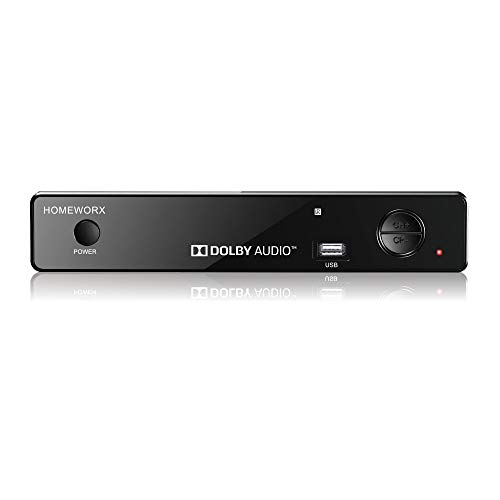
Mediasonic HomeWorx ATSC Converter Box HW-150PVR-Y22

QFX CV-103 Digital Converter Box

Mediasonic HomeWorx HW250STB

iView 3300STB ATSC Converter Box

Magnavox DTV Digital to Analog Converter

ZJBOX 1080P ATSC TV Tuner Box

IVIEW-3500STB III ATSC Digital Converter Box
More Details On Our Top Picks
The OWERSLYN box feels built for a TV you still want to keep doing real work. HDMI and AV support make it easier to match newer and older sets, while the 3RCA cables help with legacy gear in bedrooms, garages, or guest rooms.
Recording and playback add everyday usefulness, especially for anyone who wants to pause a program or revisit a show later. The USB media player is handy for photos and videos, though the trade-off is that you’re dealing with a more layered setup than a bare-bones converter.
Strengths Worth Calling Out
- HDMI and AV output give you more placement options across newer and older televisions.
- Recording and playback suit anyone who keeps odd hours or misses live broadcasts.
- USB media support turns the box into a small home media hub.
- The included 3RCA cables reduce the need for a separate accessory hunt.
Things To Consider
- Extra functions mean a busier remote and menu flow than a plain tuner box.
- You’ll want a tidy place for the cables, since the setup can spread out behind a TV.
Feature Rundown
Who It Suits Best
You benefit most here if your TV corner mixes old and newer hardware, and you want recording plus media playback in one box.
Where A Sibling Pick Shines
Choose the QFX CV-103 if you want a simpler setup with fewer extras and a more straightforward path for a basic living-room refresh.
This HomeWorx model leans practical, especially for a cable household that still wants over-the-air backup. Clear QAM means it can work with unscrambled cable channels, and that gives it a wider job description than a plain antenna box.
The newer material update, stronger reception sensitivity, and more stable recording are the kind of changes that matter in everyday use, not just on paper. The 12-hour clock format is a small but useful touch for anyone who checks recordings often, though the interface still asks you to spend a little time learning it.
What We Like
- Clear QAM support broadens use with compatible cable service.
- Recording stability is a meaningful plus for households that schedule shows often.
- Improved reception sensitivity can help in rooms where signal strength varies.
- The 12-hour AM and PM display is easier to read at a glance.
Room For Improvement
- The feature set asks for a little setup patience before things feel natural.
- The best results depend on how cleanly your cable or antenna signal reaches the box.
- Menus and remote handling may feel busy compared with the QFX CV-103.
Core Details
Who Will Love This
You’re the right fit for this one if you want a converter that can handle antenna use and compatible cable channels without feeling bare bones.
A Better Fit Elsewhere
The OWERSLYN 1080P ATSC Tuner Box suits you better if HDMI and AV flexibility matter more than Clear QAM support.
The QFX CV-103 keeps the idea simple, which is helpful for someone bringing an older television back into service. RF input for the antenna, RF output, HD output, and video output give you several connection paths, so the box can sit between a lot of different TV setups.
It also ships with the power adapter, A/V cable, remote, UL adapter, and manual, so the basics are covered without much hunting around. The sleep timer is a small comfort feature, and the honest read is that this pick makes the most sense when you want straightforward function more than modern extras.
Positives
- Multiple outputs make it easy to match older and newer displays.
- The included accessories help reduce setup friction for a first install.
- USB recording adds a useful layer beyond plain channel viewing.
- The sleep timer fits a living room or spare-room setup nicely.
Areas To Watch
- The feature list is narrower than the OWERSLYN and Mediasonic HomeWorx picks.
- You may want to keep the manual handy during first setup.
Details At A Glance
Right Fit For
You’ll like this most if your goal is a simple converter for a legacy TV and you want the included cables to do a lot of the work.
Skip It When
The iView 3300STB is a better fit for households that want a built-in clock and QAM support alongside recording.
The HW250STB feels like the tidiest member of this group, thanks in part to its metal case and 1080P HDMI output. That combination tends to suit a main-room TV better than a bargain box tucked into a corner, especially when you want the setup to look a little more finished.
Clear QAM, TV recording, and USB multimedia support keep it versatile without making it feel overstuffed. Compared with the QFX CV-103, it leans more polished; compared with the OWERSLYN box, it looks a bit cleaner but gives you a slightly more focused feature set.
Bright Spots
- Metal housing adds a sturdier feel for a visible entertainment setup.
- 1080P HDMI output fits newer televisions and monitors neatly.
- Clear QAM support helps with unscrambled cable channels.
- USB multimedia and recording make it more useful day to day.
Small Caveats
- Metal cases can show fingerprints more readily than matte plastic finishes.
- The polished feature mix may be more than you need for a simple spare-room TV.
Spec Overview
Made For
You fit this pick well if you want a converter for a living room or den where finish quality matters alongside features.
A Better Fit Elsewhere
The Magnavox DTV Digital to Analog Converter is the cleaner choice for someone who only wants basic conversion without extra playback features.
The iView 3300STB brings a few homely touches that make daily use easier, especially the built-in digital clock. That sounds small, yet it matters in a family room or bedroom where the box gets checked often, and the QAM tuner gives you a little extra channel flexibility.
Recording and media playback keep it useful beyond live TV, so you’re not locked into one job. Compared with the QFX CV-103, this one feels a bit fuller without getting as busy as the OWERSLYN box.
Highlights
- The built-in clock makes it easier to keep track of scheduled viewing.
- Recording and media playback support give it broader everyday use.
- QAM tuning adds value in homes with compatible cable channels.
- It suits a shared TV better than a bare minimum converter.
Points To Note
- The added functions mean you’ll spend a little time learning the remote flow.
- It’s more featureful than a plain converter, so minimalists may not need everything here.
Feature Snapshot
Whose Shelf It Belongs On
This suits you best if the TV gets used for a mix of live viewing, recordings, and casual media playback.
Another Choice May Suit
The Mediasonic HomeWorx HW250STB is the better match for you if a metal case and cleaner styling matter more than the clock feature.
The Magnavox converter keeps things stripped down, which is exactly what some older TVs need. It’s the kind of box you choose when the goal is simple digital-to-analog conversion and you don’t want extra menu layers getting in the way.
That simplicity is the upside, and also the trade-off, because there’s less here for recording or media handling. For a guest room, workshop, or secondary set, though, that lean approach can feel refreshingly easy.
Upsides
- Simple conversion keeps the setup process straightforward.
- The minimal feature set can be easier to live with on a spare TV.
- Good fit for anyone who only needs the core job done.
Softer Spots
- You don’t get the richer playback and recording tools found on the OWERSLYN or iView boxes.
- It’s not the most flexible choice for mixed HDMI and AV setups.
Core Details
The Right Fit
You’re the best match for this model if you want plain conversion for a secondary TV and value easy ownership over extra features.
Where A Sibling Pick Shines
The IVIEW-3500STB III suits you better if you want recording, media playback, and a learning remote in the same setup.
The ZJBOX unit is the neat-freak option in this group, with a layout that suits a TV mounted close to the wall or a cabinet with little spare space. HDMI output and the included 3RCA cables help it flex between newer and older displays, while the hidden-behind-TV idea keeps the front of the setup cleaner.
Power adapter support, 2-in-1 remote control, recording and playback, plus USB media player functions make it more than just a hiding-place box. The trade-off is that tucked-away gear can be a little fussier to reach later, so placement matters more here than with the open-shelf picks.
Best Bits
- The behind-TV layout keeps visible clutter down.
- HDMI and 3RCA connections help with mixed hardware.
- Recording and playback make it practical for everyday TV use.
- USB media playback adds another useful layer.
Honest Caveats
- Hidden placement can make cable access less convenient later.
- You’ll want to plan the mounting or shelf position before you settle the setup.
Technical Sheet
Best Suited To
You’ll appreciate this most in a tighter room where keeping the box behind the TV matters as much as the channel support.
Look Elsewhere When
The QFX CV-103 is the easier match for you if you want a straightforward box with less emphasis on hidden placement.
The IVIEW-3500STB III lands in a very usable middle ground, especially for homes that need a little of everything without going deep on any one feature. Recording, media playback, QAM tuning, HDMI, A/V, USB, and Channel 3/4 output give it a broad set of jobs, so it can sit comfortably in a mixed AV setup.
The learning remote is useful for families, since it can make day-to-day control feel less scattered once it’s programmed. Compared with the Magnavox box, this one is much more flexible, and compared with the OWERSLYN pick, it feels a touch more traditional in how it handles the whole TV stack.
Reasons To Buy
- Recording and media playback give you more than live TV access.
- QAM tuning and ATSC support widen its use in certain homes.
- HDMI, A/V, USB, and Channel 3/4 output cover several setup styles.
- The learning remote is handy in a family room with shared use.
Minor Gripes
- The broad feature set may take longer to sort out than a simple converter.
- More connection options can mean a slightly busier cable bundle.
Quick Facts
Who Should Grab It
You’re a strong match for this box if your setup mixes older and newer devices and you want one converter that can sit in the middle of that system.
Reach For A Different Pick When
The Magnavox DTV Digital to Analog Converter suits you better if you only need basic conversion and want fewer features to learn.
How To Choose The Right Digital Converter Boxes
Match The Box To The Way You Watch
Start with your TV and your signal source, because that decides most of the fit. An ATSC tuner handles local over-the-air broadcasts, while a Clear QAM model can also work with unscrambled cable channels in some homes. Older sets that only need digital-to-analog conversion usually do fine with a simpler unit like the Magnavox.
Recording matters more than many shoppers expect. In a family room, a recording feature helps you catch a show after dinner or keep pace with a shift schedule, and USB playback can make the box feel more useful than a plain tuner.
Check The Connections Before You Commit
HDMI suits newer TVs and usually makes the cleanest connection, while A/V and 3RCA help with older sets and spare-room gear. A box like the OWERSLYN gives you a wider path across mixed hardware, and the ZJBOX hides that flexibility behind the television for a tidier look.
Placement matters too. A behind-TV setup saves visible space, but it can make cable access less convenient later, so tight cabinets and wall mounts need a little planning.
Think About Ease Of Use, Not Just Features
Remote design, menu flow, and clock display affect everyday ownership more than many spec sheets admit. The iView 3300STB’s built-in clock and the IVIEW-3500STB III’s learning remote are good examples of small details that help in real homes.
More features can be helpful, but they also add setup time. For a guest room or workshop TV, a simpler box often feels calmer to live with.
Things Worth Knowing First
Mistakes Worth Dodging
Don’t choose a box only because it has recording. The wrong connection mix or the wrong signal type can leave you with extra functions you never use.
Also, avoid squeezing a hidden converter into a spot with no access. You still need to reach the ports, the remote sensor, and the power lead with some ease.
The Upgrade Payoff
Higher-tier models usually cost more because they add recording tools, broader outputs, better-case materials, or more flexible channel support. That extra hardware can make daily use smoother in a main room where the box stays in sight.
The upgrade makes sense for households that move between antenna, cable, and multiple TVs. For a spare television, a leaner box is often the better call.
Frequently Asked Questions
What does a digital converter box do for an older TV?
It translates digital broadcast signals so an older television can still display channels. Some models also add recording, playback, or cable-channel support.
Do all converter boxes work with cable channels?
No, only models that include Clear QAM can handle unscrambled cable channels. Standard ATSC boxes are mainly for over-the-air broadcasts.
Is HDMI necessary on a converter box?
No, but HDMI is helpful for newer TVs because it keeps the connection simple. A/V or RCA connections still matter for older sets.
Why do some boxes include USB playback?
USB playback lets you use the box with stored media files, not just live TV. That can be handy in a family room or on a second set.
What should you check before setting one up?
Check the TV’s input ports and the kind of signal you plan to use. You’ll save time by matching the box to your TV and antenna or cable setup first.
Closing Thoughts
The right digital converter box depends less on flashy extras and more on how your TV space actually works. A simple Magnavox suits a spare set, the QFX CV-103 gives you broad basics, and the OWERSLYN or IVIEW picks make sense when you want recording and more connection options. For a main-room setup, the Mediasonic HomeWorx models bring a nice balance of features and finish. Choose the box that matches your signal, your ports, and your patience for setup, and you’ll end up with a much more useful television corner.
