

A reliable power distribution unit quietly anchors every well-built rack. I put this roundup together for home-lab tinkerers, small-office IT folks, and anyone tired of juggling wall adapters behind a server shelf. Whether you’re mounting a compact enclosure or planning a full relay cabinet, the right PDU (power distribution unit, the strip that feeds every device in the rack) keeps your gear protected and your cables manageable.
Your Options, Compared
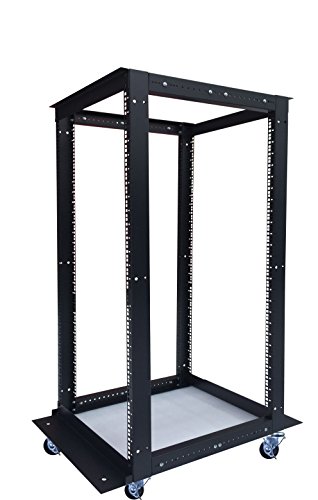
Sysracks 18U 4 Post Open Frame 19″ Network Server Rack

StarTech.com 6U 12 in Wall Mount Bracket & 8 Outlet Power Strip

BTU 2PCS Power Strip Surge Protector Rack-Mount PDU

9U Wall Mount Server Rack Cabinet 24″ Deep with PDU & Fan

6U Wall Mount Server Rack Cabinet 24″ Deep with PDU & Fan
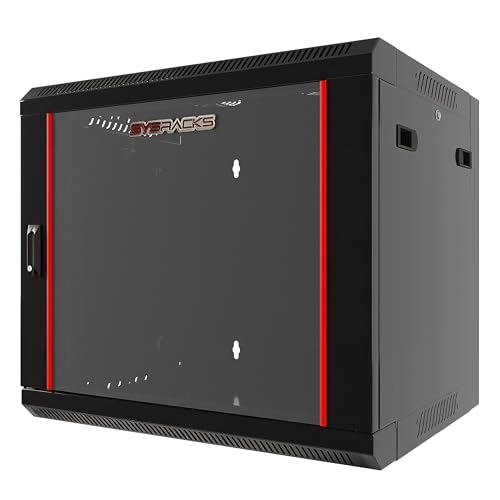
9U Wall Mount Home Lab Server Rack 18″ Deep Locking

Rack Mount Power Strip 240V 30A PDU with Surge Protector

12U Wall Mount Server Rack Cabinet 24″ Deep with PDU & Fan
22U Wall Mount Server Rack Cabinet 24″ Deep with 2 Shelves
A Breakdown Of The Leading Choices
An open-frame relay rack sits at the foundation of many serious IT closets, and this 18U (rack unit, equal to 1.75 inches of vertical mounting space) Sysracks model gives you the breathing room to grow. The four-post design supports gear that mounts from the front and back rails, which matters once you add deeper switches or UPS units.
Compared with the enclosed wall-mount cabinets later in this list, this rack trades a lockable door for full access from every angle. That makes cable routing and component swaps faster, and it tends to suit hobbyists who treat the rack like workbench furniture rather than secured storage.
Well-Handled Touches
- Adjustable depth from 24″ to 37″ fits shallow patch panels and bulky servers in the same chassis.
- Heavy-duty casters with brake option let you roll the rack out for service, then lock it down.
- Included cage nuts and mounting hardware save a separate trip to the hardware store.
- Open frame means heat dissipates faster than enclosed cabinets, helpful for always-on gear.
Things To Consider
- No included PDU, so you’ll need to budget for a separate rack-mount strip.
- Open frame offers no dust or tamper protection for the equipment inside.
Who It Suits Best
Tinkerers and IT pros running relay-style setups in a garage, basement, or dedicated server closet who value airflow and easy access over locking doors.
Where Another Pick Suits Better
The Sysracks 9U Wall Mount Cabinet with PDU fits better when floor space is tight and you need an enclosed, locking enclosure.
StarTech bundles a 6U wall-mount bracket with an 8-outlet rack-mount PDU in one box, which removes two trips from your shopping list. The bracket is the open-frame 2-post style, so you get quick access to gear but limited support for very deep equipment.
Where the earlier Sysracks open frame rolls on the floor, this one anchors to the wall and gets your gear off the ground entirely. For a small apartment network closet, that footprint savings is often the real reason to pick it.
Features That Help
- 8 NEMA 5-15 outlets (the standard 3-prong household plug) handle a typical mix of switches, modems, and small servers.
- 6-foot power cord reaches nearby outlets without forcing a new circuit.
- Integrated 1U (one rack unit of vertical space) horizontal mount fits cleanly into the included 6U bracket.
- LED ground and surge indicators give quick visual confirmation that protection is active.
Worth Noting
- 35 cm maximum mounting depth rules out deeper rack-mount servers.
- 44 lb weight capacity is fine for networking gear but tight for multiple UPS units.
Quick Facts
Made For
Beginners building their first wall-mounted network rack who want the bracket and PDU matched from the start.
Swap It Out When
The VALIANT POWER 240V 30A PDU is a better fit when you need higher amperage and a built-in meter.
Right-angle plugs save space in tight racks, and BTU builds its PDU around wide-spaced outlets that handle chunky wall-wart adapters side by side. The two-pack format means you can wire up a primary and backup rack without buying twice.
Versus the StarTech combo earlier, this is a PDU-only bundle, so you bring your own rack. That keeps the cost focused on the outlet count rather than bundled hardware.
Bright Spots
- Right-angle outlet orientation keeps cables flush against the rack wall.
- 300J surge rating adds a layer of protection for sensitive networking gear.
- Two-pack format is practical for mirrored setups or rack-plus-workbench use.
- Wide-spaced outlets accept oversized plugs without blocking adjacent sockets.
Trade Offs
- 125V / 15A rating stays within standard household circuits, so no headroom for high-draw server gear.
- No included rack-mounting ears, depending on retailer configuration, so verify what’s in the box.
Feature Snapshot
Best Suited To
Rack owners who fill outlets with bulky power bricks and want a flush, organized cable path.
A Better Fit Elsewhere
The StarTech 6U bundle is the better fit when you still need the rack bracket itself.
This 9U wall-mount cabinet ships as a near-complete home lab in a single box, with a built-in PDU, cooling fan, and shelf already in place. The locking glass front keeps curious hands away from the gear, which matters in shared spaces.
Compared with the BTU strip-only option above, this cabinet delivers the enclosure and power together, removing two separate purchases. For a first home lab, that’s the kind of integration that keeps the project moving.
Where It Excels
- 24″ overall depth (600 mm) with 20″ usable mounting fits most prosumer rack gear.
- Locking tempered glass door adds security in shared offices or living areas.
- Included fan helps exhaust heat from always-on networking equipment.
- Standard 19″ compatibility accepts the same gear as commercial data racks.
Room For Improvement
- 9U is roomy for a router and switch but may feel tight once a NAS and UPS arrive.
- 133 lb wall-mounted load rating requires solid wall anchoring, especially on drywall.
Key Product Details
Who Should Grab It
Home-lab builders stepping up from a shelf-mounted router to an enclosed, lockable setup with power handled.
Look Elsewhere When
The 22U cabinet suits users who already know they’ll outgrow a 9U enclosure within a year.
The 6U sibling to the cabinet above trims vertical space for tighter closets where wall area is at a premium. The depth, door, fan, and PDU all carry over, so you don’t lose functionality by going shorter.
Versus the 9U version, this one trades three rack units of headroom for a smaller footprint. For a router, modem, and small switch, that’s often a worthwhile trade.
A Few Highlights
- Compact 6U footprint fits where larger cabinets simply won’t.
- Same 24″ depth as bigger Sysracks cabinets, keeping gear compatibility consistent.
- Locking glass door protects equipment from accidental power cycles.
- Included PDU removes the need for a separate purchase.
Points To Note
- Limited expansion room once you add a NAS or UPS.
- Single shelf may not suit mixed-depth equipment layouts.
At A Glance
Who Will Love This
Apartment dwellers and small-office IT folks with limited wall space who still want a clean, enclosed setup.
Consider Something Else When
The 9U Home Lab Favorite is a smarter pick when you anticipate adding storage or a UPS within months.
An empty rack enclosure gives full control over which PDU, fan, and shelf go inside. This 9U Sysracks model ships bare, so you build a setup that matches your exact mix of networking gear.
Compared with the 9U cabinet covered earlier, you give up the included PDU and fan in exchange for a shallower 18″ depth. That shallower depth suits most consumer-grade routers and switches, which rarely need full 24″ clearance.
What Pays Off
- 18″ depth suits the majority of consumer networking hardware.
- Locking glass door keeps gear secure in multi-user environments.
- Empty layout invites custom PDU, fan, and shelf choices.
- Removable side panels simplify maintenance and cable rerouting.
Honest Caveats
- No PDU, fan, or shelf means more shopping before first use.
- 18″ depth rules out deeper rack-mount servers, depending on model.
Perfect Match For
Home-lab enthusiasts who already know which PDU and accessories they want to install.
Not Your Match When
The 9U Home Lab Favorite fits better if you’d rather skip the planning and unbox a working setup.
Most home racks run on 120V, but heavier workloads push you toward 240V and 30A. The VALIANT POWER PDU delivers that higher capacity along with a built-in volt and amp meter for real-time load monitoring.
Where the StarTech combo earlier stays in residential territory, this one steps into data-center territory. It suits hobbyists running crypto rigs or high-draw homelab hardware who need headroom and visibility.
Standout Benefits
- 240V / 30A single-phase capacity handles demanding equipment.
- Built-in volt and amp meters give live load readings.
- Surge protection adds defense for connected gear.
- 19″ metal housing includes ears and fittings for rack mounting.
Less Ideal Details
- Requires a 240V outlet, which most homes don’t have without electrical work.
- Six outlets is fewer than competing 8-outlet PDUs.
Quick Technical Notes
Whose Shelf It Belongs On
Owners of high-draw homelab hardware, crypto-mining setups, or anyone upgrading from residential to commercial-grade power.
Reach For A Different Pick When
The BTU 8-outlet right-angle strip fits better for standard residential 120V circuits with bulky plugs.
Twelve rack units splits the difference between the compact 9U and the larger 22U cabinets, leaving room for a NAS, UPS, and switch in one enclosure. Like its siblings, it ships with a PDU, fan, and shelf, so installation moves quickly.
Versus the 9U Home Lab Favorite reviewed earlier, you gain three extra U of vertical space without stepping into full-size territory. That makes 12U a common sweet spot for growing collections.
Everyday Wins
- 12U capacity absorbs a router, switch, NAS, and small UPS without crowding.
- 24″ depth handles deeper rack-mount gear when needed.
- Locking glass front protects equipment in busy homes or offices.
- Included fan and PDU mean fewer separate purchases on day one.
Small Caveats
- Single shelf may force creative stacking for non-rack-mount gear.
- Heavier wall load than smaller cabinets requires confident anchoring.
Built With In Mind
Home-lab builders who expect to add storage and a UPS within their first year of ownership.
Another Choice May Suit
The 22U cabinet makes more sense for maximalist builds that already know they’ll fill a dozen rack units.
Twenty-two rack units turns a wall-mount cabinet into something close to a full server room, and this Sysracks model pairs that capacity with two included shelves. The locking glass door still keeps everything contained, even with a packed interior.
Compared with the 12U Flexible Favorite, this adds 10 more U of vertical space and an extra shelf for non-rack-mount gear. For long-term home-lab growth, the extra room tends to pay off.
What Stands Out
- 22U capacity handles multi-server homelabs and AV installations.
- Two included shelves support mixed-mount gear layouts.
- 24″ depth maintains compatibility with full-size rack equipment.
- Locking glass door and included PDU deliver turnkey security and power.
A Few Limitations
- Size and weight require solid wall construction for safe mounting.
- Single fan may feel modest once the cabinet fills with active gear.
The Right Fit
Maximalist home-lab builders who already plan to fill well beyond a dozen rack units within a year.
Skip It When
The 12U Flexible Favorite is the smarter call if you only need a router, switch, and NAS for now.
Getting The Right Match For Your Rack
Voltage and amperage shape every other decision. Standard North American residential circuits deliver 120V at 15A, which suits the StarTech combo and the BTU 8-outlet strip. Higher-draw setups, especially those running multiple servers or mining rigs, often step up to 240V / 30A, which is the lane the VALIANT POWER PDU serves. Choosing the wrong voltage either wastes capacity or, worse, demands an electrician before you can even plug in.
Outlet count and spacing matter once gear lands in the rack. Right-angle, wide-spaced outlets like the BTU design accept oversized power bricks without blocking neighbors. Standard spacing is fine for slim plugs but can frustrate anyone using wall-wart adapters.
Depth is the silent spec that breaks plans. Most home networking gear fits comfortably in 18″ cabinets like the empty 9U Sysracks, but deeper switches and rack-mount servers want the 24″ found across the larger Sysracks lineup. Measure your deepest component before ordering, then add an inch of breathing room.
Bundled versus empty enclosures split the build process. Bundled cabinets with PDU, fan, and shelf included shorten the path to a working rack. Empty enclosures like the 18″ Sysracks let you pick your own accessories, which suits tinkerers with specific preferences. Either way, plan the PDU first, since it determines how many outlets you’ll have for everything else.
Key Considerations Across These Picks
Where Shoppers Go Wrong
The most common mistake is underestimating depth. A rack that fits the gear today often can’t accommodate the next UPS or NAS upgrade. Add an inch of clearance around your deepest component, and you’ll thank yourself later. Another trap is ignoring wall anchoring. Cabinets in the 100+ lb range need studs, not just drywall anchors, especially once you load them with servers.
What The Higher Tier Buys
Premium PDUs in this category earn their keep through monitoring, higher amperage, and surge protection rated for serious events. The VALIANT POWER 240V / 30A PDU is a clear example: a built-in meter shows live load, while the higher voltage handles gear a residential strip simply can’t. Paying more usually means paying for visibility and headroom, the two things that prevent surprises during a long weekend of uptime.
Frequently Asked Questions
What size PDU do I need for a home lab?
Count the devices you plan to plug in, then add two or three outlets of headroom for future gear. An 8-outlet PDU covers most home labs, while 6-outlet high-amperage units fit specialized setups.
Can I mount a PDU vertically in a wall-mount cabinet?
Most rack-mount PDUs are designed for horizontal 1U installation, though some brackets allow vertical mounting. Verify the PDU’s orientation options before drilling extra holes.
Do I need surge protection on my rack PDU?
Surge protection adds a layer of defense against spikes, especially for always-on networking equipment. Budget PDUs offer basic protection, while higher-tier models handle larger surge events.
What’s the difference between a rack PDU and a regular power strip?
Rack PDUs mount cleanly into 19″ racks using standard ears, fit into 1U of vertical space, and often include features like surge protection, meters, or higher amperage. Regular strips lack those mounting and electrical features.
Is a 240V PDU safe for home use?
Yes, provided the home has a properly installed 240V circuit. Without that circuit, the PDU cannot be used safely, and an electrician may be required for installation.
Bottom Line
The right rack depends on your space, your gear, and how much you expect to grow. Compact 6U and 9U cabinets serve tight closets and starter setups, while 12U and 22U enclosures absorb the gear lists of serious home labs. PDUs split between residential 120V strips and data-center 240V units, so match the electrical capacity to your workload before anything else. Pick the cabinet that fits your room, the PDU that fits your gear, and the rest of the rack will fall into place.
