

Anyone who’s tried to route one antenna feed to two rooms, split an Ethernet drop without rewiring the house, or fan out a single RCA output to a subwoofer and amp at the same time knows the headache. Cable splitters solve a deceptively simple problem, but the wrong pick means signal loss, weird humming, dead ports, or worse, gear that doesn’t talk to each other at all. I put this list together for people who want the right splitter the first time, whether it’s for a home theater, a small office network, or a multi-room antenna setup.
The Picks In Brief

Shure UA221 Passive Antenna Splitter/Combiner Kit

KAYQINHO RCA Splitter 1 Male to 2 Female

KAYQINHO 2RCA Audio Cable 3.3FT Stereo

KAYQINHO RCA Y Adapter 1 Female to 2 Male

Antronix CMC2008V 8-Way Cable Splitter

LIEZHUA Gigabit Ethernet Splitter 1 to 2

LIEZHUA Upgrade Ethernet Splitter 1 to 3
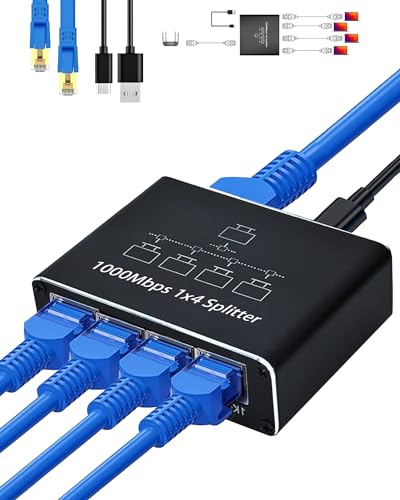
LIEZHUA Ethernet Splitter 1 to 4
More On The Choices That Made The List
This kit from Shure is built for a very specific world: wireless microphone systems. The UA221 ships as a pair of passive adapters, meaning they split or combine RF antenna signals without any active amplification. A passive splitter draws no power, so there’s no risk of introducing noise from a wall adapter, which touring engineers and venue installers tend to appreciate.
The kit is designed to work with Shure receivers like the SLX4, ULX, and UR4 families. For anyone running a house of worship setup, a small theater, or a club rig, that’s a meaningful fit. Compared to the RCA picks further down, this lives in a completely different category, and that’s the point.
Practical Advantages
- Passive design means zero added noise floor, which matters for clean wireless audio
- Bidirectional: split one antenna feed to two receivers, or combine two antennas into one input
- Purpose-built compatibility with a long list of Shure professional receivers
- Compact BNC-style hardware that mounts cleanly in a rack or behind a stage rack
- No power supply required, simplifying cable runs and rack layouts
Points To Keep In Mind
- Niche audience: only useful if your wireless system is in the supported Shure family
- Passive splitting introduces some signal loss, so very long cable runs may need a distro amp instead
- Not a consumer-friendly pick for home TV or stereo use
Who Will Love This
Audio engineers, venue installers, and anyone running a multi-channel wireless mic rig with compatible Shure receivers.
Look Elsewhere When
Anyone splitting home coax or HDMI should reach for the Antronix CMC2008V or one of the LIEZHUA Ethernet models instead.
Short, cheap, and simple: the KAYQINHO 1-male-to-2-female RCA splitter is the kind of cable you toss in a drawer and forget about until you need it. At roughly 20 cm long, it stays out of the way behind a receiver or amp, splitting a single RCA output into two without much clutter. Gold-plated connectors and dual shielding aim to keep the signal clean.
For a basic home stereo or a vintage gaming console feeding two sources, this works fine. Compared with the KAYQINHO 2RCA-to-2RCA cable later in the list, this one is purely a fan-out adapter rather than an extension.
Where It Helps
- Tiny footprint keeps gear racks tidy, especially behind crowded AV shelves
- Gold plating helps resist corrosion over years of plugging and unplugging
- Reversible direction: combine two sources into one input if needed
- Compatible with everything from CD players to HDTV analog outputs
Honest Caveats
- Short length means it won’t reach between widely separated gear
- Splits an analog signal, so signal level drops slightly per output
- Not designed for digital audio or HDMI-only systems
Built With In Mind
Casual home users running an old receiver, a console, or a CD player who need a quick two-way analog split.
Reach For A Different Pick When
Home theater fans needing a longer stereo run will prefer the KAYQINHO 2RCA Audio Cable 3.3FT instead.
This is the everyday workhorse for analog stereo hookups. The KAYQINHO 2RCA-to-2RCA cable runs 3.3 feet, which is enough to span between a TV and an AV receiver or between a turntable and a mixer. Gold-plated connectors, AWG26 copper conductors, and a double-braided nylon jacket make it feel a bit sturdier than bargain-bin options.
The bend-tested claim of over 20,000 flex cycles is reassuring for cables that get moved around. It’s not a splitter in the strict sense, but in a stereo setup it sits next to the splitter picks as the connecting cable.
Where It Excels
- Nylon braid resists tangles and fraying behind a media console
- 24K gold-plated plugs help maintain a steady connection over time
- AWG26 copper conductors support cleaner analog audio transfer
- Wide device compatibility, from subwoofers to DJ controllers
Trade Offs
- Only one length offered, so very long runs require a different option
- Analog RCA, not suited to modern HDMI-only home theaters
- Braid can be slightly stiff in tight right-angle bends
Best Suited To
Anyone wiring a home theater, hi-fi system, or DJ setup with standard stereo RCA gear.
Swap It Out When
Anyone needing a true Y-split for a subwoofer should pick up the KAYQINHO RCA Y Adapter Splitter Cable instead.
Mirror image of the earlier KAYQINHO splitter. This Y cable takes one female RCA and splits it into two male RCAs, which is exactly the configuration most people hit when adding a subwoofer to a stereo amp. The 20 cm length keeps it tucked behind gear without coiling excess cable.
The bidirectional design also lets it combine two mono feeds into one. Same braided sleeve, same gold plating as its sibling. Useful where space is tight.
Everyday Wins
- Perfect fit for adding a subwoofer to a 2-channel amp without re-cabling
- Short length means no slack behind the rack
- Nylon braid and gold connectors match the rest of the KAYQINHO RCA family
Minor Gripes
- Won’t reach between gear on opposite ends of a media console
- Analog-only, so it won’t help with HDMI or optical feeds
Feature Snapshot
Perfect Match For
Stereo amp owners adding a subwoofer, or anyone needing a short mono-to-stereo RCA adapter.
Not Your Match When
Home coax users should skip this and grab the Antronix CMC2008V for TV distribution.
This is the real-deal coax splitter for cable TV and over-the-air antenna distribution. The Antronix CMC2008V takes one incoming coax line and splits it into eight outputs, which is the kind of headroom a whole-house TV setup needs. It is rated for modern bi-directional digital networks, so it handles both downstream video and upstream signals from cable boxes and modems.
For anyone cutting the cord with an attic antenna and feeding multiple TVs, or running a small apartment building’s CATV, an 8-way passive splitter like this is the workhorse. Compared to the RCA and Ethernet picks above, this is firmly in the RF world.
The Value In It
- Eight outputs cover most household or small-office TV distribution needs
- Built for digital-ready, bi-directional cable networks
- Vertically ported design helps with dense coax bundles behind a panel
- Durable housing suitable for basement or attic installations
Some Limits To Know
- Not designed for satellite dishes, which use different frequency ranges
- Splitting eight ways costs signal strength, so long downstream runs may need amplification
- Bulkier than 2-way or 4-way splitters and harder to hide
Right Fit For
Anyone distributing cable TV or antenna signal to multiple rooms without running a separate feed to each TV.
A Better Fit Elsewhere
Satellite TV subscribers should look for a satellite-rated splitter, since this one isn’t built for that frequency range.
The LIEZHUA 1-to-2 splitter is the simplest of the Ethernet family, taking one RJ45 feed and exposing it as two gigabit-capable ports. It’s useful when a wall jack only has a single run, but you need to plug in a desktop and a printer or a console at the same spot. Compatible with Cat 5 through Cat 8 cabling.
Power comes from a USB connection, which is a small but important detail, since passive Ethernet splits simply don’t work at gigabit speeds without some active electronics.
Notable Gains
- Gigabit speeds across both outputs, plenty for most home office work
- USB-powered, no bulky wall wart
- Backward compatibility with older Cat 5 and Cat 5e cable
- Tiny footprint that fits behind a monitor stand
A Few Limitations
- Both ports share the same 1 Gbps upstream link, so heavy simultaneous use gets divided
- Needs a free USB port for power, which isn’t always handy at a wall jack
Feature Snapshot
Who Should Grab It
Remote workers and home office users with a single Ethernet drop who need a second wired connection.
Consider Something Else When
Households with three or more wired devices should look at the LIEZHUA 1-to-3 or 1-to-4 splitters instead.
Step up to three outputs and you’ve got the middle child of LIEZHUA’s Ethernet line. Three gigabit ports off a single incoming line is a useful count for a desk with a computer, a network printer, and a streaming box, or for a small media cabinet that needs more wired drops.
Like its 1-to-2 sibling, it pulls power through a USB cable, which keeps the install clean. Backwards compatible with Cat 5 through Cat 8, so it’s forgiving on existing wiring.
Useful Strengths
- Three gigabit ports cover most small-cluster wired setups
- USB-powered means no extra outlet is needed
- Works with legacy Cat 5 cable as well as Cat 8
- Stable throughput for streaming, gaming, and large transfers
Where It May Fall Short
- Three devices share one gigabit upstream, so heavy simultaneous use gets divided
- No included LAN cable, so a separate patch cable is needed
Feature Snapshot
Whose Shelf It Belongs On
Anyone with a small desk cluster or media cabinet that needs three wired devices off one wall jack.
Where Another Pick Suits Better
Heavy households with four or more wired endpoints will find the LIEZHUA 1-to-4 model more useful.
The biggest of the LIEZHUA bunch: one incoming Ethernet line, four gigabit outputs. It’s the most flexible option for a busy household where the office, the game console, the streaming box, and a smart TV hub all want wired connections. The bundle includes a Cat 6 patch cable, which is a thoughtful touch compared to the other LIEZHUA picks.
Same USB-powered design philosophy, same wide cable compatibility. For a four-device wired cluster without rewiring, this lands in a sweet spot.
What Makes Sense
- Four gigabit ports handle a full wired entertainment or work cluster
- Includes a Cat 6 patch cable, ready to plug in out of the box
- Compact housing stays out of sight behind a desk or TV
- USB-powered for simple, clutter-free installation
Worth Bearing In Mind
- Four ports share a single gigabit upstream, so simultaneous heavy use will queue
- Active device generates a small amount of heat during continuous use
Made For
Families and home office users who need to expand a single Ethernet drop to four wired devices without a new install.
Wrong Turns To Avoid
Anyone with only two devices should save a bit and grab the simpler LIEZHUA 1-to-2 splitter instead.
What To Weigh Before Picking A Splitter
Signal Type Matters Most
Every splitter on this list handles a specific kind of signal: RF coax for cable TV and antennas, RCA for analog stereo, RJ45 for wired networking, or BNC for pro audio. Mixing them up is the most common mistake, since a coax splitter cannot help an Ethernet problem and vice versa. Match the connector type to the cable already in the wall before anything else.
Port Count And Signal Loss
Every split divides the incoming signal strength across more outputs. A 2-way split loses a small amount of signal per leg, while an 8-way coax split loses significantly more, often enough to require an inline amplifier on long downstream runs. Plan port count around the number of devices you actually use, with a small buffer for the next addition.
Active Vs Passive Designs
Passive splitters need no power but introduce signal loss. Active splitters, like the LIEZHUA Ethernet units, need USB power and use onboard electronics to maintain speed and signal integrity. For gigabit Ethernet, active is essentially required. For short coax or analog audio runs, passive usually does the job.
Cable Compatibility And Build Quality
Check the cable category or frequency range before buying. The LIEZHUA Ethernet units support Cat 5 through Cat 8, which covers nearly any existing install. Coax splitters like the Antronix CMC2008V are digital-ready but not satellite-compatible, a key distinction. Gold-plated RCA connectors resist corrosion over years of use, which matters in gear racks that rarely get unplugged.
Practical Notes Across The Lineup
Where Shoppers Go Wrong
The most common slip is grabbing the cheapest coax splitter and expecting it to handle satellite TV, which uses different frequencies and will simply pass no signal. Another mix-up is buying a passive Ethernet splitter for gigabit speeds, which can’t work without active electronics. Always confirm signal type, frequency range, and power requirements before clicking through.
What The Higher Tier Buys
Spending more on a splitter typically means better shielding, higher port counts, bi-directional support for upstream data, and more durable housings. The Antronix CMC2008V costs more than a basic 2-way coax splitter, but it gives you whole-home distribution and modern DOCSIS compatibility in one box. For Ethernet, the 1-to-4 LIEZHUA is a step up because it includes a patch cable and supports the most devices, which is worth the modest price difference for a busy household.
Frequently Asked Questions
Do cable splitters reduce signal quality?
Every split divides signal strength across outputs, so a small amount of loss is unavoidable. Higher-quality splitters minimize that loss, and long downstream cable runs may need a powered amplifier to recover the signal at the far end.
Can one splitter handle both cable TV and internet?
Yes, provided the splitter is rated for bi-directional digital use, like the Antronix CMC2008V. It must pass both downstream video and upstream data from a cable modem simultaneously, which not every splitter can do.
Are Ethernet splitters a good replacement for a router?
An Ethernet splitter only shares one connection across multiple devices, so it does not provide routing, DHCP, or firewall features. A small switch or router is the right tool when devices need independent network identities.
Will a coax splitter work with satellite TV?
Standard coax splitters are designed for CATV and antenna frequencies. Satellite uses higher frequencies and specific power-passing needs, so a satellite-rated splitter or multi-switch is required instead.
What length of RCA cable works best?
For analog RCA audio, keep runs under about 25 feet to avoid noticeable signal degradation. Longer runs benefit from thicker conductors or active line drivers, depending on the gear involved.
The Takeaway
The right cable splitter depends entirely on which signal you’re splitting and how many endpoints you need to feed. Match the connector and signal type first, then choose port count and active-versus-passive based on your setup. With those two decisions made, any of the picks above will do its job quietly and reliably.
