

Older TVs, soundbars, and set-top boxes often need different kinds of signal handling, and that’s where the right converter saves a lot of fiddling. Some of these picks are built for over-the-air TV, while others are meant for audio links between optical, HDMI ARC, RCA, and 3.5 mm gear. You’ll get the most value from this list if your setup is half vintage, half modern, and you want fewer cables that do more work.
The Shortlist At A Glance

iView 3300STB ATSC Converter Box with Recording
PROZOR 192Khz Digital to Analog Audio Converter

IVIEW-3500STB III ATSC Digital Converter Box

PROZOR 192KHz Digital to Analog Audio Converter

192kHz DAC Digital to Analog Audio Converter

HDMI ARC to RCA Audio Converter 3 in 1

DP CTCB105 Over The Air Digital TV Converter
More Details On Our Top Picks
The first iView box fits the home that still relies on an older TV but wants a more complete way to handle over-the-air channels. Recording, media playback, a built-in clock, HDMI, USB, and QAM support make it feel less like a bare converter and more like a small hub for regular TV use.
You may find it especially handy in a family room where the TV stays in place and the same box needs to handle live viewing plus stored content. The trade-off is simple: more functions usually mean a little more setup time, so it suits someone who wants capability over bare-minimum simplicity.
Strong Points
- Converts digital broadcasts for older televisions.
- Recording support adds pause-and-save flexibility for regular viewing.
- Media player support helps you use USB content without extra hardware.
- QAM compatibility gives you more path options with some cable setups.
- HDMI gives you a cleaner link to newer displays.
Things To Consider
- Feature depth can mean a busier setup menu.
- The built-in extras are useful, but they also add more to learn at first.
- Older TVs with cramped shelf space may need a little planning for placement.
Feature Snapshot
Who It Suits Best
You get the most from this box in a home with an older set, a simple antenna setup, and a real need for recording or USB playback.
A Better Fit Elsewhere
DP CTCB105 Over The Air Digital TV Converter suits you better when DVR-style TV recording is the main goal and you want a more recording-focused setup.
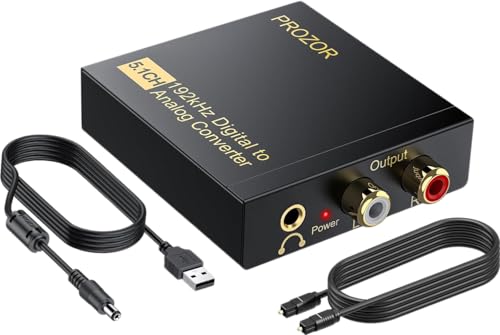
This PROZOR unit is aimed at audio conversion rather than TV tuning, so it fits the shelf next to a television more than the television itself. Optical input, RCA output, 3.5 mm output, and support for 5.1-channel sources make it practical for older stereo gear, compact speakers, or a basic living-room audio bridge.
The magnetic ring power cord is a small but helpful detail because it can help keep interference down around crowded entertainment cabinets. In most simple TV-audio setups, the honest appeal is that it keeps the job focused and compact, though you still need to match the source output correctly.
What We Like
- Optical-to-analog conversion covers many everyday TV audio links.
- RCA and 3.5 mm outputs give you flexible connection choices.
- 5.1-channel support helps with source compatibility.
- The magnetic ring cord is a thoughtful touch for busy setups.
Small Caveats
- It serves audio duties, not TV channel conversion.
- Correct source settings matter, especially with surround-style outputs.
- Cable routing can get crowded behind a console or receiver.
Core Details
Who It Suits Best
You’ll like this most in a living room where the TV’s optical output needs to feed older analog speakers or a small amplifier.
A Better Fit Elsewhere
XPTSFDU HDMI ARC to RCA Audio Converter suits you better when you need HDMI ARC alongside optical and coaxial input paths.
Compared with the first iView box, this version leans harder into flexible output options for older and newer gear. Channel 3/4 output, HDMI, A/V, USB, recording, media playback, and a learning remote make it a strong fit for a cluttered entertainment shelf where one box has to reach several devices.
The ATSC tuner is for over-the-air digital broadcasts, so it makes sense for homes that still want local channel access through an antenna. The trade-off is a little more complexity, but that’s the point for setups that have moved past a single simple connection.
Highlights
- Channel 3/4 support helps older televisions that still rely on coax-style input paths.
- HDMI, A/V, and USB create more ways to connect different gear.
- Recording and playback features add useful everyday flexibility.
- The learning remote cuts down on remote clutter.
- QAM support broadens compatibility beyond antenna-only use.
Worth Noting
- The broader feature set asks for a bit more setup patience.
- Channel 3/4 output is handy, though it’s mainly for legacy TV paths.
- As with many multi-function boxes, the menu can feel busier than a basic tuner.
Technical Sheet
Who Will Love This
You’re the best match for this model when your TV corner mixes old and new gear and you want one box that can bridge both eras.
A Better Fit Elsewhere
iView 3300STB ATSC Converter Box with Recording suits you better when you want the same brand’s feature mix in a slightly simpler package.
This PROZOR version looks similar on paper to Item 2, but the output mix is a little more flexible for a small home theater stack. Optical digital input, RCA output, and 3.5 mm output keep it useful for TVs, set-top gear, and older stereo systems that need a simple bridge.
For a compact media cabinet, that kind of no-drama layout is useful because you can tie together different generations of equipment without adding a bulky box. The trade-off is that it stays strictly in audio-converter territory, so it won’t replace a TV tuner.
Reasons To Buy
- Optical input keeps it broadly compatible with modern TVs and media boxes.
- RCA and 3.5 mm outputs make it easy to match older gear.
- The converter format keeps the setup small and straightforward.
- It fits well in a home cinema rack with mixed equipment.
Areas To Watch
- No TV tuning function, so it won’t handle channels on its own.
- Audio output choice depends on your source and your speaker inputs.
- Small converter boxes can disappear behind furniture, so cable labeling helps.
Details At A Glance
Perfect Match For
You fit this model well when your setup centers on TV sound or a disc player and your speakers still depend on analog inputs.
Swap It Out When
YGiTK 192kHz DAC Digital to Analog Audio Converter suits you better when you want an included optical cable in the box.
This YGiTK pick stands out because it includes an optical cable, which saves you an extra accessory purchase and makes first-time setup less awkward. The RCA female plus 3.5 mm output layout makes sense for bedrooms, small living rooms, and compact receivers that still lean on analog inputs.
The built-in audio amplification chipset is the main reason some shoppers will notice it, since it pushes the RCA output level with more confidence than a bare-bones bridge. The catch is that volume changes still happen on the source side, so it’s best for people who want straightforward conversion, not front-panel control.
Upsides
- Included optical cable makes the box more ready to set up.
- RCA female and 3.5 mm outputs cover two common analog paths.
- The amplification chipset helps the output feel more assertive in daily use.
- Compact size suits a small cabinet or TV stand.
Minor Gripes
- Volume control stays on the source device, not the converter.
- It serves audio conversion only, so it does not tune channels.
- Extra cable length can add clutter behind a tight console.
Core Details
Who Should Grab It
You’ll get the most from this model in a simple TV-to-speaker setup where convenience matters as much as clean conversion.
Another Choice May Suit
PROZOR 192Khz Digital to Analog Audio Converter suits you better when you want a more traditional no-frills bridge without the added cable.
This XPTSFDU converter is the most connection-heavy choice in the group, which makes it attractive for a modern TV paired with older speakers or a soundbar. HDMI ARC, optical, coaxial, RCA, and AUX output support give you room to adapt as the gear stack changes, and that flexibility is the real reason to consider it.
It also handles Dolby, DTS, and LPCM, so it fits living rooms where format compatibility matters as much as port count. The trade-off is that more inputs and outputs usually ask for more careful setup, though the payoff is cleaner integration with mixed equipment.
Best Bits
- HDMI ARC support makes it useful with many modern televisions.
- Optical, coaxial, RCA, and AUX options cover a wide range of gear.
- Dolby, DTS, and LPCM support broadens source compatibility.
- It works well for soundbar and home theater bridges.
- Flexible connections help reduce the need for extra adapters.
Softer Spots
- Setup takes more attention because there are several signal paths.
- Too many connection options can make cable management a little messy.
- It focuses on audio routing, not TV channel conversion.
Feature Rundown
The Right Fit
You’ll appreciate this most in a living room where the TV, soundbar, and older speakers all need to stay in the mix.
Where A Sibling Pick Shines
PROZOR 192KHz Digital to Analog Audio Converter suits you better when optical-to-analog conversion is your only goal and you want a simpler box.
DP’s converter is the most straightforward TV-focused option here, and the DVR framing tells you exactly where it wants to live, beside an antenna-fed set. For households that still care about recording broadcast TV, that can be more useful than a pile of audio adapters, and the box stays squarely in the over-the-air lane.
Compared with the more feature-stacked iView models, this one feels more specialized, which is a good thing for people who want a dedicated TV utility box. The practical upside is less confusion, while the trade-off is that it doesn’t chase the broader connection variety of some earlier picks.
Positives
- Built for over-the-air TV use with DVR support.
- Keeps the job centered on live viewing and recording.
- Simple focus can make everyday operation easier.
- Works well in homes that want one clear TV task.
Honest Caveats
- It is narrower in scope than the multi-input audio converters.
- Recording-focused gear often asks for a little planning around storage and setup.
- You may not need this level of specialization for a very basic antenna TV.
Core Details
Whose Shelf It Belongs On
You’re the best match for this box if antenna TV is part of your daily routine and you want recording built into the same unit.
Look Elsewhere When
IVIEW-3500STB III ATSC Digital Converter Box suits you better when you want more output variety and media playback in the same package.
How To Choose The Right Analog Digital Converters For Tv
Match The Converter To The Signal
The biggest split in this category is between TV signal converters and audio DACs, and you can save a lot of frustration by sorting that out first. An ATSC converter box handles over-the-air television, while an optical or HDMI ARC audio converter only moves sound between devices.
That sounds obvious, but mixed home setups create confusion fast. A family room with an older set, a soundbar, and a streaming box may need two separate pieces of gear rather than one all-purpose answer.
Check The Inputs And Outputs You Actually Use
Ports matter more than marketing language. HDMI, USB, optical Toslink, coaxial, RCA, AUX, and 3.5 mm each solve different connection problems, so your TV, receiver, soundbar, or antenna setup should drive the choice.
RCA is the older red-and-white analog connection, while optical carries digital audio through light. One is not better in every case, but the wrong match leaves you with extra adapters and more cable clutter.
Think About Daily Use, Not Just Setup Day
Recording, media playback, a learning remote, or a built-in clock may sound like extras, yet they change how a box feels after a month of use. In a bedroom or den, those touches can make the difference between a device that earns its spot and one that only seems useful on paper.
Maintenance stays simple for most of these units, though you’ll still want to keep vents clear, label cables, and leave room for access to USB ports or rear inputs. Small boxes are easy to tuck away, but that convenience can turn into annoyance during the next cable swap.
Choose For Your Setup, Not The Spec Sheet
For an older TV with antenna service, a converter box with ATSC and maybe QAM support is the right lane. For a TV or disc player feeding older speakers, a DAC with optical input and RCA output makes more sense.
The best fit is usually the one that removes a single pain point cleanly. Anything more complicated than your setup needs can become another thing to manage instead of a real upgrade.
Things Worth Knowing First
Wrong Turns To Avoid
A common mistake is buying an audio converter for a television channel problem, or the other way around. That mix-up leads to a box that works exactly as designed, just not for your equipment.
Another slip-up is overlooking the output type on the TV or receiver. A soundbar with HDMI ARC needs a different path than an older amp with RCA only.
The Case For Spending Up
Higher-tier models usually cost more because they do more than basic signal shifting. Recording support, extra outputs, learning remotes, and broader format compatibility all add parts and setup depth.
That upgrade makes sense in a main living room or a shared family space where one box has to serve several people and several devices. In a spare room, a simpler converter is often plenty.
Frequently Asked Questions
What’s The Difference Between A TV Converter And A DAC?
A TV converter box handles broadcast television signals for older sets. A DAC moves digital audio to analog audio for speakers, amps, or receivers.
Do You Need HDMI For An Older TV?
No, many older TVs work fine with coaxial or A/V paths. HDMI helps with newer displays, but it is not required for every setup.
Why Does QAM Matter?
QAM support can help with unscrambled cable channels in some setups. It does not replace an antenna tuner, but it adds flexibility.
Is Optical Better Than RCA?
Optical carries digital audio, while RCA carries analog audio. The better choice depends on the ports on your TV and speakers.
Do Recording Features Matter For Everyday Use?
They matter most in rooms where you want to save live broadcasts. For casual viewing, a plain converter may be enough.
Final Thoughts
Your best match depends on whether you need TV tuning, audio conversion, or a little of both. The iView boxes make the most sense for antenna-based television, the PROZOR and YGiTK units fit older audio gear, and the XPTSFDU model covers the widest range of connection types. Once you sort the signal path first, the rest gets much easier. A clean setup usually matters more than a long feature list.
