

I spent weeks digging into wall dimmers and remote kits that actually deliver on the “3 way dimmer switch” promise, and the honest truth is that the category splits into two camps: smart-home hubs with remotes, and purpose-built strip-light drivers. Most people shopping for 3 switch dimmers want one of two things: control from a hallway staircase, or a clean install for under-cabinet LED tape. I kept both audiences in mind while putting this shortlist together, and I called out which use case fits each pick.
The Picks In Brief

Lutron Pico Remote for Caseta Smart Dimmer Switch, 3-Button Control

Lutron Caseta Smart Dimmer Switch (No Neutral Required)
HitLights EZDim Pro 100W LED Driver/Dimmer 24V
HitLights EZDim Pro 60W LED Driver/Dimmer 12V
HitLights EZDim Pro 160W LED Driver/Dimmer 24V

Lutron Pico Remote Wall-Mounting Kit (Bracket & Wallplate)

DEWENWILS 2 Pack Single-Pole/3-Way Dimmer Switch
A Closer Look At Each Pick
The Lutron Pico remote is the small handheld piece that makes a Caseta dimmer worth installing in the first place. It is a three-button controller that runs on a battery, pairs directly with the Caseta in-wall dimmer, and lets you raise, lower, or snap lights on and off from across the room. A “favorite” button in the middle stores your go-to brightness, which is genuinely handy for evening TV-watching scenes.
I like how flexible the mounting is, because the Pico works equally well clipped to a car visor, stuck to a metal fridge with an optional cradle, or screwed next to a second switch location in a hallway. Owners commonly report battery life stretching into years with regular use. It is the cleanest answer when you want 3-way dimmer control without pulling new wire through the wall.
Useful Touches
- Wireless pairing with Caseta dimmers means no extra wiring for multi-location control.
- Three buttons plus a preset “favorite” speed up everyday routines.
- Battery-powered portability, useful at bedside, in the garage, or by the front door.
- Works through walls, so a bedside remote can control hallway fixtures reliably.
Points To Note
- It only talks to Caseta receivers, so it is wasted money outside that ecosystem.
- You will need to grab a separate wall-mount bracket or pedestal for a finished look.
Right Fit For
Shoppers already invested in Lutron Caseta who want portable or multi-room control without hiring an electrician.
A Better Fit Elsewhere
For homeowners running plain LED tape under cabinets, the HitLights EZDim Pro 100W driver/dimmer is a closer match than any Lutron remote.
This is the in-wall switch that anchors the whole Caseta line, and it solves one of the most stubborn retrofit headaches around. A “neutral wire” is the extra conductor most modern switch boxes include, and many older homes simply lack it. Caseta skips that requirement, which is why it slides into wiring from the 1970s and earlier without a rewire.
Once installed, you get app scheduling, voice control through major assistants, and pairing with the Pico remote in pick 1. A smart hub is still required, and that is an extra purchase worth budgeting for. Performance is smooth from full brightness down to a low glow, with no flicker on most modern LED bulbs.
What Pays Off
- No-neutral install opens smart dimming to older homes that most competitors cannot touch.
- Pairs with Pico remotes for 3-way control without pulling new traveler wire.
- Wide bulb compatibility reduces the dreaded low-end flicker on common LEDs.
- App, voice, and remote all work together, so nobody in the house is locked out.
Worth Bearing In Mind
- The hub adds to the upfront cost, and the system feels incomplete without it.
- It is bulkier in the box than a standard toggle, so shallow boxes can feel crowded.
Quick Facts
Made For
Homeowners with older wiring who want app and voice dimming without opening up walls to add a neutral conductor.
Reach For A Different Pick When
Renters looking for a no-hub, no-commitment option should consider the DEWENWILS 2 Pack Dimmer Switch instead.
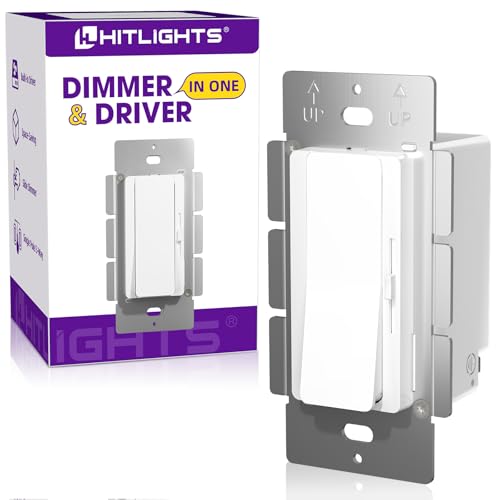
Most LED tape installs need two boxes: a driver that drops household 120V AC down to a safe low voltage, and a separate dimmer switch. The HitLights EZDim Pro combines both into a single wall unit, so you skip the hidden driver and the gamble of matching driver wattage to dimmer model. For a kitchen or office with 24V strip lights, this is one of the cleanest installs I have come across.
It supports single-pole and 3-way wiring, meaning one dimmer can be paired with a standard toggle at the other end of the hallway. The 100W capacity covers a typical 16 to 20-foot 24V tape run with margin to spare. It is UL Listed, which most inspectors and insurers expect on a wall-mounted electrical component.
Notable Upsides
- One-box design removes the wall wart driver and frees up the junction box.
- 100W headroom suits most medium room LED tape layouts without overdriving.
- Single-pole and 3-way compatibility lets you control from two locations.
- Compatible with most solid-color 24V strip lights, simplifying shopping.
Trade Offs
- Not compatible with RGB or tunable-white strips, only single-color runs.
- Slightly deeper in the box than a plain slider, so shallow old-work boxes can feel tight.
Best Suited To
DIYers running mid-length 24V solid-color tape under cabinets, behind a bar, or along a cove who want a tidy single-device install.
Look Elsewhere When
Anyone working with 12V tape should grab the HitLights EZDim Pro 60W 12V unit instead.
The 12V sibling to the 100W unit above, this HitLights dimmer targets shorter tape runs. A typical 12V strip pulls more current than a 24V strip at the same wattage, which is why most kitchen under-cabinet and closet installs max out somewhere around 8 to 10 feet. This unit’s 60W rating is a comfortable match for that workload.
The single-pole and 3-way support carries over, which is rare at this wattage in a combined driver/dimmer. It drops straight into a standard junction box with no extra driver tucked in the ceiling. Owners commonly report a smooth fade without the buzzing some cheaper dimmers produce on 12V tape.
The Good Stuff
- Compact 60W rating fits small-to-medium 12V runs without oversizing.
- All-in-one design keeps the install in a single wall box.
- Single-pole and 3-way wiring supports a hallway or stair control point.
- UL Listed for safety and code acceptance.
Small Caveats
- Solid-color only, no RGB or color-temperature strip support.
- Pushes the limit of older shallow junction boxes.
Perfect Match For
Homeowners lighting a small kitchen, closet, or display shelf with 12V single-color tape who want a one-box solution.
Skip It When
For longer runs or 24V tape, the HitLights EZDim Pro 100W 24V version is a smarter pick.
The big sibling of the EZDim family, this 160W unit handles 24V tape projects that would normally need a chunky external driver. Think long cove lighting around a living room, a workshop bay, or a basement bar where the strip runs stretch past 25 feet. The 160W rating leaves genuine headroom, so the unit runs cool instead of cooking itself.
You still get the all-in-one wall form factor and 3-way wiring support, which is unusual for a driver/dimmer this powerful. For homes planning to expand the tape layout later, the extra wattage buys forgiveness. It is UL Listed, just like the rest of the line.
What Helps Most
- 160W capacity covers large 24V tape installs without splitting power.
- Extra wattage margin extends dimmer life by keeping it out of thermal stress.
- Single-pole and 3-way support lets you control a long run from two locations.
- All-in-one form factor avoids the separate-driver headache entirely.
Honest Caveats
- Overkill for short runs under 10 feet; the 60W or 100W models would do the same job.
- Solid-color only, no tunable-white or RGB compatibility.
Feature Snapshot
Built With In Mind
Installers wiring long stretches of 24V tape across a single room or open floor plan who want one dimmer to handle the load.
Swap It Out When
A compact under-cabinet setup is a better match for the HitLights EZDim Pro 60W 12V unit.
This kit finishes a Pico remote installation so the remote looks like it belongs on the wall rather than floating on a coffee table. You get the Pico itself, a screw-in wallplate bracket, and a coordinating wallplate in matching white. It is the difference between a permanent fixture and a gadget.
The bracket accepts a standard Pico remote, so people with remotes bought separately from pick 1 can still use it. It is also the easiest way to add a second control location to a Caseta dimmer without pulling wire, because the Pico paired with the dimmer handles the 3-way logic wirelessly. The included favorite button is the same preset you would get on a standalone Pico.
Useful Highlights
- Coordinated wallplate gives a clean, intentional look next to a Caseta dimmer.
- Bracket installs without an electrical box, so it works on any flat surface.
- Same wireless 3-way capability as the standalone Pico, with no new wiring.
- Quick swap-out, the remote pops out for handheld use when you need it.
Things To Consider
- Tied entirely to the Lutron Caseta ecosystem.
- Matching white is the only finish listed, so design-conscious shoppers may want to confirm color first.
Whose Shelf It Belongs On
Anyone finishing a Caseta installation who wants a second switch location that looks built-in instead of improvised.
Where A Sibling Pick Shines
For a hub-free 3-way dimmer at lower cost, the DEWENWILS 2 Pack Dimmer Switch is the better fit.
For shoppers who want a plain 3-way dimmer without a hub, app, or monthly anything, this DEWENWILS two-pack delivers the basics at a friendly cost. Each switch supports single-pole and 3-way wiring, and the smooth slider plus rocker switch is the kind of control style most grandparents already understand. No neutral wire is needed, so older rental units are fair game.
A side adjustment dial lets you set the minimum brightness, which is the trick that prevents flicker on LED bulbs. Most folks only fiddle with it once per bulb type. It is sold as a pair, so a stairway top and bottom is covered in one box.
Real-World Strengths
- Two-pack covers both ends of a hallway or stairway for one purchase.
- No neutral wire required, fits older homes and many rentals.
- Adjustable minimum brightness eliminates LED flicker at low settings.
- No hub, no app, no learning curve, just wire and slide.
Less-Strong Areas
- Only one dimmer is allowed per 3-way circuit, so plan the box assignments carefully.
- No smart features, so phone control is not in the picture.
Spec Overview
Who Should Grab It
Renters, landlords, and homeowners who want a no-fuss dimmer swap without smart-home features or a hub.
Not Your Match When
Someone wanting app scheduling and voice control will get more from the Lutron Caseta Smart Dimmer Switch.
Picking The Right 3 Way Dimmer Setup For Your Home
A 3 way dimmer is really about one question: do you need smart features, low-voltage tape support, or just a reliable slider? Smart-home households with older wiring lean toward Lutron Caseta, where the no-neutral in-wall switch pairs with Pico remotes for a wireless second location. People lighting up kitchens, bars, or closets with LED tape benefit more from an all-in-one driver and dimmer, because it removes a hidden component from the ceiling or cabinet.
Wattage is the next filter. LED tape wattage scales with length and density, so a 60W unit suits short under-cabinet runs, 100W covers most medium rooms, and 160W handles long open layouts with comfort. Over-sizing slightly is reasonable insurance for thermal headroom, while under-sizing risks flicker, buzzing, or premature failure.
Compatibility deserves a close look. Bulb type, voltage, and the existing wiring in the box (especially whether a neutral conductor is present) all shape the realistic shortlist. For strip-light installs, confirm whether the controller handles single-color, RGB, or tunable-white tape. Mismatched systems can light up but refuse to dim past 50 percent.
Compatibility And Wiring Reality
Older homes without a neutral wire rule out a large slice of smart dimmers. That is precisely where the Lutron Caseta line earns its keep, and where most generic smart dimmers fall flat. For LED tape projects, the wiring reality is simpler, but you still need to match 12V tape with a 12V driver/dimmer and 24V tape with a 24V unit.
Wattage, Bulb Type, And Future Expansion
Right-sizing wattage keeps the dimmer from running hot and extends its service life. If you might add more tape or change bulbs later, leaving a 20 to 30 percent wattage cushion is a sensible move. Bulb compatibility matters with LED, since older dimmers often cause flicker or audible hum on modern bulbs.
Key Considerations Across These Picks
Mistakes Worth Dodging
The most common stumble is mixing voltage, which means buying a 24V driver/dimmer for 12V tape, or vice versa. The strip will not light up, and forcing the issue can cook the LEDs. Another trap is ignoring the neutral-wire question until the switch is in hand; on older homes, this single detail knocks most smart dimmers off the list.
When Paying More Pays Off
Higher-tier pricing in this category usually buys either the Lutron ecosystem (app, voice, scheduling) or higher-wattage headroom on a tape driver. The upgrade is worthwhile for whole-home lighting control or for tape projects that will grow, and less valuable for a single-room rental swap.
Frequently Asked Questions
Do 3 way dimmers need a neutral wire?
Most smart 3 way dimmers do, because the radio inside needs constant power. Lutron Caseta is the standout exception, designed specifically for older homes without a neutral conductor. Plain slider dimmers like the DEWENWILS 2 Pack also skip the neutral requirement.
Can I use any dimmer with LED bulbs?
Not always. Older dimmers were designed for incandescent loads and often cause LED bulbs to flicker, buzz, or drop out at the low end. Modern dimmers list compatible bulb types, and many include a low-end trim adjustment to fine-tune the dimming curve for specific LEDs.
What is the difference between single-pole and 3-way dimmer switches?
A single-pole dimmer controls one fixture from one location, while a 3-way dimmer works as part of a pair to control the same fixture from two locations. Hallways, staircases, and large rooms with multiple entrances are the classic use case for 3-way setups.
How many watts do I need for LED strip lights?
Right-size the dimmer to roughly 80 percent of your strip’s rated wattage, and confirm the dimmer voltage matches the strip voltage. A 60W dimmer can safely run about 48W of 12V tape, while a 100W unit handles around 80W of 24V tape.
Can smart dimmers work without a hub?
A few do, but most rely on a hub for app control, scheduling, and remote access. Lutron Caseta requires its Smart Bridge, while products like the Pico remote still need a paired Caseta dimmer in the wall to do anything useful.
The Takeaway
A 3 way dimmer is the right answer when you want to control a single light from two locations, and the right pick depends on whether you are upgrading an old switch, lighting LED tape, or finishing a smart-home install. Match the dimmer to your wiring, voltage, and ecosystem first, and let the rest of the shortlist fall into place from there.
