

I built this list because I kept losing the charger war at home, and the fix wasn’t a bigger power brick but a smarter outlet. Whether you charge phones overnight in the kitchen, run a monitor-and-laptop desk, or just want to retire that dusty adapter graveyard in the hallway, USB-equipped outlets and power strips are the easiest upgrade. The picks below cover workbenches, bedrooms, bathrooms, and tight apartment corners, with trade-offs called out honestly.
The Picks In Brief

NANOLAKE Surge Protector Power Strip 18 AC 4800J Black

Anker Power Strip 900J Surge Protector 35W

ELEGRP 20A USB Outlets 3-Port 2-Pack White
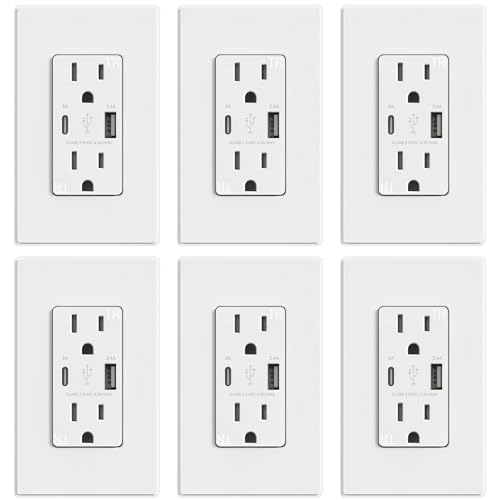
ELEGRP 15A 21W USB Outlets 6-Pack Matte White

ELEGRP 30W 3-Port USB Wall Outlet Matte White

ELEGRP USB Wall Outlet Dual 4.0A Glossy White

ELEGRP GFCI USB Outlet 24W Matte White

ELEGRP 3-Port USB Wall Outlets Matte Black 2-Pack

ELEGRP 30W USB C Wall Outlet PD Matte White

ELEGRP 42W 4-Port USB Wall Outlet Matte White
What Each Pick Brings To The Table
Power strips like this one earn their keep when you stop counting how many wall warts are sharing a single outlet. The NANOLAKE brings 18 widely spaced AC sockets along with two USB-A and two USB-C ports, and the 10-foot cord gives you reach to a distant wall without crawling behind furniture.
Where it shines is in workshops, shared offices, or entertainment centers where the same surge protector powers a monitor, laptop, console, and a string of peripherals. The 4800J rating is the kind of margin worth having next to expensive electronics. Mounting slots on the back help it disappear under a desk.
What Helps Most
- 18 AC outlets handle a full desk-plus-entertainment rig without adapter juggling.
- 4800J surge rating absorbs spikes before they reach sensitive gear.
- Two USB-C ports with PD20W cover modern phones and small laptops.
- 10-foot cord and flat plug reach behind heavy furniture and tight baseboards.
- Mountable design clears floor clutter in busy rooms.
Things To Consider
- The strip is long, so users with shallow desks may find it overhangs.
- Wide spacing helps big plugs, but smaller bricks can leave loose gaps.
Quick Facts
Who It Suits Best
Heavy users running gaming setups, broadcast desks, or full home offices with a dozen plugs benefit most from the dense layout and long cord.
Where Another Pick Suits Better
The Anker Power Strip 900J is a leaner choice for travelers or anyone who wants a slimmer footprint on a bedside table.
Anker built its reputation on charging bricks, and that DNA shows in this strip’s USB-C behavior. Eight AC outlets pair with two USB-C and two USB-A ports, and the 35W max output is enough to fast-charge a laptop while a phone tops up beside it.
For most home desks, this is the sweet spot. Compared to the NANOLAKE in pick 1, it trades raw outlet count for a slimmer, easier-to-position shell. The 900J surge rating is modest, but appropriate for typical electronics rather than big workshop tools.
Advantages To Know
- 35W USB-C output charges modern phones and small laptops quickly.
- Slim profile slides behind monitors and under standing desks.
- Eight AC outlets cover a typical laptop-plus-peripherals load.
- Anker’s charging protocols optimize power to whichever device is plugged in.
Worth Noting
- 900J surge rating is lower than the NANOLAKE’s 4800J, so it’s a softer choice next to high-end TVs.
- Cord length may run short in rooms with oddly placed wall outlets.
- High-speed 35W only kicks in on a single USB-C port at a time, depending on load.
Quick Facts
Made For
Remote workers and home-office users who want faster phone charging without the bulk of a 18-outlet industrial strip.
Skip It When
The NANOLAKE in pick 1 is the better match for workshop benches where many bulky plugs share one strip.
This is the in-wall pick for anyone who wants to forget about power strips entirely. ELEGRP builds the outlet into your wall, with two USB-C and one USB-A port delivering a combined 21W, and the 20-amp rating handles heavier appliance circuits.
I see it working hardest in kitchens and garages where tool chargers and appliances stack up. Unlike the Anker strip in pick 2, this is permanent wiring, so the trade-off is installation effort in exchange for a clutter-free counter.
What Works In Its Favor
- 20-amp rating supports higher-draw appliances like microwaves or shop vacs.
- Three ports cover multiple devices from one wall plate.
- Tamper-resistant shutters add child safety in family spaces.
- Two-pack design lets you upgrade a kitchen and a garage in one go.
Trade Offs
- Requires basic electrical wiring, so it’s not a renter-friendly swap.
- 21W total output is modest compared to laptop-focused picks later in this list.
- Standard 5V output means fast-charge protocols aren’t supported on every phone.
Feature Snapshot
Right Fit For
Homeowners with 20-amp circuits in the kitchen, laundry, or workshop who want clean counters without sacrificing plug count.
Look Elsewhere When
Renters and those who want 30W or higher laptop charging should look at the ELEGRP 30W outlets covered in picks 5 and 9.
This six-pack is the easiest way to standardize an entire home on USB outlets without buying them one at a time. Each unit is a 15-amp duplex with one USB-A and one USB-C port, and the matte white finish blends with most modern wall plates.
Compared to the 20A two-pack above, this trades per-outlet power for quantity. Most bedrooms and hallways only need 15 amps anyway, and the protocol chip in each port adjusts output to whatever you plug in.
Practical Advantages
- Six outlets cover a typical three-bedroom home in one purchase.
- Type A and Type C ports coexist on every plate.
- Built-in protocol chip optimizes charging per device.
- Tamper-resistant design adds a layer of child safety.
Honest Caveats
- 15-amp rating won’t substitute for dedicated 20-amp appliance circuits.
- 21W shared output is fine for phones but slow for tablets under heavy use.
- Installation across six boxes is more time than swapping a single outlet.
Best Suited To
Homeowners planning a whole-home USB upgrade who want consistent hardware in every room.
Swap It Out When
Anyone needing only one outlet should grab the single-pack ELEGRP USB Wall Outlet in pick 6 instead.
The 30W rating here is the meaningful upgrade over the 21W outlets earlier in the list. Two USB-C ports and one USB-A share a higher total ceiling, which translates to faster top-ups for tablets and modern accessories. The screwless wall plate keeps the install looking tidy.
Where this outlet earns its place is in shared family spaces. Two siblings charging phones plus a tablet at the same time won’t trigger the slowdown you see on lower-wattage plates.
The Practical Payoff
- 30W total output handles multiple phones plus a tablet simultaneously.
- Dual USB-C ports cover newer cables without adapters.
- Screwless wall plate gives a clean, modern finish.
- Tamper-resistant shutters help in kid-heavy rooms.
Points To Note
- Fast-charging protocols aren’t supported, so some phones won’t reach their top speed.
- Not designed for full laptop charging under load.
Feature Card
Perfect Match For
Households where multiple devices charge side by side and the standard 21W outlets feel sluggish.
A Better Fit Elsewhere
The ELEGRP 42W 4-Port in pick 10 makes more sense when a household truly needs four ports in a single room.
This is the simple, no-frills wall replacement for someone who just needs two USB ports where a single duplex outlet used to be. The two ports share 4 amps total, which is enough for overnight phone charging without raising the utility bill.
Compared to the more advanced ELEGRP outlets earlier, this one skips USB-C entirely, so it’s the right pick for households still mostly on legacy cables. The glossy white finish matches traditional builder-grade plates.
Strengths Worth Knowing
- Simple two-port design drops into a standard single gang box.
- Dedicated charging port controller adjusts power per device.
- Tamper-resistant shutters add child safety.
- Glossy white finish blends with traditional wall plates.
Room For Improvement
- No USB-C, so newer cables need an adapter or a different pick.
- 4A shared output is the lowest in this list and will feel slow on tablets.
Whose Shelf It Belongs On
Anyone doing a single-room refresh who values simplicity over the latest USB-C speeds.
Consider Something Else When
Users with newer phones should pick the ELEGRP 30W outlet in pick 9 for proper USB-C PD speeds.
Bathrooms and kitchen counters need GFCI protection (ground-fault circuit interrupter, which cuts power instantly if it detects a shock hazard), and this outlet combines that with USB charging in a single wall plate. The 24W shared output handles a phone plus a small accessory without breaking a sweat.
Self-test GFCI means the outlet checks itself periodically, which is the modern code requirement. Compared to the wall outlets in picks 3 through 6, this one trades general-purpose flexibility for that critical safety layer.
Everyday Perks
- Built-in GFCI satisfies code in bathrooms, kitchens, and laundry rooms.
- 24W total handles a phone plus a small accessory.
- Self-test feature means less manual maintenance.
- Single AC outlet plus two USB ports in one compact face.
Where It May Fall Short
- Only one AC receptacle means you lose a plug to gain two USB ports.
- Compact design needs careful box-depth planning in older homes.
Who Should Grab It
Anyone remodeling a bathroom or kitchen who wants USB charging without sacrificing required GFCI safety.
Not Your Match When
The ELEGRP 20A outlet in pick 3 is the smarter choice for kitchen appliance circuits where 20A is required.
Most wall outlets blend into the paint and that’s fine. The matte black finish here does the opposite, and it’s the reason to consider this pick if your walls are dark, your fixtures are matte black, or you simply want the outlet to read as a design choice.
Underneath, the spec sheet mirrors the ELEGRP 21W 3-port outlets from earlier picks, including the same combined output and tamper-resistant shutters. The difference is purely cosmetic.
Notable Upsides
- Matte black finish coordinates with modern hardware and dark walls.
- Three USB ports handle a phone, watch, and earbuds side by side.
- Screwless wall plate keeps the look clean.
- Two-pack covers bedroom and entryway in one purchase.
Worth Bearing In Mind
- 21W shared output is unchanged from the white version, so charging speed isn’t faster.
- Fast-charge protocols aren’t supported on this model.
Right Fit For
Design-conscious renters or homeowners who treat outlets as part of the room’s hardware palette.
Reach For A Different Pick When
Speed matters more than color: the ELEGRP 30W outlet in pick 9 charges modern phones faster.
This is the outlet for the laptop-and-tablet household. The 30W USB-C port supports PD 3.0 (Power Delivery, a fast-charging standard that negotiates higher voltages with compatible devices), which is enough to charge a MacBook Air or an iPad meaningfully while you work.
Universal compatibility is the headline: it covers PD 3.0, Apple protocols, Samsung protocols, and more. The trade-off versus the 30W 3-port model in pick 5 is fewer ports in exchange for proper fast-charge behavior on a single device.
What It Does Well
- 30W USB-C PD output fast-charges laptops and tablets.
- Broad protocol support across Apple, Samsung, Google, and Huawei devices.
- Tamper-resistant shutters fit family spaces.
- 15-amp rating matches standard residential circuits.
Small Caveats
- Only one USB-C port, so multi-device households will want a multi-port pick.
- Performance depends on the device actually supporting PD 3.0.
Quick Technical Notes
Built With In Mind
Laptop and iPad owners who want wall-outlet charging that matches the speed of a dedicated brick.
Consider Something Else When
Families charging four devices at once should look at the ELEGRP 42W 4-port outlet in pick 10.
This is the highest-output wall outlet on the list, and it earns that label honestly. Four ports share 42W, with two USB-C and two USB-A, and built-in protocol chips read each device’s needs to allocate power where it helps most.
It fits the kind of room where everyone lands at the end of the day, kitchen counters, mudrooms, or a charging nook in the living room. Compared to the 30W 3-port model in pick 5, this one handles the full family lineup without anyone waiting their turn.
Well-Handled Touches
- 42W total output tops this list and handles four devices with headroom.
- Dual USB-C plus dual USB-A supports mixed device households.
- Built-in protocol chips optimize charging speed per port.
- Single wall plate simplifies the install.
Potential Drawbacks
- Fast-charge protocols aren’t full PD on every port, so laptops may still want their brick.
- Higher power draw on a single circuit box can be a planning consideration.
Who Will Love This
Busy families that pile four devices on a single counter every evening and want them all topped up by bedtime.
Where A Sibling Pick Shines
The ELEGRP 30W USB-C PD outlet in pick 9 is the better single-laptop charger when fewer devices are involved.
Picking The Right Outfit For Your Setup
Start with where the outlet will live. A workshop bench or shared office is built for power strips like the NANOLAKE in pick 1, where 18 sockets and a 4800J surge rating absorb the constant plugging and unplugging of daily work. Bedrooms and hallways usually need a permanent in-wall upgrade, and that’s where the ELEGRP 6-pack in pick 4 pays for itself across multiple rooms.
Bathrooms and kitchen counters live under different rules. Code requires GFCI protection in those spaces, which is why the GFCI USB outlet in pick 7 is the right tool there, even though it gives up an AC receptacle to do it. For 20-amp appliance circuits, the 20A pick 3 outlet handles heavier loads without tripping.
Charging speed matters more than most people expect. A 21W outlet will charge a phone overnight just fine, but the moment you add a tablet or a second phone, the slowdown becomes obvious. The 30W and 42W models from picks 5, 9, and 10 allocate power more intelligently. PD (Power Delivery) support, found on pick 9, is what unlocks genuine laptop charging from a wall plate.
If you rent, stick with power strips. Pick 1 and pick 2 install in seconds and leave no trace. Permanent in-wall outlets make more sense during a remodel or as part of a planned electrical upgrade.
Finally, think about cables. If your household is still mostly USB-A, the older ELEGRP outlets from picks 4 and 6 cover you without forcing cable upgrades. Newer USB-C devices benefit from the 30W and 42W outlets later in this list.
Before You Click Buy
Pitfalls Shoppers Hit
The first mistake is buying a USB outlet without checking the amperage. A 15-amp outlet on a 20-amp appliance circuit is a code violation, not a suggestion. The 20A ELEGRP in pick 3 exists specifically to avoid that mismatch.
The second mistake is assuming all USB ports are equal. A 21W shared output across three ports drops to roughly 7W per port when all three are in use, which is barely a trickle. The 30W and 42W outlets in picks 5, 9, and 10 handle that scenario better.
The third is forgetting protocol support. A USB-C port that doesn’t speak PD 3.0 will still charge a laptop, just slowly. Pick 9 is the explicit PD pick in this list.
Where The Extra Money Goes
Higher-tier outlets and strips cost more for real reasons. The 4800J surge rating on pick 1 costs more than 900J on pick 2 because of the internal MOV (metal-oxide varistor) components that absorb larger spikes. PD 3.0 support, found on pick 9, requires a more capable power controller than basic 5V USB-A output.
Multi-port 30W and 42W outlets (picks 5, 9, 10) carry more sophisticated protocol chips that recognize each connected device. The result is faster, safer charging across the board. If your household charges more than two devices at a time in one spot, that upgrade pays off within months.
Frequently Asked Questions
Are USB outlets worth replacing standard wall outlets?
For high-traffic rooms like kitchens, bedrooms, and home offices, USB outlets cut down on adapter clutter and free up the remaining AC plugs. For guest rooms or low-use spaces, a power strip may be enough.
What does PD mean on a USB outlet?
PD stands for Power Delivery, a fast-charging standard that negotiates higher voltages with compatible devices. It is how a wall outlet can charge a laptop meaningfully, not just a phone. The 30W PD outlet in pick 9 supports PD 3.0.
Can USB outlets handle a laptop charger?
Only outlets with sufficient wattage and PD support, like the 30W models in picks 5 and 9, can substitute for a laptop brick in many situations. Lower-wattage outlets will charge a laptop too slowly to be practical.
Is a GFCI USB outlet required in a bathroom?
Yes, code requires GFCI protection for any outlet in a bathroom, and that includes USB-equipped outlets. Pick 7 in this list is built specifically for that scenario.
How many devices can a 42W USB outlet charge at once?
Four devices simultaneously, with two USB-C and two USB-A ports sharing the 42W total. Real-world speeds depend on what each device requests, but the protocol chip allocates power per port to keep things efficient.
Closing Thoughts
The right USB outlet depends less on specs and more on the room it’s going into. A workshop needs a long power strip with serious surge protection, a kitchen needs GFCI safety, and a family charging nook needs wattage to spare. Pick the closest match to your actual scenario, and the rest of the list is there to handle the trade-offs.
