

A single brownout can corrupt a project file, lock up a NAS mid-write, or knock a router offline right when you’re on a call. I’ve spent enough time on the receiving end of flaky power to know the difference between a UPS that buys you ten minutes and one that quietly clicks off mid-shutdown. This shortlist covers tower models, rackmount units, compact desktop backups, and a wall mount that solves a problem most people forget they have.
How The Shortlist Stacks Up

CyberPower CP1500AVRLCD3 Intelligent LCD UPS
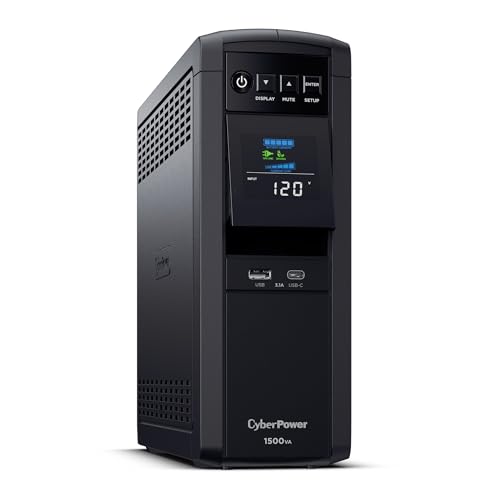
CyberPower CP1500PFCLCD PFC Sinewave UPS
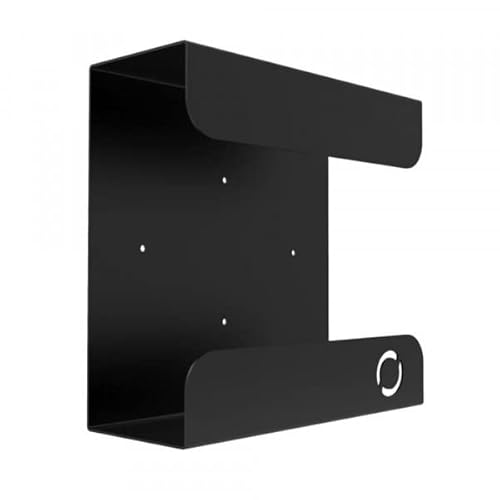
Oeveo UPS Mount 143 Wall Bracket

APC BE600M1 and BE425M Bundle

APC BE850G1 and BE600M1 Bundle

CyberPower EC850LCD Ecologic UPS

CyberPower ST425 Standby UPS

CyberPower ST625U Standby UPS

CyberPower CP2000PFCRM2U Rackmount UPS

CyberPower CP1500PFCRM2U Rackmount UPS
Taking A Closer Look At The Options
The CP1500AVRLCD3 is the kind of UPS that slots into the corner of a home office and never asks for attention. Line-interactive topology (a design that uses the battery only when incoming voltage strays outside safe limits) means the unit actively trims minor sags and boosts minor swells without draining the battery, which I appreciate in areas where the grid gets twitchy around dinnertime. The simulated sine wave output (a stepped approximation of utility power) covers most desktops, monitors, and networking gear comfortably.
For most people reading this list, this is the right place to start. It’s a step up from the smaller CyberPower units lower in the roundup but doesn’t push into pure-sine territory that only matters for active PFC power supplies. The LCD readout makes it obvious when the battery is doing the heavy lifting, which removes a lot of the guesswork during a real outage.
What Makes Sense
- AVR corrects small voltage swings without dipping into battery, extending runtime during long brownouts.
- The LCD status panel shows load percentage and battery charge at a glance, so you know what’s happening during an outage.
- Tower form factor handles a mid-size workstation plus a monitor and a network switch.
- Multiple outlets spread across battery-backed and surge-only banks let you protect what’s critical and skip what’s not.
Things To Consider
- Simulated sine wave may not play nicely with some active PFC supplies, where the CP1500PFCLCD below fits better.
- Replacement batteries are typically needed every 3 to 5 years depending on how often the unit cycles.
Key Specs
Best Suited To
A home user with a single desktop tower, monitor, and a network box who wants automatic voltage correction without paying for pure sine wave.
Consider Something Else When
Anyone running a workstation with an active PFC supply should look at the CyberPower CP1500PFCLCD further down this list for that clean sine wave output.
The CP1500PFCLCD earns its slot by delivering a true sine wave (a clean reproduction of grid power that matches what comes out of the wall), which matters more than people realize. Active PFC power supplies in modern workstations can behave oddly, or simply refuse to run, when fed a simulated sine wave. If you’ve ever seen a high-end PC mysteriously power down during a switchover, this is likely the reason.
Compared to the CP1500AVRLCD3 above, this unit gives up AVR-driven efficiency for a cleaner output. The color LCD is a small but welcome touch, especially during an outage when you’re squinting at the screen to decide whether to save and shut down. It’s the right call for anyone whose PC build cost more than the UPS itself.
What It Does Well
- Pure sine wave output pairs correctly with active PFC power supplies.
- Color LCD adds quick visibility to load, runtime, and event logs without needing software.
- Mid-tower footprint fits under most desks and stays out of the way.
- Multifunction control panel makes manual testing and self-diagnostics easy.
Worth Noting
- Costs more than the simulated sine wave option, which is hard to justify for basic home use.
- Replacement batteries use a specific RBC cartridge, so verify availability before committing long-term.
Right Fit For
Users with modern workstations, gaming rigs, or pro audio gear that uses active PFC power supplies and needs a clean waveform to ride out an outage.
Look Elsewhere When
A simpler home setup without active PFC gear can save money by going with the CyberPower CP1500AVRLCD3 covered above.
This isn’t a UPS, it’s the thing your UPS sits in. The Oeveo wall mount solves a problem that most product pages never mention, which is where to put a brick-shaped tower once you actually own one. Available in a single mount, 3-pack, 5-pack, or 10-pack for those outfitting a closet or a small office, it accepts most APC and CyberPower units in this list.
The flat black powder coat finish blends with most AV and IT equipment, and the hardware comes in the box so there’s no extra trip to the hardware store. If your UPS is currently sitting on the floor behind a desk collecting dust bunnies, this is the small upgrade that makes the whole setup look intentional.
Noteworthy Benefits
- Lifts the unit away from foot traffic, accidental kicks, and vacuum cleaner collisions.
- Flat black powder coat resists scuffs and matches common rack and AV gear.
- Multi-pack options bring down per-mount cost for larger installations.
- Mounting hardware included, so installation is a single trip to the wall.
Minor Gripes
- It’s a bracket, not a UPS, so it only solves the mounting side of the equation.
- Larger rackmount units like the CP2000PFCRM2U later in this list won’t fit.
Quick Facts
Whose Shelf It Belongs On
Anyone whose UPS currently lives on the floor behind a desk, especially in homes where vacuuming the cord nest is a weekly chore.
Skip It When
Rackmount-focused buyers running a 2U unit like the CyberPower CP2000PFCRM2U need a real rack shelf instead, since this bracket is sized for tower models.
Two APC backups in one box, which sounds odd until you realize most homes need protection in two places. The BE600M1 handles a small PC or a network stack, and the BE425M covers the modem and router, which is the actual combination that keeps a household online during an outage.
There’s an important warning baked into this bundle: don’t daisy chain them. They’re meant to run side by side, not stacked. Once that’s clear, the value here is solid for first-time UPS shoppers who just want a sensible pair to scatter around a home office without overthinking it.
Well-Handled Touches
- Pairing covers both the workstation and the network gear that keeps you online.
- APC’s battery replacement model (RBC17) is widely available for long-term upkeep.
- Compact shapes slide behind monitors and routers without claiming floor space.
Points To Note
- Units must run separately, not stacked, which limits where they can be tucked.
- Both are entry-level, so high-draw workstations will want something larger.
Feature Card
Who It Suits Best
First-time UPS shoppers outfitting a home office who want a matched set for the desk and the network corner without reading a spec sheet.
Swap It Out When
A user running USB-charging accessories on the desk should look at the APC BE850G1 and BE600M1 bundle further down, which adds charging ports.
The BE850G1 and BE600M1 pairing adds USB charging ports to the basic APC bundle covered above. The 850VA unit carries two shared 2.4A USB outputs, which is the small detail that turns a “battery backup” into the actual hub on a desk. Phones and tablets stay topped up during an outage without hunting for the wall charger.
The larger unit provides 9 outlets split between battery-backed and surge-only banks, while the smaller BE600M1 covers the networking corner. The 600VA / 330W secondary keeps the modem and router alive so the network stays usable while the lights are out.
Benefits That Matter
- Two USB ports on the larger unit keep phones and tablets charged through an outage.
- 9 outlets on the main unit split between battery and surge-only for flexible load planning.
- Battery is user-replaceable (RBC17) for easy long-term upkeep.
- Pairs well with the smaller APC unit in this list to cover the full home office.
Trade Offs
- USB ports share 2.4A total, which is slow when charging two tablets at once.
- Still entry-level VA ratings, so larger desktops will exceed the 450W headroom.
Built With In Mind
A home office where phones, tablets, and a router all need to stay alive during a brownout, and the desk doubles as a charging station.
Another Choice May Suit
A single-PC household with no charging demand will find the simpler APC bundle earlier in the list does the job for less money.
The Ecologic series is built around a small idea: stop burning power when nothing is plugged in doing anything useful. When the connected PC goes to sleep, the EC850LCD shuts off its own peripheral outlets. That’s a real, measurable drop on the electric bill over a year, especially in homes where the PC is technically on for sixteen hours a day.
Battery backup is still standby topology (the simplest design, which kicks in only when power cuts out), so this is a fit for systems that don’t draw much and don’t mind a brief switchover. For typical desktop and monitor loads, that’s exactly the right profile.
Positive Takeaways
- Patented energy-saving circuitry cuts idle draw when the host PC sleeps.
- LCD keeps status visible without needing the bundled software.
- Right-sized for typical home office loads without overspending on capacity.
Where It May Fall Short
- Standby topology means a small switchover gap, which can matter for sensitive equipment.
- Simulated sine wave output is not ideal for active PFC supplies.
Who Should Grab It
Energy-conscious home users with modest PC setups who want battery backup that doesn’t quietly add a few dollars a month to the power bill.
A Better Fit Elsewhere
Anyone running modern workstations with active PFC power supplies should consider the CP1500PFCLCD earlier in this roundup for cleaner output.
The ST425 is the smallest unit in this roundup by a comfortable margin, and it’s the one I’d hand to a college student setting up a dorm desk. It runs a single PC and monitor long enough for a graceful shutdown, and that’s exactly what a standby UPS is for. Anything more is overspec.
Compared to the larger CyberPower models above, this trades runtime and AVR for price and footprint. For a bedroom PC, a kitchen laptop station, or a small office with light loads, that trade is reasonable.
The Helpful Details
- Compact wall-wart style minimizes desk clutter.
- Enough runtime to save work and power down during typical flickers.
- Surge protection covers lightning and grid events even when battery isn’t engaged.
Smaller Limitations
- Limited capacity means anything beyond a single monitor is pushing the limit.
- Standby topology creates a brief switchover gap that’s noticeable on sensitive gear.
Perfect Match For
A student or remote worker with a single laptop and monitor who wants basic outage protection without taking up real estate on the desk.
Reach For A Different Pick When
Anyone running a desktop tower with multiple peripherals should step up to the CyberPower CP1500AVRLCD3 at the top of this list.
The ST625U takes the small-form idea from the ST425 below and adds a USB charging port, which sounds tiny until you actually need it during an outage. It’s the difference between scrambling for a phone charger and not. For dorm rooms, guest rooms, and home lab benches, this is a tidy little package.
It’s still standby topology, and it’s still modest capacity. The honest read is that this is the right size for a single monitor-plus-PC setup and not much beyond that.
Real-World Strengths
- USB port keeps a phone topped up during an outage without a separate brick.
- Compact footprint fits behind a monitor arm or in a media cabinet.
- Surge protection is active even when battery isn’t, guarding against lightning events.
A Few Limitations
- Capacity is tight for gaming PCs or multi-monitor setups.
- Simulated sine wave output means active PFC systems should look elsewhere.
Made For
Tight desk setups in apartments and dorms where a single PC, a monitor, and a phone need to stay alive during the next flicker.
Not Your Match When
A workstation-class PC with active PFC belongs on a pure sine wave unit like the CyberPower CP1500PFCLCD covered earlier in this article.
The CP2000PFCRM2U is a 2U rackmount unit (a unit that occupies two vertical rack spaces, called “U” for “rack unit”), which already tells you this is for someone with a real rack. It delivers pure sine wave output for active PFC power supplies, plus AVR for the smaller voltage swings, plus EMI/RFI noise filtering (circuits that block electromagnetic and radio-frequency interference from riding on the power line) for sensitive A/V gear.
Compared to the tower units earlier in this list, the form factor here assumes a server closet, an A/V rack, or a network cabinet. If that describes your setup, this is where the conversation starts.
Real Benefits
- Pure sine wave output plays nicely with active PFC power supplies in pro audio and server gear.
- 2U rack form factor slides into standard 19-inch enclosures.
- EMI/RFI filtering protects sensitive network and A/V components from line noise.
Practical Considerations
- Requires a real rack, which most home users don’t have.
- Higher capacity and rackmount build typically command a higher price than tower equivalents.
Technical Snapshot
Perfect Match For
Home lab owners, A/V integrators, and small office server closets running gear that demands clean power and a rack-friendly footprint.
A Better Fit Elsewhere
Anyone without a rack should stick with the tower CyberPower models like the CP1500PFCLCD earlier in this article.
The CP1500PFCRM2U is the lighter rackmount sibling of the CP2000PFCRM2U above, and for many mid-sized racks it’s the more sensible choice. Pure sine wave output, AVR for small fluctuations, and the same 2U rack form factor, just sized for setups that don’t need the heavier capacity.
It’s a clean match for mid-tier network switches, a prosumer NAS, or a security NVR (network video recorder) stack. If your rack is full but not stuffed, this lands in the sweet spot.
Notable Gains
- Pure sine wave plus AVR handles both clean output and minor voltage correction.
- 2U form factor leaves room in the rack for switches and patch panels.
- EMI/RFI filtering reduces line noise on shared circuits.
Honest Caveats
- Smaller capacity than the 2000VA model, so power-hungry servers will exceed headroom.
- Still needs a real rack, so it isn’t a fit for tower-only installations.
Who Will Love This
Mid-sized rack owners running a NAS, security system, or A/V stack that needs clean sine wave power but doesn’t draw server-class loads.
Where Another Pick Suits Better
Larger server rooms with heavier draw should size up to the CP2000PFCRM2U covered just above for the extra headroom.
Matching The Right Pc Ups To Your Setup
Picking a UPS starts with the gear you actually need to keep alive. Add up the wattage of your PC, monitor, modem, router, and anything else that must stay on, then leave at least 25% headroom so the unit isn’t running at full tilt. A 600W PC plus a 50W monitor wants a UPS rated for at least 800W of output to feel comfortable.
Waveform matters more than people expect. Simulated sine wave (a stepped approximation of grid power) handles most consumer PCs and monitors fine. Active PFC power supplies in modern workstations, gaming rigs, and pro audio gear need a true sine wave (a clean reproduction of utility power) to behave themselves. Mismatching these is the most common reason a “good” UPS mysteriously restarts a high-end PC.
Topology is the third filter. Standby UPS units are the simplest and least expensive, switching to battery only when the wall fails. Line-interactive UPS units add AVR (Automatic Voltage Regulation), which trims minor sags and boosts minor swells without dipping into battery. For areas with twitchy grid conditions, line-interactive is usually worth the modest step up.
Key Considerations Across These Picks
Mistakes Worth Dodging
The single biggest error is sizing by VA rating alone instead of watt rating, since VA (volt-amps) and watts diverge on computer loads with reactive power supplies. A unit rated 1500VA may only deliver 900W, which won’t cover a mid-range gaming PC. The other classic mistake is ignoring outlet layout, since some units place outlets too close together for wall-wart plugs. Always count the actual receptacles you need before committing.
Where The Extra Money Goes
Stepping up to a line-interactive or sine wave model buys quieter operation under bad grid conditions, longer battery life through fewer discharge cycles, and compatibility with sensitive gear. The premium tier also tends to add useful software for graceful shutdown and event logging. For most home offices, the upgrade pays for itself the first time a brownout lasts longer than five minutes.
