

Anyone with a desk that doubles as a charging station knows the struggle. Laptops, monitors, lamps, phones, headphones, and a tangle of brick adapters all fight for the same wall outlet, and a flimsy power bar rarely keeps up. The right PC power strip turns that mess into a clean, protected setup, whether the goal is more outlets, faster USB-C charging, or a flush-mount look that hides cables inside the desk. I pulled together nine solid options that cover the most common setups: sprawling gaming rigs, tidy home offices, conference tables, and small side-table nooks. Each pick solves a different pain point, so the match depends on how the desk actually gets used day to day.
How The Shortlist Stacks Up

POWSAV 18-Outlet Surge Protector Power Strip 10ft Cord

Belkin 12-Outlet Surge Protector Power Strip 8ft Cord

Jgstkcity Desk Clamp Power Strip USB C 40W
Jgstkcity Recessed Power Grommet with AC Outlets 20W USB-C
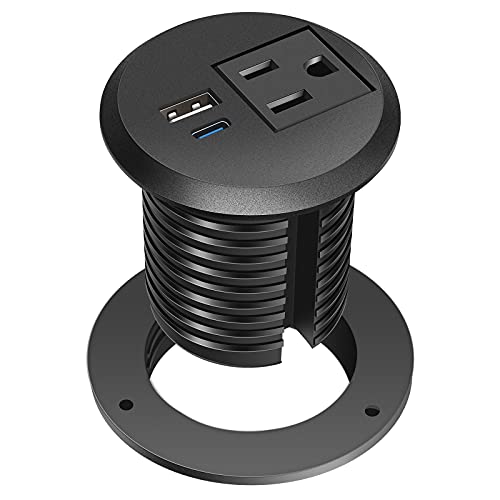
Jgstkcity Desktop Power Grommet 2 inch USB C PD 20W
Jgstkcity Recessed Power Strip Retractable USB C Cable 65W

Jgstkcity Recessed Power Strip USB C PD 30W

Jgstkcity Pop Up Outlet with 15W Wireless Charger

Jgstkcity Recessed Power Strip with 30W USB C Ultra Thin Flat Plug
The Details Behind The Selections
Anyone running a packed PC battle station, a streaming setup, or a home recording corner will feel right at home with this POWSAV bar. It carries 18 widely spaced AC outlets plus 4 USB ports, so the monitor, PC tower, audio interface, ring light, and a stack of peripherals can all share one strip without a single adapter shuffle. The 10-foot flat plug cord slips behind furniture with a low profile, which matters when the nearest wall outlet is across the room.
Surge protection sits at 2,100 joules, which is a meaningful buffer for sensitive gear. ETL listing adds a layer of verified safety. Compared to the Belkin below, the joule rating is lower, but the outlet count is far higher for the same footprint.
Practical Advantages
- 18 AC outlets handle dense gaming or workstation setups in one place
- 4 USB ports at 5V/3.0A charge phones, tablets, and wireless headphones without a brick
- 10-foot flat plug reaches distant outlets and hugs the wall cleanly
- 2,100-joule surge protection covers unexpected spikes
- ETL listed, a useful safety checkpoint for daily-use hardware
Things To Consider
- Wider outlet spacing helps, but oversized power bricks can still block neighbors
- 2,100 joules trails the Belkin’s 3,940 for areas with frequent power events
- The all-black housing shows dust, so occasional wiping is part of the routine
Who It Suits Best
PC builders, streamers, and anyone running six or more plugged-in devices from a single desk benefit most from the outlet count and cord length.
Consider Something Else When
For a cleaner flush-mounted look with USB-C, the Jgstkcity Recessed Power Grommet suits a minimalist setup more than this bulky bench strip.
Belkin has been on home-office desks for years, and this 12-outlet surge strip is a familiar workhorse. The 3,940-joule rating is the highest in this roundup, which gives a lot of comfort in regions with older wiring or storm-prone summers. Six block-spaced outlets keep chunky adapters from crowding each other, and the 8-foot right-angle plug is a small detail that makes a big difference when the strip needs to tuck behind a credenza or a desk return.
Coaxial line protection is a less common feature, useful for setups that still pass cable or antenna lines through the same workstation. The 12 outlets are fewer than the POWSAV above, but the build quality and surge capacity are the tradeoff.
A Few Strong Suits
- 3,940-joule rating absorbs strong surges that would reset lesser strips
- Six widely spaced outlets accept large wall warts without blocking neighbors
- 8-foot right-angle plug slips into tight wall clearances
- UL listing and coaxial protection cover both power and signal lines
- Sturdy housing stands up to daily plug-and-unplug use
Worth Noting
- No USB ports, so a phone charger is still a separate accessory
- The strip is a traditional brick shape, not recessed, so it needs a floor or shelf
Right Fit For
Home offices, family workstations, and anyone in a region with stormy weather who values surge capacity over gadget features will appreciate this Belkin.
Look Elsewhere When
For laptop-and-phone charging on a standing desk, the Jgstkcity Desk Clamp Power Strip handles USB-C duties more elegantly.
Standing-desk users and tidy-workstation people tend to run into the same problem: power strips on the floor get kicked, snagged, and forgotten. The Jgstkcity clamp strip bolts directly to the back edge of the desk, lifting the whole charging hub off the ground. Four 20W USB-C PD ports share 40 watts total, and 5 AC outlets handle the rest of the gear. The clamp fits a tabletop edge up to roughly 1.96 inches thick.
Compared to the recessed grommets later in the list, this one skips the cutout step entirely, which is a relief for renters who can’t drill into their desk.
Advantages To Know
- Edge-clamp mount needs no drilling and keeps outlets within reach
- Four 20W USB-C PD ports cover phones, tablets, and lightweight laptops
- 5 AC outlets handle monitor, lamp, and dock without an extra bar
- ETL listing covers the electrical safety basics
- Lifts cables off the floor where feet and chair wheels love to catch them
Trade Offs
- 40W shared across four USB-C ports means charging speed drops when all ports are in use
- Clamp design adds visible hardware to the desk edge, which some minimalists won’t love
Built With In Mind
Renters, standing-desk users, and anyone rebuilding a workspace without drilling will find this clamp strip a quick, reversible upgrade.
Not Your Match When
For a fully hidden installation, the Jgstkcity Recessed Power Grommet disappears into the desk surface more completely than any clamp.
Recessed grommets are the answer when the goal is a desk that looks like furniture, not a tech hub. This Jgstkcity model drops into a standard 3-1/8 inch hole, sits flush with the surface, and adds AC outlets plus a 20W USB-C port. The black finish blends with most desk tops, and the pop-down cover keeps the surface clean when nothing is plugged in. The retractable cable design from the later Jgstkcity strip is missing here, but the install is genuinely simple.
Anyone buying this should already have a desk with a 3-1/8 inch cable hole or be willing to cut one. That’s the real commitment.
Real-World Strengths
- Flush-mount design disappears into the desk when not in use
- 20W USB-C port charges a phone quickly without an extra brick
- Fits a standard 3-1/8 inch cable hole, common in many standing desks
- Cover keeps dust and crumbs out of the outlets between sessions
Honest Caveats
- Requires a 3-1/8 inch cutout, so renters without an existing hole will need to drill
- 20W USB-C handles phones well but is light for laptop charging
Best Suited To
Minimalist desk owners and custom-furniture builders who want outlets to vanish into the surface benefit most from this grommet.
A Better Fit Elsewhere
For a higher-wattage USB-C port on the same flush-mount concept, the Jgstkcity Recessed Power Strip with 65W USB-C delivers more laptop-friendly charging.
When the desk has a 2-inch grommet hole instead of a 3-1/8, the previous grommet won’t drop in. This compact Jgstkcity solves that exact problem. It carries a 20W USB-C PD port for fast phone charging and a 6-foot cord that reaches most wall outlets without a tension pull. The minimal surface footprint means it barely changes the look of the desk when not in use.
For shoppers who don’t want the larger 3-1/8 inch cutout, this smaller hole size is often the deciding factor.
Where It Helps
- Fits a 2-inch grommet hole, smaller than most recessed strips on the market
- 20W USB-C PD handles modern phones and small tablets efficiently
- 6-foot cord adds reach without forcing a new wall outlet
- ETL listing covers safety basics for daily plug-in use
Small Caveats
- 2-inch form factor means no AC outlets, so a separate bar is still needed for monitors
- Requires an existing 2-inch hole or a willingness to cut one
Whose Shelf It Belongs On
Owners of compact desks with smaller pre-drilled grommet holes, plus anyone adding a tidy USB-C dock to a nightstand, will find this the right match.
Skip It When
For AC outlets and USB-A in the same recessed housing, the Jgstkcity Recessed Power Strip USB C PD 30W is the more capable step up.
Somewhere along the way, a retractable USB-C cable stopped being a gimmick and started being a desk essential. This Jgstkcity recessed strip tucks a 65W USB-C cable that pulls out when needed and disappears when not. The housing also fits 3 AC outlets, 2 more USB-C ports, and a USB-A port, all from a flush-mount cutout of 7.18 by 2.03 by 2.15 inches. The 6-foot power cord gives flexibility for deeper desks and conference tables.
Installation is the part to plan for, since the cutout is rectangular and larger than a round grommet. Measure twice, cut once.
A Few Highlights
- Retractable 65W USB-C cable charges most laptops without a separate brick
- 3 AC outlets plus additional USB-A and USB-C ports cover the full device family
- Flush-mount design keeps the desk surface clean and uncluttered
- 6-foot power cord reaches distant outlets behind conference tables
Points To Note
- Larger rectangular cutout requires more careful measuring and cutting than a round hole
- Retractable cable benefits from gentle handling over years of use
Made For
Hybrid workers, laptop-first users, and conference-room setups that need clean cable management and real laptop-level charging speed benefit most.
Reach For A Different Pick When
For a simpler two-outlet recessed option that prioritizes flush aesthetics over wattage, the Jgstkcity Recessed Power Strip with 30W USB C keeps the cutout smaller.
The middle of this roundup is a slim recessed strip with 20W USB-C and 10W USB-A ports, designed for desks that want charging built in but don’t need a tangle of outlets. The cutout is a manageable 3.79 by 1.68 by 1.57 inches, which is approachable for a first-time furniture cut. The strip disappears when not in use, leaving the desk surface uncluttered.
It’s a quieter option than the 65W retractable model, trading raw charging speed for a smaller footprint.
Noteworthy Benefits
- 20W USB-C and 10W USB-A ports handle phones, earbuds, and small tablets
- Compact cutout is easier to measure and install than larger rectangular options
- Recessed design keeps the desk looking like a desk, not a charging station
- Good middle-ground for shared workspaces that want a tidy but capable port cluster
A Few Limitations
- 20W USB-C is light for laptop charging, so a separate laptop brick stays on the desk
- AC outlets are not part of the build, so a traditional strip is still needed for monitors
Who Should Grab It
Hot-desking environments, shared office tables, and homeowners adding charging to a built-in desk without rewiring find this a clean fit.
Swap It Out When
For a hidden AC-plus-USB-C combination, the Jgstkcity Recessed Power Grommet with 20W USB-C is the better match.
Kitchen counters and conference tables benefit from outlets that aren’t always visible. This Jgstkcity pop-up fits a 3.15-inch hole and pushes up with a spring-loaded mechanism when needed, then hides flat with the surface the rest of the time. The top hides a 15W Qi wireless charger for phones, and 4 AC outlets at 15A handle coffee makers, laptops, or projector plugs. Splash resistance adds peace of mind around the kitchen.
Compared to the recessed grommets, this is the more “appearance-first” choice: nothing shows until you press down.
Reasons It Performs
- Spring-loaded pop-up keeps the surface flat and clean when outlets aren’t needed
- 15W wireless charging pad handles modern Qi-compatible phones
- 4 AC outlets cover kitchen, conference, or workshop needs
- Splash resistance adds practical protection in kitchen and bar settings
- ETL listed for safety in shared or family environments
Possible Compromises
- Pop-up mechanism benefits from gentle use; aggressive presses can wear the spring over time
- 15W wireless is slower than a cable, so quick top-ups still prefer a USB-C port
Perfect Match For
Kitchen islands, conference tables, and anyone building a clean countertop with hidden power benefits most from this pop-up design.
Another Choice May Suit
For desk-only use where a wireless pad isn’t needed, the Jgstkcity Recessed Power Strip with 65W USB C is the more desk-native solution.
Side tables, sofa tables, and tight nightstand nooks rarely have room for a chunky bench strip. This Jgstkcity recessed strip is built for those exact spots: 2 AC outlets, 4 USB ports, and a 30W USB-C port sit inside a flush-mount housing, and the 6-foot cord ends in an ultra-thin flat plug that slides behind narrow furniture. The cutout is 4.28 by 1.73 by 2 inches, slightly larger than the 30W model above but with an extra AC outlet.
It’s the most furniture-friendly of the recessed bunch.
A Favorable Mix
- Ultra-thin flat plug slips behind sofas and tight side-table gaps
- 2 AC outlets plus 4 USB ports cover living-room device families
- 30W USB-C port handles phones and smaller laptops comfortably
- Recessed design keeps the side table looking like a side table
Practical Considerations
- 30W is below full laptop-charging speed for heavier 15-inch machines
- Cutout is rectangular, so installation needs a steady hand and a good template
Who Will Love This
Living-room setup owners, side-table tinkerers, and anyone running a sofa-side charging station without a visible brick will appreciate the flat plug.
Where A Sibling Pick Shines
For a kitchen or conference setting where wireless charging matters, the Jgstkcity Pop Up Outlet with 15W Wireless Charger fills a different niche.
What To Weigh Before Choosing Pc Power Strips
Match The Strip To The Mounting Style
The biggest fork in the road is whether the strip lives on the floor, clamps to a desk edge, or recesses into a pre-cut hole. Floor and clamp models install in minutes and move with the desk. Recessed grommets look cleaner but require a cutout, which renters often can’t make. Standing-desk users tend to favor clamp or recessed designs so the strip moves with the desk and stays out of the chair’s path.
Count The Right Outlets, Not Just The Big Number
Outlet count matters less than the layout. A 12-outlet strip with six block-spaced outlets can outperform an 18-outlet strip where every third plug is a wall wart. Look for spacing that fits the actual adapters on the desk, and count USB-C ports separately from USB-A since modern phones and tablets lean on USB-C PD (Power Delivery, a fast-charging standard).
Joule Rating Is Real, But Context Matters
Surge protection is measured in joules, the amount of energy the strip can absorb before it stops protecting. A 2,000-joule strip handles everyday spikes; 3,000-plus joules is a stronger buffer for storm-prone areas or older wiring. For most home offices, anything above 1,500 joules is reasonable, but heavy electronics like desktop towers benefit from higher ratings.
USB-C Wattage Changes The Daily Experience
A 20W USB-C port fast-charges a phone. A 30W port handles a tablet or lightweight laptop. A 65W port covers most thin-and-light laptops at full speed. Sharing matters too: a “40W total” rating across four ports means each port gets around 10W when all are in use, which is slower than a single dedicated fast port. Match the wattage to the heaviest device that will plug in regularly.
Key Considerations Across These Picks
Common Shopping Slip Ups
One of the easiest mistakes is buying by outlet count alone, then finding that the spacing can’t accept the actual wall warts on the desk. Another slip is underestimating wattage. A “USB-C port” that delivers 5 watts does not fast-charge a phone, and shoppers sometimes learn this only after the cable is already in the box. Measure the desk’s cutout before ordering a recessed model, and confirm the cord length reaches the nearest wall outlet without strain.
What The Higher Tier Buys
Premium-tier strips in this category tend to add faster USB-C PD (often 65W or higher), retractable cables that disappear when not in use, and higher joule surge ratings. The upgrade pays off for laptop-first users, anyone in a storm-prone region, or households that want fewer visible cables. For a basic phone-and-monitor setup, a mid-tier strip handles the job without the extra cost.
Frequently Asked Questions
How many joules do I really need in a PC power strip?
For most home offices, a 1,500 to 2,500 joule rating is plenty for everyday spikes from the grid. If the area sees frequent storms or runs older wiring, stepping up to 3,000 joules or more adds a meaningful buffer.
Are recessed power strips hard to install?
The harder part is the cutout. Most recessed models need a 2-inch to 3-1/8 inch round hole, or a rectangular slot for higher-capacity units. A drill with the right hole saw or a jigsaw with a template handles the work, but renters may need permission before cutting into a desk.
Do USB-C ports on a power strip charge laptops?
It depends on the wattage. A 20W USB-C port handles phones and small tablets. Charging a laptop usually needs 30W minimum, and full-speed charging for most 13-inch and 14-inch laptops requires 45W to 65W. Check the laptop’s charger rating before relying on the strip’s port.
Can a power strip with a flat plug sit flush against furniture?
Yes, a flat plug is designed to lay almost parallel with the wall, which lets a sofa, dresser, or bed sit close without bending the cord. That’s the main reason these plugs exist, and they’re worth choosing for tight furniture gaps.
Is surge protection the same as a power strip with USB ports?
No. A power strip just multiplies outlets. Surge protection is a separate circuit that absorbs voltage spikes. Some power strips include surge protection, some don’t, and the joule rating tells you how much protection is built in. Always check the listing before assuming.
Closing Remarks
The right PC power strip comes down to where it lives and what it needs to power. A floor bar with 18 outlets suits a packed gaming setup, while a flush-mount grommet fits a desk that should look like a desk. Match the form factor to the room, count the right USB-C wattage, and don’t skimp on joules where storms are common. Pick the one that solves the actual daily hassle, and the desk will feel calmer from day one.
