

A working setup that blinks off mid-meeting costs more than the gear itself. Brownouts, brief outages, and voltage spikes can scramble unsaved work, brick sensitive electronics, and leave you rebooting everything when the lights come back. A small UPS tucked behind the desk quietly fills that gap, giving you a window to save files, finish a call, or ride out the flicker entirely.
This roundup leans toward real home office realities: a single workstation, a router plus a laptop dock, a NAS tucked in a closet, or a wall-mounted battery that frees up floor space. I focused on capacity, battery chemistry, outlet layout, and the small details that decide whether a UPS actually lives where you plan to put it.
The Leading Options At A Glance

GOLDENMATE 1500VA/1000W Lithium UPS Battery Backup & Surge Protector, Gray

APC UPS 1500VA/900W, LCD, AVR, UPS Battery Backup & Surge Protector BX1500M
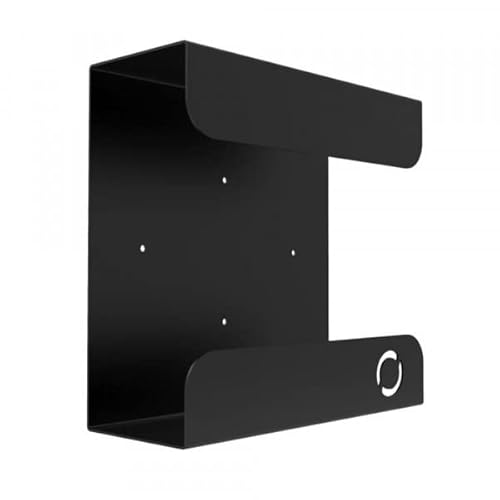
Oeveo UPS Mount 143 Single Wall Mount for UPS

Glitwing UPSM-548 Heavy Duty UPS Wall Mount Bracket

APC BR1500MS2 Pure Sine Wave UPS 1500VA/900W

APC BE600M1 UPS 600VA/330W Battery Backup

GOLDENMATE 1500VA/1000W Lithium UPS Battery Backup & Surge Protector, White

GOLDENMATE 1000VA/800W Lithium UPS Battery Backup & Surge Protector, White

GOLDENMATE 1000VA/600W Lithium UPS Battery Backup & Surge Protector, White

UGREEN NAS UPS US3000 120W DC 12000mAh Battery Backup
Taking A Closer Look At The Options
Most home offices run a single tower PC plus a monitor, maybe a printer, plus the router that has to stay alive. That is exactly the workload this GOLDENMATE unit is sized for, with 1500VA capacity (VA, or volt-amps, measures how much load a UPS can carry) and a 1000W real-world ceiling. The lithium iron phosphate (LiFePO4) chemistry here is the headline feature, and the honest read is that you mostly feel that benefit years from now when a lead-acid replacement would already be due.
Compared with the APC BX1500M further down the list, this model leans into longevity rather than a brand-name LCD interface. For a desk-bound workstation that rarely moves once set up, that trade-off tends to feel reasonable.
Everyday Advantages
- LiFePO4 battery chemistry rated for a long service life and thousands of charge cycles, which means fewer battery swaps over the years.
- 1500VA / 1000W capacity covers a tower PC, monitor, and router together without flinching during a brief outage.
- Surge protection built in, so the same box guards against both sags and sudden spikes.
- Metal housing that feels sturdier than the plastic shells on smaller consumer UPS units.
Things To Consider
- Lacks the LCD screen found on some mainstream competitors, so reading runtime and load takes more guesswork.
- Heavier than compact units, so wall mounting requires checking the mount rating first.
- Bulkier footprint than the APC BE600M1, which can crowd a tight under-desk area.
Right Fit For
Remote workers and serious home office users who want a long-life battery powering a full desktop workstation.
A Better Fit Elsewhere
The APC BE600M1 is the better match for someone only protecting a router and modem against short outages.
APC has been a familiar name in this category for years, and the BX1500M is the kind of unit that disappears behind the desk and just does its job. The front LCD shows load and estimated runtime at a glance, which removes a lot of the “is it actually working” anxiety during a power event. Automatic Voltage Regulation (AVR) trims brownouts without draining the battery, a quiet but useful trick during long voltage sags.
The capacity lands close to the GOLDENMATE above, though the battery inside uses traditional sealed lead-acid chemistry rather than lithium. Owners should expect a battery replacement somewhere down the road, which is the honest trade-off for the lower upfront footprint.
Benefits That Matter
- Built-in AVR handles minor voltage dips without switching to battery, preserving runtime for real outages.
- LCD readout shows load percentage and estimated minutes remaining, which is genuinely useful during an event.
- 1500VA / 900W handles a tower plus monitor plus networking gear with room to spare.
- Plenty of outlets for a typical multi-device desk setup.
- Replaceable battery extends the useful life of the unit itself.
Worth Noting
- Lead-acid battery chemistry means a replacement battery is on the horizon in a few years for heavy-use owners.
- Fan noise can be noticeable under high load in a quiet room.
Who It Suits Best
Mainstream home office workers who want a recognizable brand, clear status readouts, and AVR smoothing for brownouts.
Consider Something Else When
The APC BR1500MS2 is the stronger pick if you run sensitive electronics that need clean pure sine wave output.
Sometimes the smartest upgrade in a home office is not the battery itself but where the battery lives. The Oeveo UPS Mount 143 holds a UPS vertically on the wall, which clears floor space and pulls the unit away from dust and accidental kicks. At roughly 11 inches deep, 4.3 inches wide, and 10.65 inches tall, it fits a wide range of mid-size units from APC and CyberPower.
Compared with the heavier Glitwing mount later in the list, this one targets everyday use rather than oversized units. For most home offices, that scope is exactly right.
Where It Delivers
- Vertical wall orientation reclaims floor space and reduces dust exposure around the UPS vents.
- Compatible with APC and CyberPower units commonly used in home offices.
- Flat black powder coat finish blends into most workspace backgrounds.
- Mounting hardware included in the box, so no extra trip to the hardware store.
Trade Offs
- 70 lb weight capacity rules out the largest commercial-grade UPS units.
- Requires a wall stud or solid surface, so renters with drywall-only walls may struggle to install it cleanly.
Made For
Anyone with a small home office footprint who wants the UPS off the floor and out of the way.
Skip It When
The Glitwing UPS Mount 548 is the better match for owners of larger, heavier battery backup units.
For heavier UPS units that pull double duty powering workstations and home networking gear, a lightweight shelf bracket just will not do it. The Glitwing UPSM-548 is fabricated from 16-gauge cold-rolled steel and finished with a flat black powder coat (powder coating is a baked-on finish that resists scratches and corrosion). Owners commonly report that the steel feels reassuringly solid once it is anchored to the wall.
Compared with the Oeveo mount earlier, this one trades the smaller footprint for raw load capacity. If your UPS sits near the upper end of consumer sizing, that extra margin matters.
Useful Highlights
- 16-gauge cold-rolled steel resists flex and sagging under heavy UPS loads.
- Flat black powder coat finish holds up to incidental bumps without showing every scratch.
- Vertical mounting style keeps the UPS off the floor, away from dust and pet hair.
- Designed to match popular APC Back-UPS dimensions for a snug fit.
Points To Keep In Mind
- Heavier steel means a more involved installation, and drywall anchors are not enough on their own.
- Overspec for smaller UPS units where the Oeveo would be a lighter, simpler choice.
Best Suited To
Home offices with larger APC Back-UPS units that need a sturdier mount than a basic bracket provides.
Look Elsewhere When
The Oeveo UPS Mount 143 is a more practical fit for compact units and lighter wall loads.
Sensitive electronics, active PFC power supplies, and certain workstations behave better with a clean waveform. The APC BR1500MS2 outputs pure sine wave power (a smooth, utility-grade AC waveform, rather than the stepped approximation some cheaper units produce) during battery operation, which matters for desktop towers and AV gear that dislike the choppier simulated sine output of entry-level models. It carries the same 1500VA / 900W rating as the BX1500M, so capacity is not the differentiator here.
Where this APC pulls ahead is the waveform and the connected ecosystem. For a home office where the workstation is the most expensive thing on the desk, that pure sine output is a genuine ownership benefit.
Noteworthy Benefits
- Pure sine wave output keeps sensitive active-PFC power supplies stable on battery.
- 1500VA / 900W covers a full home office workstation plus networking gear.
- Surge protection and battery backup combined in one unit.
- APC’s connected accessories ecosystem allows network monitoring on supported setups.
Honest Caveats
- Priced higher than simulated sine wave alternatives at the same capacity.
- Larger and heavier than the compact BE600M1 in the same brand family.
Who Will Love This
Home office users running modern workstations with active PFC power supplies that need clean battery output.
Reach For A Different Pick When
The APC BX1500M is the smarter choice for setups that do not require pure sine wave output.
Not every home office needs 1000 watts of backup. The APC BE600M1 targets the smaller end of the category with a 600VA / 330W capacity that is right-sized for a router, modem, and a small NAS, or a laptop dock during a long video call. The unit includes seven outlets total, so it does not run out of plugs the moment you add a phone charger and a desk lamp.
Compared with the 1500VA APC and GOLDENMATE units earlier in the list, this one is dramatically smaller and easier to tuck behind a monitor stand. For minimalist desks, that is the whole appeal.
What Stands Out
- Compact form factor fits behind a monitor, on a shelf, or under a small desk without crowding the space.
- Seven outlets give flexibility for networking gear, laptops, and accessories.
- Trusted APC build quality in a smaller, more affordable package.
Softer Spots
- 330W real-world ceiling is too small for a full tower PC plus monitor.
- Lead-acid battery inside, so a replacement is on the horizon for owners who keep the unit for many years.
- Lacks the pure sine wave output of the BR1500MS2 for sensitive electronics.
The Right Fit
Home offices that primarily need to keep internet and a small NAS alive during short outages.
Swap It Out When
The GOLDENMATE 1000VA/600W is the better match for light desktop loads with longer-lasting lithium chemistry.
The white-finish sibling of the gray GOLDENMATE at the top of the list brings the same 1500VA / 1000W capacity and LiFePO4 battery chemistry, just dressed for brighter workspaces. In a home office with white walls, light wood furniture, or a clean Scandinavian setup, a black UPS sticks out like a piece of studio gear that wandered into the wrong room. This unit quietly blends in.
The functional story is identical to the gray model. The differentiator is purely the visual finish.
Notable Upsides
- White finish suits modern, light-themed home offices where black electronics feel out of place.
- Same LiFePO4 chemistry as the gray version, rated for thousands of charge cycles.
- 1500VA / 1000W capacity covers a workstation plus networking gear.
Minor Gripes
- Same larger footprint as the gray version, so it still needs a planned spot on or near the desk.
- No LCD display on the front panel, which may matter to owners who like at-a-glance status readouts.
Perfect Match For
Design-conscious home office owners who want performance and a finish that matches a lighter workspace palette.
Not Your Match When
The APC BR1500MS2 is a better fit for owners who want pure sine wave output and a built-in display.
The 1000VA / 800W capacity lands in a sweet spot for a single monitor plus mid-size desktop tower, no more and no less. With LiFePO4 chemistry rated for thousands of charge cycles, the long-term cost story is friendlier than a typical lead-acid replacement cycle. For a home office that runs eight hours a day, that adds up.
Compared with the 1500VA GOLDENMATE units earlier, this one gives up some headroom but gains a slightly smaller physical footprint. Owners with modest workstations should find it more comfortable in tight quarters.
Positive Points
- 1000VA / 800W capacity is a comfortable fit for a single-monitor home office setup.
- LiFePO4 battery chemistry aims for a long service life with reduced replacement frequency.
- White finish matches modern home office aesthetics.
Room For Improvement
- 800W ceiling leaves little margin for adding a second monitor or a heavier tower later.
- Lacks the front-panel display found on the APC BX1500M for at-a-glance status.
Built With In Mind
Home office users running one monitor and a modest desktop who value lithium battery longevity.
Where Another Pick Suits Better
The GOLDENMATE 1500VA/1000W is the stronger choice for owners expecting to expand their setup over time.
Where the previous GOLDENMATE offers 800W of real-world output, this one drops to 600W and trims the price accordingly. That makes it a sensible value choice for laptop-first home offices or setups running a thin client and a router. The LiFePO4 chemistry and white finish remain, which keeps the long-life and aesthetic benefits intact.
For most home offices running a tower plus monitor, the 600W ceiling is genuinely tight. Picking this one only makes sense if your actual load is closer to a laptop and accessories.
The Case For It
- LiFePO4 chemistry targets a long service life even in a smaller-capacity package.
- 1000VA / 600W capacity suits laptop-centric home offices.
- White finish keeps the unit visually quiet in lighter workspaces.
Some Limits To Know
- 600W ceiling leaves little room for power-hungry desktop towers or dual monitors.
- Less margin during high inrush events when peripherals spin up at once.
Who Should Grab It
Laptop-first home office users who want lithium battery longevity at a smaller capacity.
Another Choice May Suit
The GOLDENMATE 1000VA/800W is the better fit for users with slightly heavier single-monitor desktop loads.
Network-attached storage needs a very different kind of backup than a desktop. A NAS often runs on a DC barrel connector at modest wattage, and a sudden power loss can corrupt an entire RAID rebuild. The UGREEN US3000 is built for that exact scenario, delivering 120W of DC power and housing a 12,000mAh internal battery sized for short-to-medium outages on a compatible UGREEN NAS.
Compatibility is the key thing to verify before clicking buy. The US3000 only supports specific 2-bay and 4-bay UGREEN models, and it explicitly excludes the DXP6800 and DXP8800 series. Anyone outside that list should look at a standard UPS instead.
Good Reasons To Consider
- DC-output design avoids the inefficiency of converting battery DC back to AC for a NAS.
- Compact size sits naturally next to a UGREEN NAS for a tidy setup.
- Quiet operation suits a closet or shared-space installation.
- Internal protections cover surge, over-current, and short-circuit scenarios.
Where It Is Less Suited
- Compatibility is narrow: only certain UGREEN NAS models are supported.
- Cannot power a desktop workstation, monitor, or router.
Whose Shelf It Belongs On
UGREEN NAS owners running 2-bay or 4-bay models on the supported compatibility list.
Wrong Turns To Avoid
The APC BE600M1 is the better choice for general-purpose home office backup beyond a NAS.
What To Weigh Before Choosing A Home Office UPS
Sizing Capacity To Real Load
The single biggest mistake is buying a UPS that is either too small or wildly oversized. The right approach is to add up the actual wattage of everything plugged in, then leave at least 20 percent headroom for startup surges. A typical home office with a tower, one monitor, and a router usually lands in the 400 to 600W range, which makes 900W to 1000W UPS units a comfortable middle ground.
Owners running a single laptop dock and networking gear can usually get by with 300W to 400W of real-world capacity. Choosing anything smaller risks the UPS cutting off during the exact moment it is supposed to help.
Battery Chemistry And Long-Term Cost
Traditional sealed lead-acid (SLA) batteries cost less up front but typically need a replacement every three to five years in a frequently cycled environment. Lithium iron phosphate (LiFePO4) units cost more initially but last significantly longer, often a decade or more, and tolerate more charge cycles. For a home office that runs daily, the lifetime math tends to favor lithium.
Outlets, Waveform, And The Small Details
Outlet count matters more than people expect. A UPS with five battery-backed outlets looks generous until you add a monitor, a dock, a router, and a phone charger. Pure sine wave output matters for active PFC power supplies, which are common in modern desktops. AVR helps the unit ride out small brownouts without dipping into battery at all.
Key Considerations Across These Picks
Pitfalls Shoppers Hit
The most common error is matching VA rating to watts and calling it done. VA and watts measure different things, and a unit rated 1500VA might only deliver 900W of real power, depending on the power factor (the ratio of real working power to apparent power in an AC circuit). Reading both numbers before buying avoids a UPS that shuts down under load.
Another trap is ignoring the surge-only outlets. Many UPS units mix battery-backed and surge-only outlets on the same back panel. Plugging a desktop into the surge-only side means the computer gets no battery protection when the power drops.
Where The Extra Money Goes
Higher-tier UPS models typically earn their premium through pure sine wave output, longer-life lithium batteries, network connectivity for remote monitoring, and AVR circuitry that smooths brownouts without draining the battery. For most home offices, the upgrade is worth it when the connected gear is expensive or sensitive.
Frequently Asked Questions
How long will a home office UPS keep my equipment running?
Runtime depends on how much load is plugged in. A small router and modem on a 600VA unit may run for over an hour, while a full desktop workstation on the same unit might last only a few minutes. The point is usually to save work and shut down cleanly, not to keep working through a long outage.
Do I need pure sine wave output for my home office?
If your desktop uses an active PFC power supply, yes. Those supplies prefer a clean waveform. Older or simpler power supplies usually work fine on simulated sine wave output, but pure sine wave remains the safer choice across the board.
How often will I need to replace the battery?
Lead-acid UPS batteries commonly need replacement every three to five years in a frequently cycled home office. LiFePO4 batteries are rated for thousands of cycles and often last ten years or more under similar use.
Can a UPS protect against lightning strikes?
A UPS handles small surges and brief voltage spikes well, but a direct or nearby lightning strike carries far more energy than a consumer surge protector is built to absorb. For lightning-prone areas, a dedicated surge protector at the panel adds a useful extra layer.
Will the UPS make noise in a quiet room?
Most units stay silent during normal operation. The internal fan may ramp up under heavy load or during battery discharge, which is audible in a quiet home office. Reading owner feedback on fan noise is helpful for noise-sensitive setups.
Closing Remarks
A UPS is one of those quiet upgrades that pays off the moment the power blinks. The right size depends on your actual gear, your outlet count, and how much battery chemistry matters to you. Match those three things to your workspace and the rest tends to fall into place.
