

Running Ethernet cable through finished walls gets old fast. Whether you’re trying to power a ceiling-mounted access point, set up a security camera at the front door, or simply get reliable wired internet into a back room, Ethernet Power Adapters let you skip the drywall saw. I’ve put together this lineup for anyone who needs power and data delivered over a single cable, whether the goal is a tidy home office or a serious outdoor installation.
A Side-By-Side Look

Ubiquiti UniFi PoE-50-60W PoE Injector
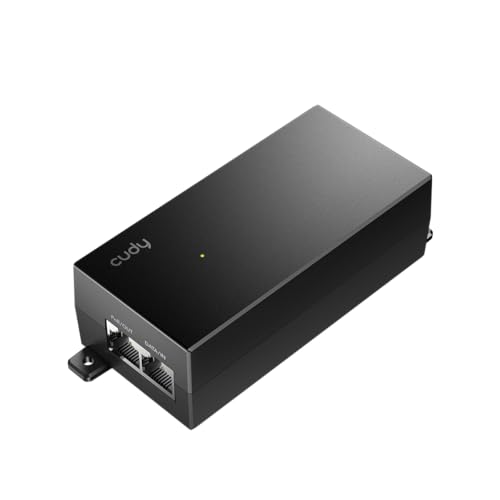
Cudy 52V 30W Passive PoE Injector POE52-30W

TP-Link Omada 48V PoE Injector POE4824G

AGILEPOELINK Gigabit PoE Injector 48V15W 802.3af

ipolex Gigabit PoE Splitter 48V to 12V

Kangsien Industrial Gigabit PoE++ Injector 95W

Ubiquiti POE-48-24W-G 48V PoE Adapter

TP-Link AV1000 Powerline Kit with AX1500 Extender

TP-Link AV1000 Powerline Adapter Kit with Passthrough
A Deeper Look At The Lineup
This is the injector most people reach for when they’re already living inside the UniFi ecosystem. It pushes 50V at 60W through a single Ethernet run, so it can comfortably feed higher-draw UniFi access points and security cameras that would otherwise need their own wall wart. Compared to the AGILEPOELINK entry further down, this one is built for shops that want a known-good power budget matched to UniFi gear.
The wall-plug form factor keeps cabling clean, and the gigabit pass-through means no bottleneck on the data side. In a busy home office where a UniFi U6 LR is mounted to a ceiling without a nearby outlet, this unit quietly sits behind a desk and does its job. For mixed environments where one device demands more wattage than standard injectors offer, it’s a tidy step up.
Useful Strengths
- 60W headroom handles demanding UniFi APs and PTZ cameras without sweating
- Full gigabit passthrough preserves speed for high-bandwidth links
- Direct fit with existing UniFi software expectations reduces guesswork
- Wall-plug shell keeps the install tidy on shared outlet strips
Points To Note
- The price lands higher than passive alternatives, so it may feel steep for a single low-power camera
- Owners commonly report a slightly bulky body that can crowd adjacent outlets
Who It Suits Best
Anyone already running UniFi gear and needing reliable 50V/60W delivery for ceiling-mounted access points.
Where Another Pick Suits Better
Budget-conscious shoppers powering a single 15W camera should look at the AGILEPOELINK Gigabit PoE Injector 48V15W instead.
The Cudy POE52-30W is aimed squarely at outdoor and multi-radio setups that need extra wattage without active negotiation. It delivers 52V DC at up to 30W over Mode B, the pin layout where power rides on the data pairs. That makes it a natural match for Cudy’s own outdoor access points and routers, but it also plays nicely with other 52V-tolerant devices.
Gigabit data passes through cleanly on both ports, so it won’t choke a 4K outdoor camera or a busy Wi-Fi 6 access point. On a long run up the side of a house to a backyard AP, this unit gives plenty of headroom without the cost of active PoE. For shoppers who know their device’s voltage tolerance, it’s a confident choice.
A Few Strong Suits
- 30W at 52V handles power-hungry outdoor APs and routers with room to spare
- Gigabit passthrough at 10/100/1000 Mbps without throughput loss
- Higher voltage helps on long cable runs where voltage drop matters
- Solid fit for multi-radio devices that need extra wattage headroom
Trade Offs
- Passive design means no handshake, so mismatched devices can be damaged if you’re not careful with voltage
- Mode B pinout may not match every brand’s passive expectation, so a quick check saves headaches
Made For
Outdoor AP owners and anyone running long cable runs who wants wattage headroom without paying for full active PoE.
Look Elsewhere When
Plug-and-play simplicity for a single indoor camera is better served by the AGILEPOELINK Gigabit PoE Injector 48V15W.
The POE4824G slots neatly into TP-Link’s Omada lineup and pairs well with EAP-series access points like the EAP245 and EAP225. It supplies 48V passive PoE up to 24W, with gigabit throughput on both the input and output ports. The wall-mounting bracket is a small touch that installers tend to appreciate.
In a small business running Omada controllers, this injector tucks behind a switch and feeds a ceiling AP without taking up rack space. It’s not flashy, but it covers the everyday case of adding PoE to a non-PoE switch port. Anyone already invested in TP-Link’s ecosystem gets the simplest path here.
Where It Helps
- Plug-and-play setup that pairs naturally with TP-Link’s Omada EAP family
- Wall-mount bracket included for cleaner wiring closets
- Gigabit passthrough keeps throughput consistent for office traffic
Some Limits To Know
- 24W ceiling means higher-draw devices like PTZ cameras will need a beefier injector
- Passive design lacks active negotiation, so device compatibility should be confirmed first
Best Suited To
Small business owners and home lab builders standardizing on TP-Link Omada access points.
Not Your Match When
Higher-wattage outdoor gear calls for the Cudy POE52-30W with its 30W budget.
AGILEPOELINK’s 48V/15W injector is the no-frills option for anyone who just needs to power a single PoE camera or a basic access point. It’s IEEE 802.3af compliant, meaning it follows the standard handshake protocol, so it won’t accidentally fry a device that expects negotiation. One gigabit input and one gigabit output keep things simple.
The draw here is straightforward: turn a non-PoE switch port into a powered port without buying a new switch. For a homeowner adding one front-door camera, this unit does the job and stays out of the way. It’s not built for harsh environments, but inside a closet or behind a desk it just works.
The Value In It
- Standards-compliant 802.3af means safe compatibility with mainstream PoE cameras and APs
- Single-cable power and data extends networks into spots without outlets
- Gigabit passthrough on both ports preserves speed for streaming cameras
Worth Noting
- 15W limit rules out anything beyond basic APs and entry-level cameras
- Lacks the rugged housing needed for outdoor or industrial placements
Right Fit For
First-time PoE users adding a single 802.3af camera or basic AP to an existing non-PoE switch.
Swap It Out When
Long outdoor runs needing surge protection make the Kangsien Industrial Gigabit PoE++ Injector 95W the smarter grab.
The ipolex splitter does the opposite job from the rest of this list. Instead of injecting power, it pulls 48V off an Ethernet run and converts it to a clean 12V at 1A through a standard 5.5×2.1mm DC jack. That’s a lifesaver when you want to mount a 12V surveillance camera or VoIP phone somewhere without a nearby outlet.
It’s fully IEEE 802.3af/at compliant, so it works with standard PoE switches and injectors from the rest of the lineup. Gigabit data passthrough means no slowdowns on the network side either. In a small office retrofit, this lets old 12V hardware live on a modern PoE switch without rewiring.
A Favorable Mix
- Converts standard PoE into a 12V DC output that older cameras and phones actually need
- 802.3af/at compliance means wide switch compatibility
- Gigabit speeds preserved for VoIP and HD camera traffic
- Plug-and-play setup with no software configuration required
Possible Compromises
- Output capped at 12V/1A, so anything above 12W will need a different splitter
- DC jack is fixed at 5.5×2.1mm, which doesn’t fit every legacy device without an adapter
Who Should Grab It
Anyone retrofitting 12V surveillance cameras or VoIP phones onto a modern PoE network without running new power.
Another Choice May Suit
For installing a brand-new PoE-native camera from scratch, the AGILEPOELINK Gigabit PoE Injector 48V15W skips the splitter entirely.
The Kangsien industrial injector is the heavy-hitter of the bunch, rated for 95W output with surge protection up to 6KV. It accepts a wide 12V to 48V DC input, which means it can run off solar setups, battery banks, or other non-standard sources. The IP40-rated housing and DIN-rail mounting option signal that this unit belongs in a workshop or outdoor cabinet, not behind a TV.
Compliance with both 802.3at and 802.3af means it plays well with newer PoE+ and PoE++ devices alongside older 15W gear. On a remote site running a high-power PTZ camera or a building-to-building bridge, this thing shrugs off temperature swings from -40°C up to 80°C. For installers working outside the climate-controlled basement, it’s the right tool.
Everyday Advantages
- 95W PoE++ budget covers the most power-hungry cameras and wireless bridges on the market
- 6KV surge protection adds resilience on long outdoor cable runs
- Wide DC input range opens solar and battery-powered deployment options
- DIN-rail and wall-mount hardware included for industrial enclosures
Factors To Consider
- Industrial form factor and DIN-rail design feel oversized for a tidy home network
- Wide DC input requires sourcing a compatible power supply separately for non-AC installs
Feature Snapshot
Whose Shelf It Belongs On
Outdoor installers, warehouse IT teams, and off-grid projects that need serious wattage and weather tolerance.
Reach For A Different Pick When
A single indoor camera at a home entryway is best handled by the compact AGILEPOELINK Gigabit PoE Injector 48V15W.
The POE-48-24W-G is one of those adapters that just shows up in networking closets everywhere. It accepts 110V or 220V AC input and pushes 48V at 24W out over Ethernet, enough to feed older UniFi access points and many standard cameras. The simple one-input, one-output layout keeps troubleshooting easy.
It runs gigabit passthrough without breaking a sweat, which is what most people actually need from a PoE adapter. Where it shines is long-term reliability on a shelf that’s been forgotten for years. For owners of older UniFi hardware, this remains a familiar and trustworthy pick.
The Helpful Details
- Wide AC input range works in homes and commercial spaces without adapters
- 24W output comfortably supports older UniFi APs and many cameras
- Compact shell fits behind furniture without dominating the outlet strip
Less-Strong Areas
- 24W ceiling rules out newer PoE+ and PoE++ devices that need more wattage
- No mounting hardware, so it tends to dangle from the outlet unless zip-tied
Perfect Match For
Existing UniFi households with older UAP-AC gear needing a quiet, no-surprises replacement injector.
A Better Fit Elsewhere
Newer UniFi deployments requiring higher wattage should consider the Ubiquiti UniFi PoE-50-60W PoE Injector instead.
This kit sits in a different lane from the rest of the list: it doesn’t inject PoE at all. Instead, it ships Ethernet through your home’s existing electrical wiring, AV1000-class speeds, then turns the receiving end into a Wi-Fi 6 access point. For renters who can’t drill holes and homeowners with thick masonry walls, that’s a genuine problem-solver.
Setup is as simple as plugging in two adapters and pairing them. The AX1500 extender piece handles modern phones and laptops without forcing an upgrade on the router. In an apartment where the signal dies in the back bedroom, this combination often does the trick where repeaters have failed.
Reasons It Performs
- Uses existing wiring, so no new cables need to be run through walls
- Built-in Wi-Fi 6 extender covers areas where the main router struggles
- Plug-and-pair design gets a non-technical household online in minutes
Honest Caveats
- Speeds depend heavily on the age and quality of the home’s electrical wiring
- Doesn’t inject PoE, so it can’t directly power cameras or access points over Ethernet
Who Will Love This
Apartment dwellers and renters blocked by thick walls who need both wired and wireless reach without modifications.
Consider Something Else When
Powering a PoE camera or AP over a single cable is the goal, and the AGILEPOELINK Gigabit PoE Injector 48V15W handles that directly.
This kit is the wired-only cousin of the previous TP-Link entry. It uses your home’s electrical circuits to push AV1000-class Ethernet between rooms and includes a passthrough outlet on the front so you don’t lose a socket. The gigabit port handles modern internet plans comfortably.
The TL-PA7017P measures roughly 2.3 x 1.7 x 3.7 inches, a small footprint that won’t crowd a power strip. For multi-story homes where the basement office needs a reliable link, this kit is often more practical than running new cable. The passthrough design is the small detail that makes daily living with it feel easy.
What It Does Well
- Passthrough outlet preserves the wall socket for other devices
- Gigabit port handles current-generation internet plans
- Compact housing fits into tight outlet strips and behind furniture
Soft Spots
- Performance varies with the home’s wiring age and circuit layout, so older homes may see reduced throughput
- Like the kit above, no PoE injection, so cameras and APs still need separate power
Built With In Mind
Multi-story homeowners who want a wired link to a basement, attic, or garage office without drilling or running new cable.
Skip It When
You actually need to deliver PoE to a remote camera, which is what the AGILEPOELINK Gigabit PoE Injector 48V15W is designed for.
Picking The Right Injector Or Powerline Kit
The first thing to settle is whether you need true PoE injection or a powerline adapter, because the two solve different problems. PoE injectors push DC power alongside data on a single Ethernet cable, perfect for cameras, access points, and VoIP phones mounted away from outlets. Powerline adapters move Ethernet traffic over your existing electrical wiring, which is helpful when neither Wi-Fi nor new cabling works in your space.
Match the wattage to the device you’re powering. A basic 802.3af camera needs around 15W, while modern Wi-Fi 6 access points and PTZ cameras often want 30W or more. Overhead matters too, since voltage drop on long cable runs can leave a borderline device underpowered at the far end. For runs over 75 meters, stepping up to 52V passive models like the Cudy POE52-30W gives more usable voltage at the device.
Active versus passive is the other key fork. Active injectors (802.3af/at/bt compliant) negotiate with the device before sending power, which protects against mismatches. Passive injectors push voltage constantly and assume you know what you’re connecting. Anyone mixing brands or voltages should stick with active standards-based models to avoid surprises.
Finally, think about the environment. Indoor wall-plug units like the TP-Link Omada 48V PoE Injector POE4824G live happily behind furniture. Outdoor or industrial runs call for hardened housings with surge protection, exactly what the Kangsien Industrial Gigabit PoE++ Injector 95W delivers.
Where Shoppers Go Wrong
A common trap is grabbing any injector that fits the wattage spec without checking the standard. 802.3af, 802.3at, and 802.3bt aren’t interchangeable, and plugging a passive 48V injector into a device expecting active negotiation can cause damage. Always confirm the device’s PoE class before matching.
Another slip-up is assuming a single injector will stretch to every device on the network. Each powered device usually needs its own injector or a PoE switch port, so planning for growth early saves rewiring later. Indoor-only units also get installed in outdoor junction boxes, where humidity and temperature swings shorten their lifespan quickly.
When Paying More Pays Off
Premium injectors earn their keep in three main ways. First, higher wattage budgets (60W to 95W) future-proof an install against newer PoE++ cameras and access points that older 24W adapters can’t feed. Second, surge protection and wider operating temperatures, like the Kangsien’s 6KV rating, prevent field failures from lightning and seasonal swings. Third, gigabit passthrough at full line rate avoids bottlenecks that cheaper adapters sometimes introduce under load.
For a one-off indoor camera, a budget 15W injector is plenty. For a small business rack, a multi-port PoE switch or matched injectors across devices tends to be the cleaner path. Spending up pays off when the install lives outdoors, runs long distances, or supports gear that might get upgraded in a year or two.
Frequently Asked Questions
What is the difference between a PoE injector and a PoE switch? A PoE injector adds power to a single Ethernet run between a non-PoE switch and a powered device. A PoE switch combines switching and power delivery across many ports in one box.
Can I use a passive PoE injector with any device? No. Passive injectors push a fixed voltage without negotiating, so they only work with devices specifically designed to accept that voltage and pinout. Active standards-based injectors are safer for mixed environments.
How far can PoE run over Ethernet cable? Standard Cat5e and Cat6 cable runs work reliably up to about 100 meters (328 feet). Beyond that, voltage drop and data integrity both suffer without extenders or fiber.
Do powerline adapters work in older homes? Sometimes. Older wiring, multiple breaker panels, and noisy circuits can reduce throughput dramatically. Testing one outlet before committing to a kit saves frustration.
What wattage do I need for a Wi-Fi 6 access point? Most Wi-Fi 6 APs draw between 12W and 25W, so a 30W injector covers them with headroom. Higher-end units with extra radios may push past that and need PoE+ or PoE++.
Bottom Line
The right Ethernet Power Adapter depends entirely on what’s at the other end of the cable. A single indoor camera, a busy outdoor install, and a multi-story home each call for a different tool from this list. Match the wattage, standard, and environment first, then pick the model that fits the budget from there.
