

A sudden blackout mid-project can wipe out hours of work in a single flicker, and most desktops go down the moment the wall outlet stops cooperating. Computer UPS units sit between the wall and your gear, smoothing out voltage dips and giving you a few critical minutes to save files or ride out short outages. I’ve put together this list to help anyone who works from a home office, runs a small server, or simply wants a quieter relationship with grid power find the right match for their setup and budget.
How The Shortlist Stacks Up

CyberPower CP1500AVRLCD3 Intelligent LCD UPS

APC BX1500M 1500VA UPS Battery Backup
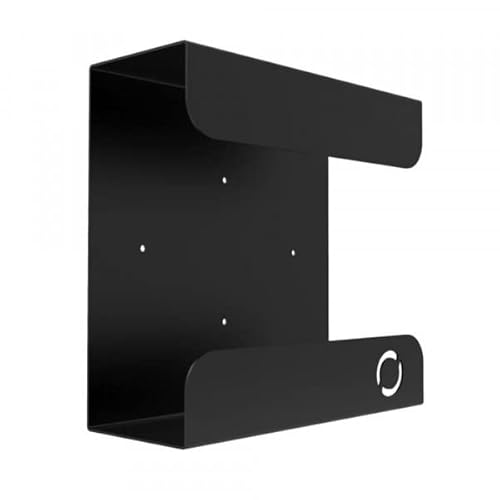
Oeveo UPS Mount 143 Wall Bracket

APC BE600M1 + BE425M Backup Bundle

APC BE850G1 + BE600M1 USB Bundle
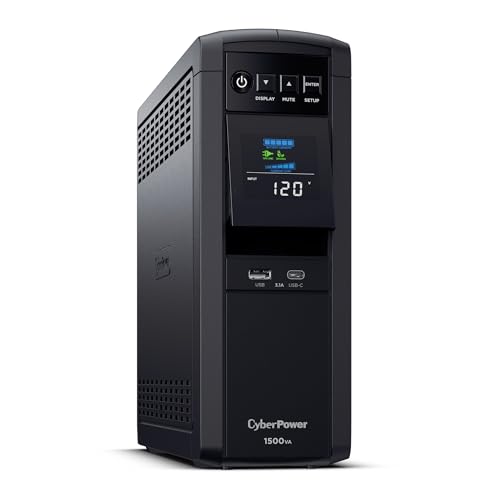
CyberPower CP1500PFCLCD PFC Sinewave UPS

CyberPower EC850LCD Ecologic UPS

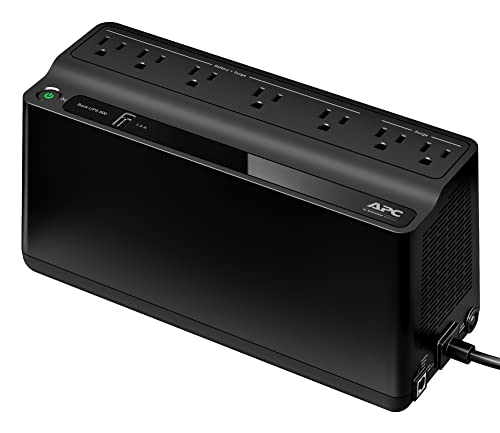

CyberPower CP1500PFCRM2U Rackmount UPS
What Each Pick Brings To The Table
The CyberPower CP1500AVRLCD3 lands in the middle of the lineup with the kind of flexibility that fits most living-room-and-office hybrids. Its mini-tower footprint slides under a desk without dominating the floor, and the front LCD panel reports battery load at a glance rather than hiding diagnostics behind software.
Line‑interactive design means the unit actively smooths small voltage swings without draining the battery, which extends runtime for the moments that actually matter. Compared with the smaller EC850LCD that comes later in this list, this model handles heavier home‑office loads with more headroom.
Reasons It Performs
- Automatic Voltage Regulation trims brownouts without dipping into battery reserves.
- Simulated sine wave output suits standard PC power supplies.
- Multifunction LCD surfaces load, runtime, and event logs without a connected PC.
- Mid-tower chassis accepts generous runtime for a desktop plus monitor.
Honest Caveats
- Simulated sine wave is a poor match for some active-PFC workstations; the CP1500PFCLCD ahead fits better there.
- Owners commonly report fan noise ramping up under heavy load.
Feature Snapshot
Who It Suits Best
Home office workers with a desktop tower, monitor, and networking gear who want clean ride-through during typical brownouts.
Where Another Pick Suits Better
Owners of modern active-PFC workstations should reach for the CyberPower CP1500PFCLCD instead, since its true sine wave output is a cleaner match.
APC’s BX1500M earns its spot because it combines the brand recognition most people already trust with the wattage budget a real workstation actually needs. It’s a tower unit that doesn’t pretend to be invisible; it sits behind a desk and quietly does the work of catching brief outages and clipping surges.
The automatic voltage regulation handles the same minor grid wobbles the CyberPower CP1500AVRLCD3 handles, but in an APC-tuned chassis that many IT departments already standardize on. Battery replacement is a known quantity here, which matters because every UPS eventually needs a new cell.
The Case For It
- 1500VA / 900W handles a desktop, monitor, and router without flinching.
- AVR smooths dips and spikes before they reach connected gear.
- Replaceable battery extends the usable life of the unit beyond the first cell.
- LCD readout gives a quick glance at load and estimated runtime.
Things To Consider
- Simulated sine wave output may bother active-PFC gear; consider the BR1500MS2 instead.
- The chassis is taller than compact standby units and needs dedicated floor space.
Right Fit For
Mid-range workstation owners who want a familiar brand, replaceable battery, and enough wattage for a full desk setup.
Look Elsewhere When
Anyone running sensitive electronics or active-PFC power supplies will find cleaner output from the APC BR1500MS2 reviewed below.
The Oeveo UPS Mount 143 is a different kind of pick: it’s not a battery at all, but the metal bracket that gets one of these UPS units off the floor. For anyone running a small workshop, garage office, or basement rack, lifting the UPS off the concrete protects it from splashes and frees up prime real estate.
It’s compatible with both APC and CyberPower mid-size chassis, and the powder-coated finish shrugs off the kind of scuffs that come with shared workspaces. I see this as the kind of accessory you buy once and forget about.
Why It Works Well
- 70 lb weight capacity covers most mid-size tower UPS units comfortably.
- Flat black powder coat blends into utility spaces without drawing attention.
- Includes mounting hardware so installation skips a second trip to the hardware store.
- Made in the USA and sold in multi-packs for shops mounting multiple units.
Where It Is Less Suited
- Not a UPS itself; you still need a battery backup to plug into this bracket.
- Drywall and plaster walls may need additional anchors beyond what is included.
At A Glance
Made For
Workshop owners, garage offices, and small server closets where floor space is at a premium and equipment needs to stay off the ground.
A Better Fit Elsewhere
Anyone whose UPS lives on a clean desk shelf has no reason to buy a bracket; the APC BE600M1 covers lighter loads without one.
APC’s BE600M1 and BE425M bundle answers a question a lot of first‑time buyers ask: can I protect the home office and the living-room gear without buying two separate listings? Two compact UPS units arrive in the same box, sized for very different loads.
The catch worth noting up front: these are designed to be used separately, not chained. Each protects its own corner of the house, and the smaller BE425M is meant for modems, routers, and streaming hardware rather than full desktops.
Good Reasons To Consider
- Two units cover home office plus networking in a single purchase.
- Compact standby topology keeps both units small enough for shelving.
- APC battery replacement parts are widely documented and easy to source.
- Ideal starter set for households standardizing on one UPS brand.
Practical Considerations
- The smaller BE425M is too light for a full desktop and is best reserved for routers and modems.
- No LCD panel on either unit means runtime info requires companion software.
Best Suited To
First-time UPS shoppers covering a desktop on one floor and network gear on another without buying two separate full-size units.
Reach For A Different Pick When
Anyone running a single workstation needs to point at the CyberPower CP1500AVRLCD3 instead for cleaner LCD diagnostics on one box.
The APC BE850G1 and BE600M1 bundle is the bundle I point friends toward when their phone always seems to die during a power cut. Two units ship together, and the larger BE850G1 ships with USB charging ports that turn the UPS into a small charging station for phones and tablets.
Both are designed to run independently rather than daisy-chained. The BE850G1 lands at 850VA / 450W, and the BE600M1 comes in at 600VA / 330W, which together cover a desktop plus a router and still leave room for two phones on the charger.
The Helpful Details
- BE850G1 includes 2 USB charging ports, useful during outages when wall chargers fail.
- 9 outlets on the larger unit split cleanly between battery-backed and surge-only zones.
- BE600M1 adds 7 outlets with the same split logic for the secondary location.
- Replaceable battery (RBC17) extends the service life of the larger unit.
Factors To Consider
- USB ports share a 2.4A budget; multiple tablets will charge slowly.
- No LCD readout on either unit; runtime estimates require a USB link to a host.
Who Should Grab It
Multi-device households that want a desktop UPS plus a small charging hub for phones and tablets during blackouts.
Skip It When
Single-workstation owners will get cleaner runtime monitoring from the APC BX1500M, which puts everything on one LCD-equipped chassis.
The CP1500PFCLCD earns its place because pure sine wave output matters more than people realize. Many modern desktop power supplies use active PFC, and a stepped or simulated sine wave can confuse them, causing shutdowns during the very outage the UPS is meant to prevent.
The chassis looks nearly identical to the CP1500AVRLCD3 covered earlier, but the inside tells a different story. Real sine wave delivery plus the same multifunction LCD make this the right pick for anyone who has upgraded their tower in the last few years.
Notable Upsides
- Pure sine wave output plays nicely with active-PFC power supplies.
- Multifunction LCD displays load, runtime, and event logs without software.
- Line-interactive topology extends runtime by avoiding battery use on small dips.
- Higher capacity than the EC850LCD for full-tower workstations.
Points To Keep In Mind
- Heavier and pricier than simulated-sine options like the CP1500AVRLCD3.
- Fan noise can ramp during extended outages as the unit works harder.
Perfect Match For
Owners of modern gaming rigs, content creation workstations, or any PC with an active-PFC power supply.
Not Your Match When
Anyone running older or simpler desktops on simulated sine wave can save money with the CyberPower CP1500AVRLCD3 reviewed earlier.
CyberPower’s EC850LCD is the smallest tower in this roundup, and that is exactly why I keep it on the list. Standby topology, simulated output, and a compact chassis make it a tidy fit for tight desk corners, dorm rooms, and small studio desks that have no room for a full mini-tower UPS.
The Ecologic feature is the small but interesting twist: when the connected computer goes to sleep, the UPS drops its own outlets to save battery. Compared with the bigger CP1500AVRLCD3 earlier, it sacrifices capacity for footprint.
Well-Handled Touches
- Compact chassis fits behind monitors or on narrow shelves.
- LCD panel surfaces status info without companion software.
- Ecologic mode reduces wasted battery cycles when the host is asleep.
- Simulated sine wave output suits simpler desktops and home networking.
Small Caveats
- 850VA capacity is too small for full-tower workstations; pair with a smaller host or pair it with the CyberPower CP1500PFCLCD above for bigger jobs.
- Standby topology means slightly slower switchover than line-interactive units.
Built With In Mind
Anyone running a compact PC, mini tower, or networking closet where floor space and shelf depth are tight constraints.
Swap It Out When
Full-size desktops with active-PFC power supplies need the CyberPower CP1500PFCLCD reviewed above for cleaner output and bigger capacity.
APC’s BR1500MS2 is the unit I lean toward when readers ask which model I’d put in front of a high-end desktop, a network-attached storage box, or a home lab. Pure sine wave output means the connected gear sees clean, predictable power during outages and brownouts, and 1500VA / 900W covers most desktop-plus-monitor setups without strain.
Compared with the simulated-sine BX1500M earlier, this is the upgrade path for active-PFC rigs. It also adds more outlets and the kind of replaceable battery that makes long-term ownership feel less disposable.
Real Benefits
- Pure sine wave output protects sensitive and active-PFC electronics.
- 1500VA / 900W covers a full workstation plus monitor with room to spare.
- Replaceable battery design extends the unit’s usable life.
- Multifunction LCD surfaces runtime, load, and event data at a glance.
Trade-Offs To Consider
- Pricier than the BX1500M, which is enough for simpler desktops.
- Tower chassis needs a stable spot on the floor or a low shelf.
Quick Facts
Whose Shelf It Belongs On
Sensitive-electronics owners running active-PFC workstations, NAS boxes, or home lab servers who want clean, predictable backup power.
Where A Sibling Pick Shines
Anyone with a simpler mid-range desktop can save cash and still get AVR with the APC BX1500M reviewed above.
APC’s BE600M1 is the kind of UPS I picture in a quiet home office: small enough to slide under a printer stand, powerful enough to keep a basic desktop, monitor, and router alive through a short blackout. At 600VA / 330W, it’s modest, but modest is exactly what most people actually need.
Seven outlets split into battery-backed plus surge-only zones, so the printer or desk lamp doesn’t drain runtime when the grid goes down. Compared with the bigger BX1500M earlier, it trades runtime and capacity for footprint and price.
Positive Points
- Compact chassis fits where full-tower UPS units simply won’t.
- USB charging port keeps a phone topped up during an outage.
- Surge-only outlets let non-critical gear piggyback without draining battery.
- APC’s replaceable battery ecosystem keeps long-term service simple.
Worth Bearing In Mind
- 330W budget rules out high-end gaming rigs and multi-monitor workstations.
- No LCD readout means runtime info requires companion software.
Who Will Love This
Light home users with a basic desktop, monitor, and router who want a tidy UPS that won’t dominate the desk.
Another Choice May Suit
Anyone running a heavier workstation should reach for the APC BX1500M reviewed earlier for genuine headroom.
The CP1500PFCRM2U closes out the list because not everyone keeps their gear on a desk. This is a 2U rackmount unit aimed at AV closets, security system racks, and small server rooms, where vertical space matters more than floor space.
Pure sine wave output pairs with active-PFC gear, and AVR handles the same minor grid wobbles the tower units above handle. EMI and RFI filtration add a quiet bonus for audio gear in the same rack.
Everyday Wins
- 2U rack form factor fits where tower UPS units simply cannot.
- Pure sine wave output plays well with active-PFC power supplies.
- EMI and RFI filtration helps protect sensitive AV equipment.
- Automatic Voltage Regulation reduces unnecessary battery cycling.
Practical Considerations
- Requires an actual rack enclosure; useless without rails or a shelf.
- Heavier than the tower units above and needs careful mounting.
Who Should Grab It
Home lab owners, AV closet builders, and anyone running gear in a 19-inch rack who needs sine-wave output in a rack-friendly chassis.
Consider Something Else When
Desk-bound users have no reason to pick a rackmount unit; the CyberPower CP1500PFCLCD earlier does the same sine-wave job in a tower.
Picking The Right UPS For Your Setup
Match Capacity To What You Actually Plug In
The single biggest mistake is buying based on outlet count instead of wattage. A 600VA unit covers a basic desktop, monitor, and router; a 1500VA unit adds room for additional peripherals. List every device that needs protection, add up the wattage, then pick a UPS that lands at roughly 60 to 80% of that load for healthy runtime headroom.
Sine Wave Shape Matters For Modern PCs
Pure sine wave output mirrors what the grid delivers; simulated sine wave approximates it with a stepped pattern. Older and simpler power supplies handle simulated sine fine, but active-PFC supplies, common in modern gaming rigs and workstations, prefer pure sine wave. Choosing the wrong shape can trigger shutdowns during the very outage the UPS is meant to prevent.
Topology Affects How The Unit Behaves
Standby UPS units stay dormant until power fails; line-interactive units actively smooth small voltage swings without dipping into the battery. For grids prone to brownouts, line-interactive models extend battery life by handling those dips automatically. Standby units are quieter and cheaper but switch over to battery more often.
Runtime Is A Function Of Load
A UPS rated for 1500VA at full load delivers more runtime at half load. Most people overestimate how long they need backup power. Five to ten minutes is usually enough to save work and shut down cleanly; longer runtimes require bigger batteries or a different category of gear entirely.
Key Considerations Across These Picks
Pitfalls Shoppers Hit
The most common trap is buying a UPS that fits the budget but not the load. A 330W unit on a 500W workstation drops to battery immediately and dies fast. The honest fix is matching wattage first, then chasing features. Another trap is ignoring outlet layout: a UPS with eight rear outlets and zero front-facing ports makes wall-wart plugs a juggling act.
When Paying More Pays Off
Higher-tier units earn their keep in active-PFC compatibility, replaceable batteries, and LCD diagnostics. For a basic desktop, a budget unit does the job. For modern workstations, NAS boxes, and AV racks, the upgrade pays for itself the first time a brownout would otherwise have crashed an active-PFC power supply mid-project.
Frequently Asked Questions
How Long Will A UPS Actually Run My Computer?
Runtime depends entirely on how much load you plug in. A 1500VA unit at half load typically delivers five to ten minutes of backup, which is enough to save files and shut down cleanly. Heavier loads drain the battery faster; lighter loads stretch runtime further.
Can I Plug A UPS Into Another UPS?
No. Chaining UPS units creates ground loops and switching confusion that can damage connected gear or simply not function as intended. Each UPS should plug directly into a wall socket, and downstream gear should plug into that single UPS.
How Often Does The Battery Need Replacing?
Lead-acid UPS batteries typically last three to five years depending on usage, temperature, and how often the unit cycles. Replaceable-battery designs like the APC models above make the swap straightforward when the runtime finally drops.
Will A UPS Protect Against Lightning Strikes?
A UPS includes surge protection, but a direct lightning strike carries more energy than any consumer UPS is rated to absorb. For regions with frequent storms, dedicated surge protection at the panel plus a UPS at the desk offers layered defense.
Do I Need Pure Sine Wave For A Regular Desktop?
Simulated sine wave handles many older and simpler desktops fine. Active-PFC power supplies, common in modern gaming and workstation builds, benefit from pure sine wave and run more reliably on it. When in doubt, the active-PFC label on the PSU tells the story.
Bottom Line
The right UPS depends less on brand loyalty and more on what you actually plug in and how clean your local grid happens to be. Match the wattage to the load, choose sine wave shape based on your power supply, and pick the topology that fits your brownout frequency. From the small APC BE600M1 to the rack-ready CyberPower CP1500PFCRM2U, the picks above cover everything from light home setups to serious AV closets.
