

Gigabit media converters solve a simple problem that still shows up in homes, offices, and outbuildings, they bridge copper Ethernet and fiber without making the setup feel like a science project. Your need may be as basic as linking a router to a distant shed, or as specific as matching SC, LC, or ST fiber gear already in place. The right unit keeps the path clean, the link stable, and the install low-drama.
Quick Look At The Shortlist
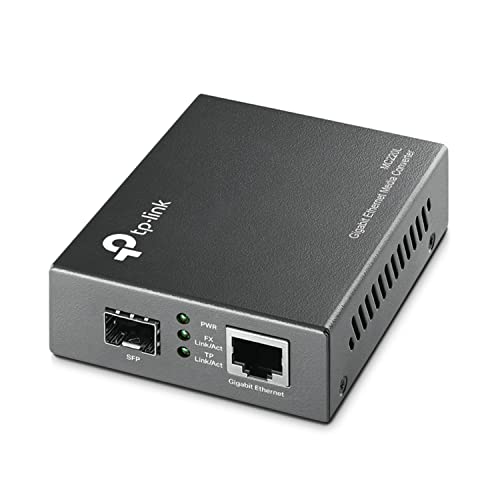
TP-Link MC220L Gigabit SFP to RJ45 Fiber Media Converter

10Gtek Gigabit SingleMode Fiber to Ethernet Media Converter

GESD 1.25G/s Bidi Gigabit Multi-Mode Fiber Ethernet Media Converter
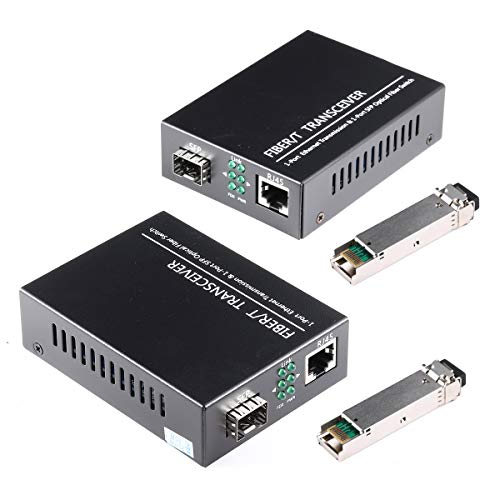
GESD 1.25G/s Bidi Gigabit Single-Mode Fiber Ethernet Media Converter

ADnet Single Mode LC Gigabit Fiber to Ethernet Media Converter

10Gtek Gigabit Ethernet Media Converter LC Fiber to RJ45 Copper

H!Fiber.com Gigabit Single Mode LC Fiber Media Converter

ADnet Multimode ST Gigabit Fiber Media Converter to Ethernet RJ45
More Details On Our Top Picks
The MC220L suits a plain, no-drama fiber-to-Ethernet handoff. Its metal shell gives it a sturdier feel than some lighter plastic boxes, and the SFP slot means you can pair it with the transceiver that matches your network layout.
That flexibility matters in office closets and home runs where the fiber side already exists. Auto negotiation helps the copper side settle into the right link speed, while the compact shape keeps it easy to tuck near a switch or router.
Strong Points
- Metal housing feels better suited to permanent installs.
- SFP support gives you room to match different link types.
- Auto negotiation helps the Ethernet side settle cleanly.
- Compact size makes shelf or rack placement simpler.
Things To Consider
- You still need the right SFP module for your fiber setup.
- The single-unit format is handy, though some projects need a pair instead.
- The metal body is practical, but not especially refined in appearance.
Feature Snapshot
Who It Suits Best
You want a straightforward converter for an office rack, a small business closet, or a home setup that already uses SFP gear.
A Better Fit Elsewhere
10Gtek Gigabit SingleMode Fiber to Ethernet Media Converter works better for a two-unit single-mode job where you want the converter pair in the same bundle.
This 2-pack is built for a basic single-mode handoff where you want both ends covered in one listing. The SC fiber connection and RJ45 copper side make the layout easy to understand, which is nice in a network room that already feels crowded.
For a long run between buildings or across a larger property, the 20 km figure gives you a useful planning target. The trade-off is simple, you are buying a pair, so it makes the most sense when both ends of the link need the same hardware.
Highlights
- Two converters in the package simplify paired installs.
- SC fiber ports suit common single-mode layouts.
- The RJ45 side keeps the copper connection familiar.
- The distance rating helps with larger property planning.
Room For Improvement
- The pair format is great for matched ends, less handy for a single spare.
- SC-based fiber gear may not suit every existing setup.
- You’ll want to confirm transceiver and cabling compatibility before mounting anything.
Core Details
Who Will Love This
You need a matched pair for a longer single-mode link and prefer getting both units together.
Swap It Out When
TP-Link MC220L makes more sense for a single converter with a separate SFP module already chosen.
The appeal here is obvious in a multi-mode setup, you get the converters and the Bidi SFP LC modules together. BiDi means bidirectional, so one fiber path can carry traffic in both directions, which can simplify cabling in a closet or lab.
That bundled approach is especially useful for small teams that want fewer parts to source and fewer chances to mismatch hardware. The honest read is that this style suits planned installs better than messy retrofit jobs, since you still want the fiber run and module choice lined up before you start.
Best Bits
- Converters and optical modules arrive together.
- BiDi design can reduce fiber pairing complexity.
- LC connectors fit many compact fiber layouts.
- The 1.25G/s rating covers common gigabit use.
- Helpful for tidy patch-panel style installs.
Small Caveats
- BiDi gear works best when your fiber plan is already clear.
- The bundle makes less sense for someone who only needs one side refreshed.
- Multi-mode support narrows the fit versus the SC and LC single-mode picks above.
Details At A Glance
Built With In Mind
You run a small office, lab, or rack-based network and want matching optics in the same carton.
Where A Sibling Pick Shines
ADnet Multimode ST Gigabit Fiber Media Converter to Ethernet RJ45 is the better fit for legacy ST cabling and older multimode infrastructure.
This pair is aimed at longer single-mode links, and the included LC transceiver modules keep the package self-contained. That makes the setup friendlier for a barn, detached office, or campus-style run where you want fewer loose parts on the workbench.
It also includes two AC/DC power supplies and a manual, which helps when you want both ends ready on arrival. The wide 100V to 240V input range is handy for mixed environments, though the physical wiring still deserves a neat, careful install.
What We Like
- Matched pair works well for two-ended single-mode links.
- LC transceivers are already part of the package.
- Two power supplies make first setup easier.
- Wide input range fits more install locations.
- UL certification adds a welcome layer of reassurance for routine use.
Points To Note
- The paired format is most useful for a full link, not a lone replacement.
- You still need to keep the optical path and polarity straight during install.
- The bundle is practical, though not especially compact in a small drawer.
Technical Sheet
The Right Fit
You want a two-unit single-mode bundle for a longer run and prefer having the optics and power gear included.
Look Elsewhere When
TP-Link MC220L is the cleaner choice for a single converter with a separate SFP module already on hand.
ADnet takes a more self-contained path than the TP-Link MC220L, because the LC SFP module ships already fitted. That matters for someone who wants fewer parts to source, especially in a site install where time is better spent routing cable than hunting for the right transceiver.
The included Cat6 cable set adds a practical touch for quick placement, and the 20 km single-mode reach keeps it aimed at longer spans. Owners commonly appreciate the LLF support and jumbo frame compatibility, though the main win here is still the ready-to-go layout.
Bright Spots
- LC SFP arrives installed, which simplifies setup.
- Cat6 cable in the set is handy for fast connection work.
- Auto sensing on the Ethernet side smooths basic integration.
- Jumbo frame support suits larger data frames in some networks.
- LLF support helps the unit fit certain network behaviors.
Areas To Watch
- The preinstalled module is convenient, but less flexible than a bare SFP cage.
- The feature set is more specific than the simpler all-purpose TP-Link option.
- The bundled cable is useful, though the overall package still needs careful fiber matching.
Feature Rundown
Whose Shelf It Belongs On
You want a ready-fitted single-mode converter for a longer link and prefer fewer separate parts.
Where Another Pick Suits Better
10Gtek Gigabit SingleMode Fiber to Ethernet Media Converter fits better for a simple two-pack where you only need matched endpoints.
This 2-pack is a clean fit for a standard single-mode LC run where both ends need the same hardware. Compared with the ADnet unit above, it keeps the focus on the converter pair itself rather than extra bundle extras.
That makes it useful for routine network extensions in small offices, outbuildings, or structured cabling closets. The 1310 nm, 20 km spec tells you it is aimed at the sort of link that crosses a meaningful distance without feeling overbuilt.
Positives
- Two-unit package keeps endpoint matching simple.
- LC fiber support fits common single-mode layouts.
- RJ45 copper handoff is easy to integrate.
- The distance rating works for long property spans.
Softer Spots
- The pair format is less flexible for one-off replacement work.
- You still need to be sure LC single-mode is the right fiber style.
- It is more specialized than the broad-purpose TP-Link unit.
At A Glance
Best Suited To
You are extending a single-mode LC network and want a matched pair without extra bundle items.
Where Shoppers Go Wrong
GESD 1.25G/s Bidi Gigabit Single-Mode Fiber Ethernet Media Converter makes more sense when you want the included transceiver modules as part of the package.
The two-converter package keeps this H!Fiber.com set straightforward for a single-mode LC installation. It lands in the same practical zone as the 10Gtek pair, though this one leans on the 1.25G/s, 1310 nm, up to 20 km combination as the core story.
That makes it a sensible fit for a link between rooms, buildings, or any run where you want matched endpoints and a familiar RJ45 handoff. You may find the bundle style handy in a spare kit, since both units are already in the box.
Reasons To Buy
- Two-pack format covers both ends of one link.
- LC single-mode focus matches common long-run setups.
- The 20 km rating suits larger layouts.
- Included SFP LX modules simplify the start of the install.
Honest Caveats
- The pair format is less useful for a single spare on the shelf.
- It overlaps closely with other single-mode bundles, so fit matters more than branding here.
- LC optics still need the rest of your cabling to line up properly.
Core Details
Made For
You want a matched LC single-mode pair with the optics already included and a familiar Ethernet handoff.
Not Your Match When
ADnet Multimode ST Gigabit Fiber Media Converter to Ethernet RJ45 fits better for ST-based multimode cabling and older infrastructure.
Legacy ST cabling is the reason this one earns a place in the roundup. The built-in module and factory alignment remove a lot of the fiddling that can slow down a retrofit, and that is exactly where a converter like this earns its keep.
The 550 m reach over 850 nm multimode fiber fits shorter indoor or campus-style routes, not long-haul links. Compared with the single-mode picks above, it is a more specific tool, which is helpful when your existing fiber plant is already ST based.
Upsides
- Built-in ST module keeps the setup simple.
- Factory alignment helps reduce matching guesswork.
- Supports common multimode fiber grades.
- Auto-sensing Ethernet side adapts to standard links.
- Jumbo frame and LLF support suit some network environments.
Areas To Watch
- ST support is specific, so it only fits the right fiber plant.
- The 550 m limit makes it a shorter-reach option than the single-mode units.
- It is less universal than the TP-Link MC220L for mixed SFP jobs.
Feature Card
Perfect Match For
You already have ST multimode fiber in place and want a converter that slots into that older layout without extra module hunting.
Reach For A Different Pick When
TP-Link MC220L makes more sense for a broader SFP-based setup that is less tied to one connector style.
How To Choose The Right Gigabit Media Converters
Match The Fiber Type First
Start with the fiber already in your wall, tray, or outdoor run. Single-mode, multimode, LC, SC, and ST are not interchangeable in practice, and the connector on the converter needs to match the cable plant you have. That sounds basic, but it is the step that keeps you from buying a box that looks right and lands wrong.
Single-mode fits longer spans, while multimode is better for shorter indoor or campus routes. LC, SC, and ST describe the connector shape, so the choice often comes down to what the existing cabling or transceiver stack already uses.
Think In Pairs, Not Just Pieces
Some listings include one converter, while others ship as a pair with optics or power supplies. For a link between two ends, a bundle can save setup time and remove the need to source matching hardware later. For a simple spare or a single replacement, a lone converter with a slot for your own module may be the cleaner move.
That trade-off shows up most clearly in single-mode installs. A self-contained two-pack feels convenient, but a flexible unit like TP-Link MC220L leaves more room for future module swaps.
Check Reach Against Real Layouts
Distance ratings matter most when your network leaves one room or building and crosses a real gap. A 20 km rating sounds dramatic, yet the more useful question is whether your run is across a driveway, through a warehouse, or just across a rack.
For shorter links, a 550 m multimode unit can be a smarter fit and usually keeps the project simpler. For longer outdoor or interbuilding paths, single-mode models give you more breathing room and less guesswork.
Look At The Small Details That Change Setup
Auto negotiation, auto-sensing ports, built-in modules, and included power supplies all shave time off installation. These are the parts that matter at 8 p.m. in a cramped closet, not just on a spec sheet.
Jumbo frame support, LLF behavior, and power input range matter more for specific network layouts than for casual use. The right converter is the one that matches your cabling, your equipment, and how tidy you want the install to feel.
A Quick Reality Check Before You Choose
Hidden Buying Traps
One common mistake is choosing by reach alone and ignoring connector type. Another is forgetting that an SFP slot still needs the correct module, while some listings already include that module and others do not.
Power details matter too, especially for a pair that will sit in different rooms or buildings. The neatest-looking setup can still become annoying fast if the cabling, optics, and power pieces do not line up.
What The Higher Tier Buys
More expensive models often include the optics, the pair, or a more specific connector layout that saves follow-up purchases. In this category, the extra money usually goes into convenience, compatibility, and fewer missing parts during setup.
That upgrade makes sense for site work, spare kits, and installs where you want less friction. For a simple desk-side bridge, a basic converter like TP-Link MC220L is often enough, and the simpler path is usually the calmer one.
Frequently Asked Questions
What does a gigabit media converter actually do?
It bridges copper Ethernet and fiber so both sides of a network can talk to each other. That helps you extend a network beyond the limits of ordinary Ethernet cable.
Do you need two converters for one fiber link?
Many links use one converter at each end, especially when both sides need the same copper-to-fiber bridge. Some listings sell them as pairs so the setup stays matched.
What is the difference between single-mode and multimode?
Single-mode is aimed at longer runs, often between buildings or across larger properties. Multimode is usually the better fit for shorter indoor paths.
Why do some models include an SFP module?
An SFP module is the small optical piece that fits into the converter’s slot. Listings that include it save you from finding a matching part separately.
Can you mix LC, SC, and ST connectors?
Not directly, because the connector style has to match the cable or module on the other side. Adapter choices exist in some setups, but a direct match is usually the cleaner route.
Final Thoughts
Your best choice depends less on brand names and more on the fiber already in place, the distance you need to cover, and whether you want a single unit or a matched pair. TP-Link MC220L is the easiest all-around place to start, while the single-mode bundles make more sense for longer links and the ADnet ST model serves older multimode cabling well. Get the connector type right first, then the rest of the decision gets much easier. That’s the part that saves you headaches later.
